

Quiltler 3 – Quilt Design
Creative Greenlight LLC Lifestyle iPhoneiPadiPod touch
Quiltler 3 – Quilt Design is a free Lifestyle app for iPhone and iPad by Creative Greenlight LLC. Rated 4.3/5 from 46 ratings. Requires iOS 18.5.
- Rating
- 4.3
- 46 ratings
- Price
- Free
- on the App Store
- Size
- 46 MB
- Age 4+
- Updated
- Oct 18
- 2026 · v1.58
Screenshots

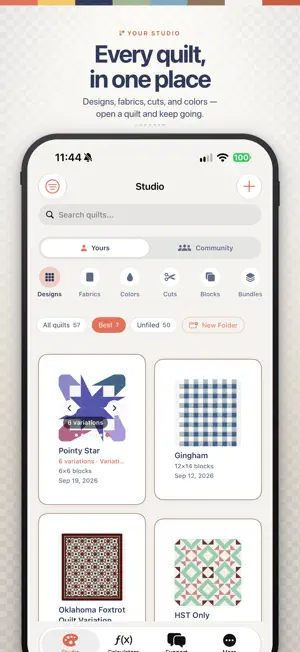
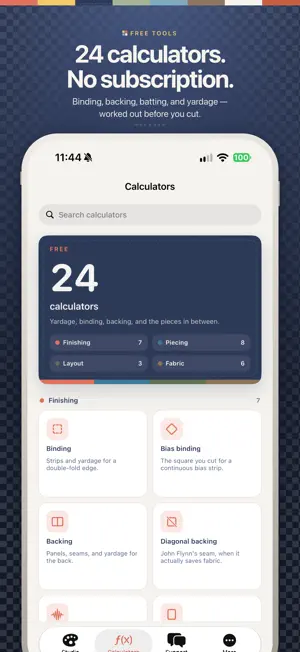

About Quiltler 3 – Quilt Design
Turn the quilt in your imagination into a pattern you can sew. Photograph your own fabric, arrange blocks and custom cuts, and explore colorways on iPhone, iPad, and the web. START WITH YOUR OWN DESIGN • Paint classic blocks with your fabric stash • Arrange blocks, custom cuts, borders and sashing • Recolor and resize your quilt as your idea develops • Keep one saved quilt and ten uploaded fabrics free, with no timer UNLOCK ONE QUILT A one-time Quilt Layout Unlock gives you exact measurements, fabric requirements, cutting instructions, printable pattern packs and quilt image exports for one saved layout. The price is shown by the App Store before purchase. Keep changing fabrics and colors and resizing the whole quilt proportionally. Your purchased original remains available even if you change or delete the editable quilt. A different arrangement, cut shape, border structure or copy needs its own unlock. This purchase does not include a subscription, Family Sharing, or commercial resale rights. CREATE WITH A SUBSCRIPTION Quilter includes unlimited saved quilts and fabrics, measurements, pattern packs and exports across your library while subscribed. Monthly and yearly options are shown in the app. Designer commercial licensing remains separate. FREE CALCULATORS Use standalone calculators for binding, backing, batting, borders and piece sizes without a subscription. PURCHASE RECOVERY Check purchases recovers interrupted Apple transactions. Existing active subscription trials keep their promised access until their current period ends. SUBSCRIPTION DETAILS Payment is charged to your Apple ID at confirmation. Subscriptions renew automatically unless auto-renewal is turned off at least 24 hours before the current period ends. Your account is charged for renewal within the 24 hours before the period ends. Manage or cancel subscriptions in your Apple account settings. A Quilt Layout Unlock is a separate one-time purchase and does not cancel an existing subscription. Terms: https://quiltler.com/terms Privacy: https://quiltler.com/privacy Apple Standard EULA: https://www.apple.com/legal/internet-services/itunes/dev/stdeula/
Ratings & reviews
4.3
46 ratings
What’s new
Version 1.58 · Updated October 18, 2026
Clearer wording throughout, in the words you use at the cutting table: custom Cuts are now Shapes, and every screen talks about pieces, blocks and fabrics. Binding now lets you choose the fold and the grain separately. Fixed color and fabric bundles that sometimes didn't appear.
App privacy
The developer, Creative Greenlight LLC, reported these privacy practices to Apple.
Data Not Linked to You
The following data, which may be collected but is not linked to your identity, may be used for the following purposes:
- Identifiers: Device ID, User ID
- Usage Data: Product Interaction
- Diagnostics: Crash Data, Performance Data, Other Diagnostic Data
- Contact Info: Email Address, Name
Used for: Analytics, App Functionality
Alternatives to Quiltler 3 – Quilt Design
Looking for apps like Quiltler 3 – Quilt Design? Here are 6 similar apps on the App Store. The highest rated is TideStitch: Quilt Designer (4.9/5), and 5 of the 6 are free to download.
-
 TideStitch: Quilt Designer
4.9
-
 Quiltful
4.4
-
 My Quilts
4.7
-
 Stash Hub
4.9
-
 Quilter's World
4.8
-
 QuiltPaper
3.2
| App | Rating | Price | Last updated | Compare |
|---|---|---|---|---|
| Quiltler 3 – Quilt Design | 4.3 / 5 (46 ratings) | Free | October 18, 2026 | |
| TideStitch: Quilt Designer | 4.9 / 5 (24) | Free | Oct 23, 2026 | Compare |
| Quiltful | 4.4 / 5 (36) | Free | Mar 11, 2026 | Compare |
| My Quilts | 4.7 / 5 (412) | Free | Aug 31, 2026 | Compare |
| Stash Hub | 4.9 / 5 (97) | Free | Oct 15, 2026 | Compare |
| Quilter's World | 4.8 / 5 (68) | Free | Aug 18, 2025 | Compare |
| QuiltPaper | 3.2 / 5 (28) | 0.99 USD | Jun 20, 2024 | Compare |