

Supernova Training
Jamie Lutz Health & Fitness iPhoneiPadiPod touchApple Watch
Supernova Training is a free Health & Fitness app for iPhone and iPad by Jamie Lutz. Requires iOS 15.1. Updated September 19, 2026.
- Price
- Free
- on the App Store
- Size
- 62 MB
- Age 4+
- Updated
- Sep 19
- 2026 · v2.4.0
Screenshots


About Supernova Training
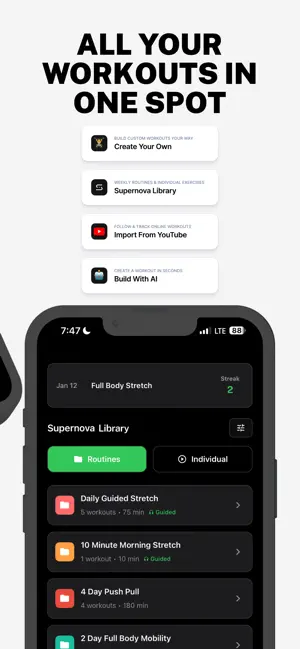
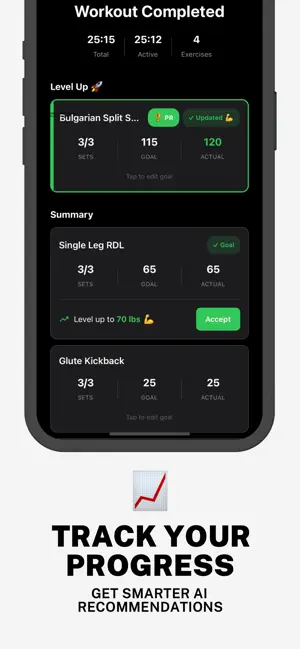
Supernova is a refined, distraction-free workout app designed to make training effortless. Create your routines with ease, follow them with focus, and enjoy a clean interface designed to keep you moving. • Build custom workout routines in seconds • Set reps, sets, and rest time • Superset with a tap for smarter training • Track your progress as you go to stay motivated • Share routines with friends and train together • Create workouts with AI or import from YouTube • No ads, no clutter, no distractions — Feedback or issues? Please email [email protected].
What’s new
Version 2.4.0 · Updated September 19, 2026
2.4 - Build with AI, iCloud sync & a cleaner workout The biggest quality-of-life release yet: describe a workout and get it built, sync everything across your devices without an account, and a workout screen that finally shows you what's supersetted with what. Build with AI - Describe your workout in the builder and get a full workout back - cloud AI, or on-device Apple Intelligence on iOS 26+. - Program bundles - import a whole week (workouts, routines and schedule) in one go, from a file, a link, or straight from the Share sheet. - "Copy my training data" - one export of your context and current program to paste into any AI. iCloud sync - Two-way sync for workouts, routines, schedule and folders across iPhone, iPad and Mac - no account needed. Merges on launch and whenever the app comes to the foreground. In the workout - Sets page redesigned as one grouped list: the current group opens automatically and follows you; everything else collapses to a one-line summary. Supersets are drawn as supersets, with numbered exercises in the order you cycle through them. - Superset hint on the timer card ("Superset 1 of 2") so you always know what's paired. - Jump to any exercise from the sets page. The title dropdown is gone; back is a plain arrow. - Exercise popup opens on the right page - your notes if you've written any, last time's numbers if there's history - and the history page explains itself when empty. - A gentle "swipe for sets" cue for newcomers that retires itself after a few visits. - Weight labels follow your lb/kg setting everywhere. Schedule - Reminders for recurring schedules work again (they had silently stopped for newer schedules), and they name the workout that's actually on that day. - Rotating routines wait for you. Miss a day and you still owe that workout; the rotation no longer skips ahead behind your back. - Missed sessions are visible - on the Home card, as a red ring on the week strip, and in the day view - with a Skip for the ones you're not going to do. - One completion rule for everything: a finished workout, run or Health-imported session fills its own slot today, else the nearest open slot within a week, else a flexible reminder. - Choose which day workout #1 lands on for a cycling routine. Flexible reminders ("Random workout" / "Let me choose") are satisfied by any workout. Create & My Workouts - Unsaved-changes guard on the builder's close button. - Inline validation instead of alerts; the first unnamed exercise opens for you. - "Use last" - tap the last-time line on an exercise to prefill sets, reps and weight. - Exercise guide links can be any URL, not just YouTube. - Create straight into a folder, share routines from inside folders, one consistent Duplicate and Delete everywhere, and a tidier folder header. - Fixed: editing a workout that lived in a folder used to move it out. - Pre-workout screen gains Schedule and Edit, and reloads after an edit. Streak - Freezes are now embers - fire, not ice. Apple Watch - Hold Next to finish the whole workout; reliable completion sync; rides log as Cycling in Health. - Pause freezes the timer on the wrist immediately. - "Log set" on the Sets page saves your numbers and advances; "Save only" just saves. - A killed phone app no longer leaves the watch stuck in a workout, and runs started with the watch app closed still start the watch's session. - Custom superset names on the overview, a hint that Next skips rest, and speed / average speed / RPM tiles for rides. - Settings -> Apple Watch rewritten to match what the watch can actually do. Home & Quick Start - Compact in-progress workout strip; tap to resume, X to discard. - Quick-start intervals default to 30 s on / 5 s off. - Background audio keepalive hardened and background notification spam cut.
App privacy
The developer, Jamie Lutz, reported these privacy practices to Apple.
Data Linked to You
The following data, which may be collected and linked to your identity, may be used for the following purposes:
- Contact Info: Email Address
- Usage Data: Product Interaction
Used for: Analytics
Alternatives to Supernova Training
Looking for apps like Supernova Training? Here are 6 similar apps on the App Store. The highest rated is Prept: Workout Saver & Planner (5.0/5), and all 6 are free to download.
-
 Workout routine: repTrack
-
 Prept: Workout Saver & Planner
5.0
-
 Gym & Protein Tracker: PeakBFF
4.0
-
 Squats Coach
4.1
-
 Layla
-
 Guava: Health Tracker
4.8
| App | Rating | Price | Last updated | Compare |
|---|---|---|---|---|
| Supernova Training | – | Free | September 19, 2026 | |
| Workout routine: repTrack | – | Free | Jun 30, 2026 | Compare |
| Prept: Workout Saver & Planner | 5.0 / 5 (1) | Free | Oct 26, 2026 | Compare |
| Gym & Protein Tracker: PeakBFF | 4.0 / 5 (4) | Free | Oct 14, 2026 | Compare |
| Squats Coach | 4.1 / 5 (27) | Free | Oct 15, 2026 | Compare |
| Layla | – | Free | Oct 16, 2026 | Compare |
| Guava: Health Tracker | 4.8 / 5 (945) | Free | Aug 18, 2026 | Compare |
Compare Supernova Training with the top alternatives: ratings, updates, ASO score and keyword gaps →