

wallyme: Quick Expense Log
GUILLERMO EDUARDO GRANADOS DAVALOS Finance iPhoneiPadiPod touch
wallyme: Quick Expense Log is a free Finance app for iPhone and iPad by GUILLERMO EDUARDO GRANADOS DAVALOS. Requires iOS 15.1. Updated October 22, 2026.
- Price
- Free
- on the App Store
- Size
- 66 MB
- Age 4+
- Updated
- Oct 22
- 2026 · v1.12.2
Screenshots

About wallyme: Quick Expense Log
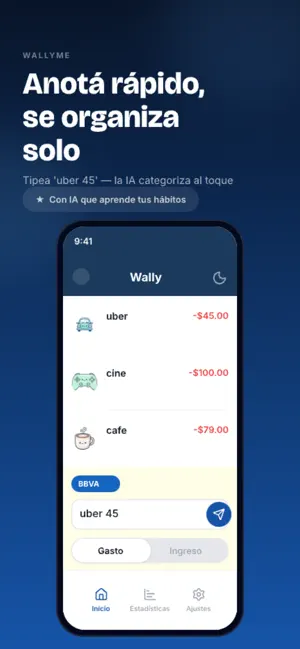
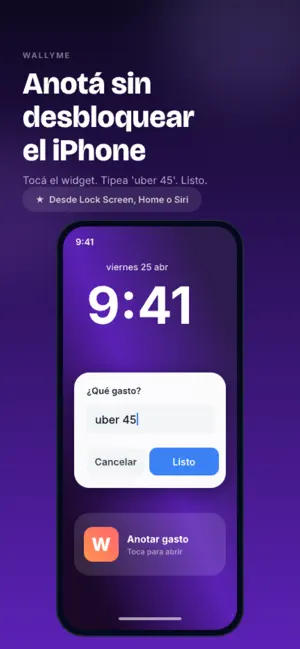
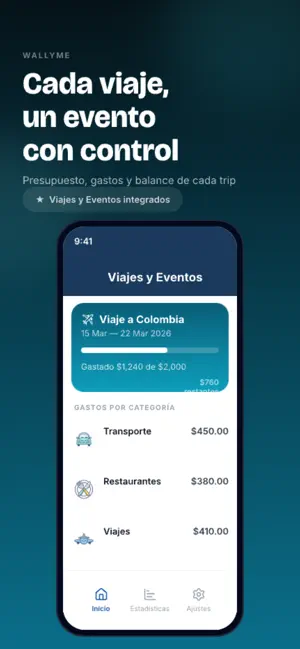
Log your spending in seconds, without opening the app. Type “uber 45” or say it, and wallyme puts it in the right category. If you pay by tapping your iPhone, the expense logs itself. LOG WITHOUT EFFORT • Type or say it: “coffee 4”, “taxi 12”, “groceries 85”. wallyme categorizes it for you. • Several at once: “uber 45, coffee 8”. You see the list and confirm it. • Contactless payments: pay with your iPhone and the expense logs itself. You can undo it from the notification. Set it up once with the Shortcuts app (iOS 17 or later). • A button on your Lock Screen or in Control Center: tap it, type, done (iOS 18 or later). • A Home Screen widget: see how much you've spent and log your frequent expenses with one tap. YOUR CARDS, NO SURPRISES • Statement and payment dates for each card, with reminders before they're due. • Installment purchases: log the purchase once and see what you pay each month. • What's still available this cycle and how much you've spent. • Cash or card: choose how you paid for each expense. TRAVEL AND MULTIPLE CURRENCIES • 63 currencies. Type “ramen 1500 JPY” and wallyme converts it to your currency. • When you're in another country, wallyme notices and offers to switch currency. • Trips and events with their own budget: set the dates and your expenses show up on their own. BUDGETS THAT WARN YOU • Monthly and per-category budgets, with a heads-up when you get close. • Your week in review: where your money went. • Expenses and income in one place. NO BANK CONNECTION We never ask for your bank login or password. You decide what you log. In 11 languages: English, Spanish, Portuguese, French, Italian, German, Japanese, Chinese, Korean, Arabic and Hebrew. SUBSCRIPTION You start for free. To keep using wallyme without limits you need a monthly or yearly subscription. The price in your currency is shown in the app before you buy. The subscription renews automatically unless you cancel it at least 24 hours before the current period ends. Payment is charged to your Apple Account when you confirm the purchase, and you can manage or cancel it in your account settings. Terms of Use: https://api.wallyme.com/terms.html Privacy Policy: https://api.wallyme.com/privacy.html
What’s new
Version 1.12.2 · Updated October 22, 2026
Better start, better travel: on first launch we ask for your main currency and, if you're abroad, which currency you want to log your expenses in (Wally converts them). Also: budget alerts that open the category, Stats that explain every total, switch an entry between Expense and Income from Edit, more reliable voice dictation, and several fixes.
App privacy
The developer, GUILLERMO EDUARDO GRANADOS DAVALOS, reported these privacy practices to Apple.
Data Not Linked to You
The following data, which may be collected but is not linked to your identity, may be used for the following purposes:
- Contact Info: Email Address, Name
- Financial Info: Other Financial Info
- Location: Coarse Location
- Usage Data: Product Interaction
- User Content: Audio Data
Used for: Developer’s Advertising or Marketing, Analytics, Product Personalization, App Functionality
Alternatives to wallyme: Quick Expense Log
Looking for apps like wallyme: Quick Expense Log? Here are 6 similar apps on the App Store. The highest rated is Flux: Budget & Expense Tracker (4.3/5), and all 6 are free to download.
-
 Vesta: AI Budget Planner
-
 Finova Mobile
-
 Envelope Budget App: Wallyo
-
 Bolsaro: Daily Expense Tracker
-
 Flux: Budget & Expense Tracker
4.3
Flux: Budget & Expense Tracker
4.3
-
 Piggy: Registra tus gastos
| App | Rating | Price | Last updated | Compare |
|---|---|---|---|---|
| wallyme: Quick Expense Log | – | Free | October 22, 2026 | |
| Vesta: AI Budget Planner | – | Free | Oct 16, 2026 | Compare |
| Finova Mobile | – | Free | Sep 29, 2026 | Compare |
| Envelope Budget App: Wallyo | – | Free | Oct 5, 2026 | Compare |
| Bolsaro: Daily Expense Tracker | – | Free | Oct 22, 2026 | Compare |
| Flux: Budget & Expense Tracker | 4.3 / 5 (3) | Free | Oct 23, 2026 | Compare |
| Piggy: Registra tus gastos | – | Free | Oct 27, 2026 | Compare |