

Pearnotes
Braveyo LLC Utilities iPhoneiPadiPod touchMac
Pearnotes is a free Utilities app for iPhone and iPad by Braveyo LLC. Requires iOS 17.6. Updated September 29, 2026.
- Price
- Free
- on the App Store
- Size
- 7 MB
- Age 4+
- Updated
- Sep 29
- 2026 · v1.2.10
Screenshots


About Pearnotes
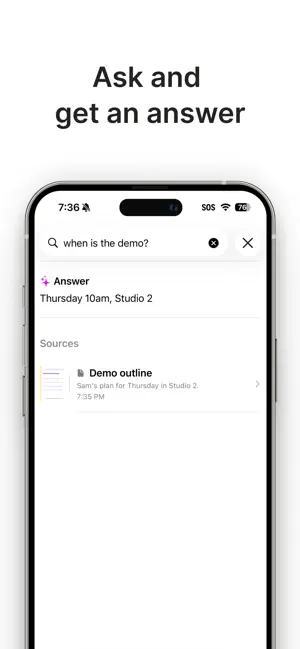
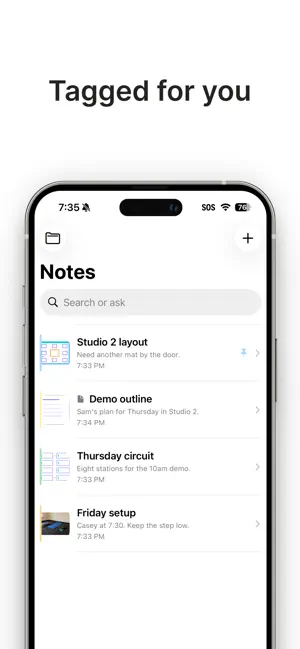
ASK YOUR NOTES - Save a drawing, photo, or PDF and the title, summary, and tags are filled in. - Ask a question and get an answer from your notes. Available where Apple Intelligence is enabled. PDFS AND PHOTOS - Add a PDF to a note and annotate it page by page, then share it as a PDF or a PNG. - Add a photo as the canvas background and draw on top of it. - Write and sketch with Apple Pencil, Apple Pencil Pro, or your finger. - Pearnotes can open onto a blank page. TIMERS AND D-DAY Set a countdown, a time, or a date, in any timezone. Recurring timers show D-Day. Color changes as the time gets close. Pin a timer to a widget. ICLOUD SYNC Notes and timers stay in sync over iCloud. Access them on Mac, iPhone, and iPad.
What’s new
Version 1.2.10 · Updated September 29, 2026
Bug fixes.
App privacy
The developer, Braveyo LLC, reported these privacy practices to Apple.
Data Not Collected
The developer does not collect any data from this app.
Alternatives to Pearnotes
Looking for apps like Pearnotes? Here are 6 similar apps on the App Store. The highest rated is Clipboard Manager - Cliptop (5.0/5), and all 6 are free to download.
-
 Solo Notepad
-
 SysOpsKit
-
 TabTidy
1.0
TabTidy
1.0
-
 Clipboard Manager - Cliptop
5.0
Clipboard Manager - Cliptop
5.0
-
 DoNotes : AI Note Taking app
-
 ShortShot
| App | Rating | Price | Last updated | Compare |
|---|---|---|---|---|
| Pearnotes | – | Free | September 29, 2026 | |
| Solo Notepad | – | Free | Apr 9, 2026 | Compare |
| SysOpsKit | – | Free | Apr 11, 2026 | Compare |
| TabTidy | 1.0 / 5 (1) | Free | Oct 11, 2026 | Compare |
| Clipboard Manager - Cliptop | 5.0 / 5 (1) | Free | Oct 19, 2026 | Compare |
| DoNotes : AI Note Taking app | – | Free | Mar 14, 2026 | Compare |
| ShortShot | – | Free | May 2, 2026 | Compare |
Compare Pearnotes with the top alternatives: ratings, updates, ASO score and keyword gaps →