

Wonder PDF - PDF Expert
小利 薛 Utilities iPhoneiPadiPod touch
Wonder PDF - PDF Expert is a free Utilities app for iPhone and iPad by 小利 薛. Rated 5.0/5 from 8 ratings. Requires iOS 17.0. Updated October 16, 2026.
- Rating
- 5.0
- 8 ratings
- Price
- Free
- on the App Store
- Size
- 23 MB
- Age 4+
- Updated
- Oct 16
- 2026 · v2.1
Screenshots
About Wonder PDF - PDF Expert
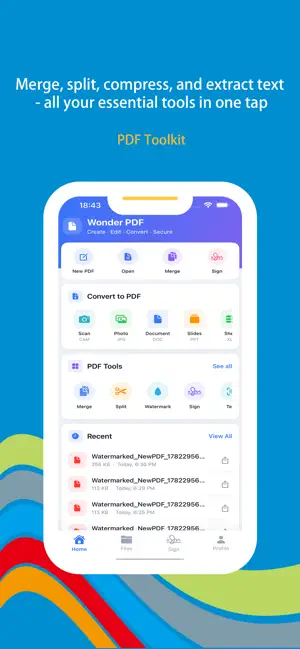
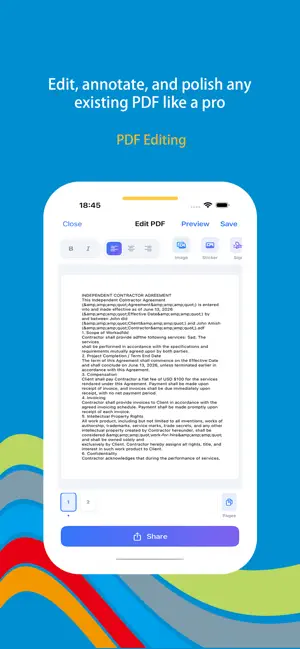
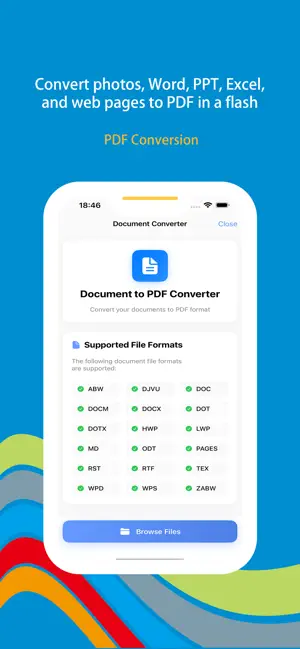
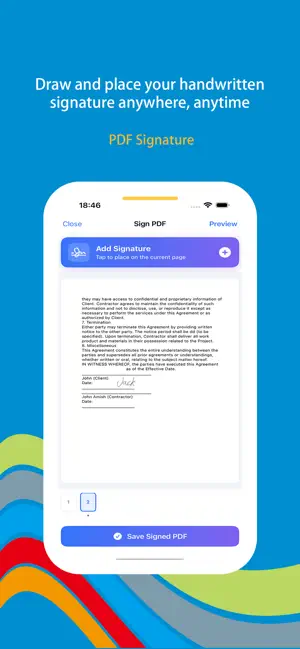
Wonder PDF is an all‑in‑one PDF tool for iOS. Edit, convert, watermark, and sign documents on the go—all in one app. Everything processes locally, so your files stay private and secure. **Core Features** **1. PDF Editing – Edit PDFs as Easily as Word Documents** Fix typos, update content, swap images, and reorganize pages—all without the original source file. Annotate with highlights, underlines, strikethroughs, sticky notes, and freehand drawings to communicate feedback clearly. From final polish to team reviews, every edit lives directly on the PDF, keeping revisions simple and straightforward. **2. PDF Toolkit – Your Complete Document Processing Hub** A powerful collection of essential utilities in one place: - **Merge**: Combine multiple contracts, invoices, or reports into a single, organized PDF for easy archiving and sharing. - **Split**: Extract individual chapters or sections from lengthy documents by page range or bookmarks, distributing only what's needed. - **Compress**: Reduce file size intelligently with minimal quality loss, making large files email-friendly and upload-ready in seconds. - **Text Extraction**: Instantly recognize and extract text from any PDF, ready to copy, paste, translate, or repurpose—no more manual retyping. **3. PDF Conversion – Break Down Format Barriers** Convert a wide range of file types into high-quality PDFs while preserving original formatting, image resolution, and clickable links: - **Photos to PDF**: Turn multiple images into a single PDF document—perfect for product catalogs, portfolios, or scanned receipt archives. - **Documents to PDF**: Convert Word, PPT, and Excel files with one tap. Share your work as a universally accessible PDF, ensuring consistent formatting across any device or platform. - **Web Pages to PDF**: Save entire web pages or specific links as PDFs for offline reading, research archiving, or sharing reference materials—with layouts and hyperlinks fully intact. **4. PDF Watermark – Protect Your Work and Elevate Your Brand** Add custom text or image watermarks with complete flexibility to suit any scenario: - **Text Watermarks**: Enter any phrase—such as "Confidential," "Internal Use," "Draft," or your company name—and adjust font, size, color, opacity, and rotation angle. Apply across all pages or select specific ranges. - **Image Watermarks**: Upload your company logo or brand mark as a watermark, ideal for business proposals, design portfolios, and marketing collateral to reinforce brand recognition. Whether you're preventing unauthorized use, marking document status, or adding a professional touch to commercial proposals, watermarking is just a tap away. **5. PDF Signature – Sign Documents Without Printing a Single Page** Create and apply handwritten signatures effortlessly, completely eliminating the print-sign-scan cycle: - **Draw Your Signature**: Use your finger or an Apple Pencil to sign naturally on screen, with adjustable stroke thickness and color to match your real pen style. - **Import Signature Images**: Upload a scanned image of your physical signature to maintain a consistent personal brand across all documents. **Subscription Service** When you subscribe to the "VIP Subscription" service, you will enjoy the following benefits: 1. Unrestricted access to all features. 2. AI content recommendations based on usage habits. Payment for subscriptions is straightforward—the user's iTunes account is credited immediately after confirmation of purchase and payment. Please note that the Apple iTunes account will be automatically debited 24 hours prior to expiration. Upon successful deduction, the subscription term will be extended by one subscription cycle. User Agreement: https://www.wonderda.com/agreement.html Privacy Agreement: https://www.wonderda.com/privacy.html Download Wonder PDF today and experience truly professional PDF processing on iOS.
Ratings & reviews
5.0
8 ratings
What’s new
Version 2.1 · Updated October 16, 2026
Thanks for staying with us! In this version, you'll find: 1. Add a new file compression algorithm to improve the PDF compression ratio 2. Polish UI details to make it easier for users to scroll through PDFs 3. Fix bugs
App privacy
The developer, 小利 薛, reported these privacy practices to Apple.
Data Not Collected
The developer does not collect any data from this app.
Alternatives to Wonder PDF - PDF Expert
Looking for apps like Wonder PDF - PDF Expert? Here are 6 similar apps on the App Store. The highest rated is Digital Business Card Makerㅤㅤ (4.9/5), and all 6 are free to download.
-
 Bluetooth - BLE Device finder
4.3
Bluetooth - BLE Device finder
4.3
-
 PDF Converter: Scan & Create
4.2
PDF Converter: Scan & Create
4.2
-
 FireApp: TV Remote Control
4.5
FireApp: TV Remote Control
4.5
-
 AI Logo Maker & Generator
4.6
AI Logo Maker & Generator
4.6
-
 E-Weigh: Scale for Grams
4.0
E-Weigh: Scale for Grams
4.0
-
 Digital Business Card Makerㅤㅤ
4.9
Digital Business Card Makerㅤㅤ
4.9
| App | Rating | Price | Last updated | Compare |
|---|---|---|---|---|
| Wonder PDF - PDF Expert | 5.0 / 5 (8 ratings) | Free | October 16, 2026 | |
| Bluetooth - BLE Device finder | 4.3 / 5 (52) | Free | Aug 29, 2025 | Compare |
| PDF Converter: Scan & Create | 4.2 / 5 (34) | Free | Sep 2, 2025 | Compare |
| FireApp: TV Remote Control | 4.5 / 5 (91) | Free | Aug 31, 2025 | Compare |
| AI Logo Maker & Generator | 4.6 / 5 (121) | Free | Oct 23, 2026 | Compare |
| E-Weigh: Scale for Grams | 4.0 / 5 (84) | Free | Jul 29, 2026 | Compare |
| Digital Business Card Makerㅤㅤ | 4.9 / 5 (30) | Free | Aug 11, 2026 | Compare |