

Eye Coach: exercises for eyes
Tapnetic LLC Health & Fitness iPhoneiPadiPod touch
Eye Coach: exercises for eyes is a free Health & Fitness app for iPhone and iPad by Tapnetic LLC. Requires iOS 15.6. Updated February 20, 2026.
- Price
- Free
- on the App Store
- Size
- 63 MB
- Age 17+
- Updated
- Feb 20
- 2026 · v1.4.10
Screenshots

About Eye Coach: exercises for eyes
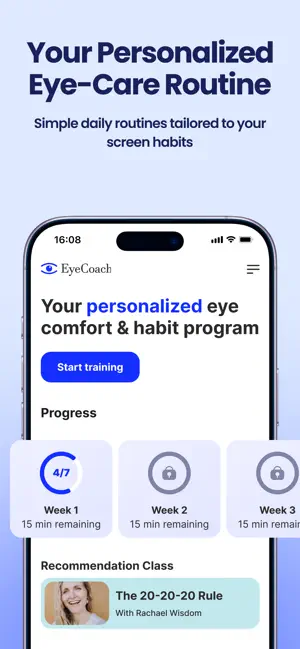
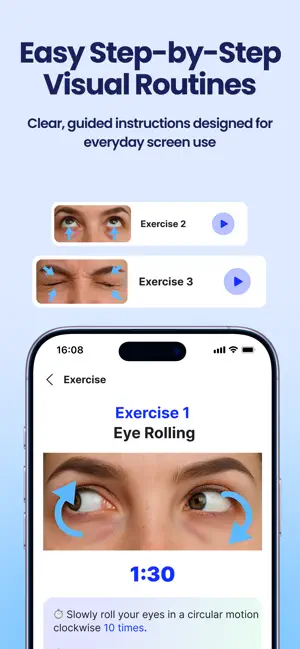
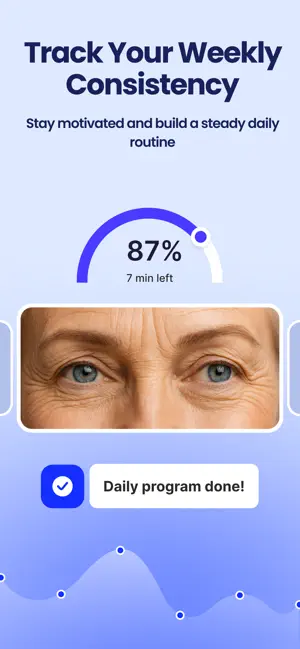
Eye Coach is a wellness app for guided eye exercises and screen-break routines. Its core feature is immersive real-time visual coaching that shows the exact eye-movement path on screen—so you don’t have to guess how to do the exercises. Who it’s for: Office & remote workers with heavy screen time Students studying on laptops/tablets Gamers who want structured breaks and eye-coordination routines Anyone spending 4+ hours/day on screens who wants short, guided sessions that are easy to stick with What it helps with: Eye fatigue after long near work Feeling “stuck” in close focus after hours on screens Forgetting to take breaks consistently Temporary sensations like dryness, tension, or a “blurred” feeling after screen use How Eye Coach works: Immersive visual guides: real-time videos guide your eye movements step-by-step (not just timers or static icons). Micro-workouts: short sessions in 3–7 minutes, built for real life (between tasks, at your desk, on the commute). Training plans (Premium): structured routines for typical screen-time scenarios (near-focus overload, dry-feeling eyes, eye coordination routines). Personalization by symptoms (Premium): choose how you feel (fatigue, burning sensation, “blurred” feeling) and get a suitable routine. Progress tracking & gamified stats (Premium): streaks and insights that help you stay consistent and build a daily habit. What makes Eye Coach different: Eye Coach delivers advanced personalized visual coaching that makes each session clearer, smoother, and easier to repeat daily—especially if you want a structured routine with minimal effort. Disclaimer: Please consult a doctor or healthcare provider if you need medical advice, diagnosis, or treatment related to vision or eye health. Eye Coach is not intended to diagnose, treat, cure, or prevent any medical condition. The app provides visual guidance and session recommendations based on user-selected inputs and preset training scenarios. All usage decisions and custom settings are the user’s responsibility. The content provided in Eye Coach is for informational and educational purposes only and does not replace professional medical or optometric advice. If you experience persistent discomfort, pain, vision changes, or other eye-related symptoms, please stop using the app and consult a doctor. Why to do eye exercises: Long workdays at a computer — a quick routine to reset your eyes between tasks Study sessions that last for hours — short breaks that help you stay comfortable and focused Gaming sessions — structured screen breaks and eye coordination practice If you often forget to pause — guidance plus consistency tools to build the habit Evening wind-down — a calming routine after heavy screen time Subscriptions: Eye Coach offers free and premium content and features. Payment is charged to your Apple ID at confirmation of purchase. Subscriptions automatically renew unless auto-renew is turned off at least 24 hours before the end of the current period. Your account will be charged for renewal within 24 hours prior to the end of the current period. You can manage or cancel your subscription in Settings → Apple ID → Subscriptions. Terms of Use (EULA) https://tapnetic.ai/2022/11/24/terms-of-use/ Privacy Policy https://tapnetic.ai/2022/11/24/privacy-policy/
What’s new
Version 1.4.10 · Updated February 20, 2026
- Updated our content with new, high-quality video instructions to make your wellness routines even easier to follow. - Squashed some bugs and improved overall performance for a smoother experience.
App privacy
The developer, Tapnetic LLC, reported these privacy practices to Apple.
Data Linked to You
The following data, which may be collected and linked to your identity, may be used for the following purposes:
- Health & Fitness: Health, Fitness
- Identifiers: User ID, Device ID
- Purchases: Purchase History
- Usage Data: Product Interaction
Used for: Analytics, Product Personalization, App Functionality
Data Not Linked to You
The following data, which may be collected but is not linked to your identity, may be used for the following purposes:
- Usage Data: Other Usage Data
- Diagnostics: Crash Data, Performance Data, Other Diagnostic Data
Used for: App Functionality
Alternatives to Eye Coach: exercises for eyes
Looking for apps like Eye Coach: exercises for eyes? Here are 6 similar apps on the App Store. The highest rated is Visionary: Eye Exercises (4.8/5), and all 6 are free to download.
-
 Eye Exercises - Improve Vision
-
 Eye Exercises: Keep an Eye
4.6
Eye Exercises: Keep an Eye
4.6
-
 visui eye fitness exercises
-
 Eye Workout
-
 Eye3D: Eye Training & Vision
3.9
Eye3D: Eye Training & Vision
3.9
-
 Visionary: Eye Exercises
4.8
Visionary: Eye Exercises
4.8
| App | Rating | Price | Last updated | Compare |
|---|---|---|---|---|
| Eye Coach: exercises for eyes | – | Free | February 20, 2026 | |
| Eye Exercises - Improve Vision | – | Free | Jul 4, 2026 | Compare |
| Eye Exercises: Keep an Eye | 4.6 / 5 (9) | Free | Oct 6, 2026 | Compare |
| visui eye fitness exercises | – | Free | Feb 20, 2024 | Compare |
| Eye Workout | – | Free | Mar 24, 2026 | Compare |
| Eye3D: Eye Training & Vision | 3.9 / 5 (10) | Free | Oct 6, 2026 | Compare |
| Visionary: Eye Exercises | 4.8 / 5 (11) | Free | Oct 14, 2026 | Compare |