

Brainrot AI - AI Photo Editor
VANGUARD RETAIL GROUP LLC Photo & Video iPhoneiPadiPod touch
Brainrot AI - AI Photo Editor is a free Photo & Video app for iPhone and iPad by VANGUARD RETAIL GROUP LLC. Rated 4.7/5 from 7 ratings. Requires iOS 14.0.
- Rating
- 4.7
- 7 ratings
- Price
- Free
- on the App Store
- Size
- 36 MB
- Age 4+
- Updated
- Feb 13
- 2026 · v1.1.4
Screenshots

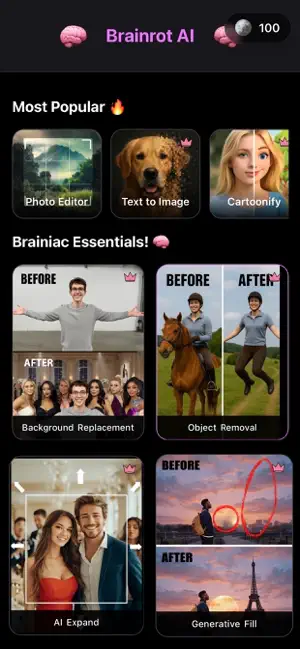
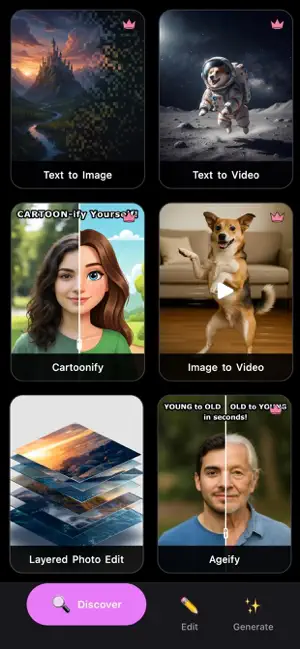

About Brainrot AI - AI Photo Editor
Generate AI Photos & Videos of your dreams! Edit like a pro with the Layered Photo Editor – no complex editing skills required! With advanced AI features, turn still images into live videos, add or remove objects, replace backgrounds, expand images, and much more. Use advanced AI features like: * Image to Video – turn still images into live videos with custom prompts * Text to Video – type simple text prompts to create complete AI videos * Text to Image – describe and generate any image you can imagine * Background Replacement – cut out people from photos and place them in any setting * Add or Remove Objects – just brush over where you want to add or remove anything * AI Enhance and Expand for any photo * Cartoonify or Ageify anyone – become a cartoon, or get a glimpse of your future (or past) The Layered Photo Editor lets you: * Upload one or multiple images and stack them in layers * Generate and add AI images as layers using custom text prompts * Remove and add objects, people, animals, etc. * Replace and generate completely custom AI backgrounds and settings * Apply filters, adjust brightness, saturation, and sharpness * Warp and distort your photos and subjects * Blend multiple images together with layered editing * Crop, transform, or rotate any photo * Add text, shapes, and freehand drawings * Preview, tweak, and save your work – come back to edit a project any time Made and designed for social sharing: * Export high-quality images ready for TikTok, Instagram, YouTube thumbnails, and more * Create eye-catching profile pictures, posts, memes, and reaction images Brainrot AI keeps the workflow simple—pick a photo, apply AI effects, customize, then save or share—while using generative AI in a safe, community-friendly way. Features and effects will continue to be updated over time, so you can keep your edits fresh and on-trend! Terms of Use: https://brainrotapp.io/terms Privacy Policy: https://brainrotapp.io/privacy
Ratings & reviews
4.7
7 ratings
What’s new
Version 1.1.4 · Updated February 13, 2026
Improved the Layered Photo Editor with major stability and workflow fixes, including reliable past project reopening, smoother and more accurate Remove and Cutout behavior, fixed undo/redo across tools, better Draw/Shapes/Text interactions and layer targeting, corrected text bounds and tool panel behavior, added Crop cancel support, improved restore-draft handling, and updated orientation handling for a consistent portrait experience.
App privacy
The developer, VANGUARD RETAIL GROUP LLC, reported these privacy practices to Apple.
Data Linked to You
The following data, which may be collected and linked to your identity, may be used for the following purposes:
- Contact Info: Email Address
- User Content: Photos or Videos
- Identifiers: User ID
- Usage Data: Product Interaction
Used for: App Functionality
Alternatives to Brainrot AI - AI Photo Editor
Looking for apps like Brainrot AI - AI Photo Editor? Here are 6 similar apps on the App Store.
-
 Cuter AI - AI Photo & AI Video
-
 Fast AI Image and Photo Editor
-
 Magic Eraser AI - PureErase
-
 Photo Organizer: Cullify
-
 Kamra: AI Photo & Video Gen
-
 Vybe: AI Photo Video Generator
| App | Rating | Price | Last updated | Compare |
|---|---|---|---|---|
| Brainrot AI - AI Photo Editor | 4.7 / 5 (7 ratings) | Free | February 13, 2026 | |
| Cuter AI - AI Photo & AI Video | – | Free | Aug 12, 2026 | Compare |
| Fast AI Image and Photo Editor | – | Free | Oct 9, 2025 | Compare |
| Magic Eraser AI - PureErase | – | Free | Jun 27, 2026 | Compare |
| Photo Organizer: Cullify | – | Free | Jun 16, 2026 | Compare |
| Kamra: AI Photo & Video Gen | – | Free | Sep 2, 2026 | Compare |
| Vybe: AI Photo Video Generator | – | Free | Jun 1, 2026 | Compare |