

CVRater
Deniz Ata ES Utilities iPhoneiPadiPod touch
CVRater is a free Utilities app for iPhone and iPad by Deniz Ata ES. Requires iOS 15.0. Updated October 7, 2026.
- Price
- Free
- on the App Store
- Size
- 70 MB
- Age 4+
- Updated
- Oct 7
- 2026 · v1.2.0
Screenshots


About CVRater
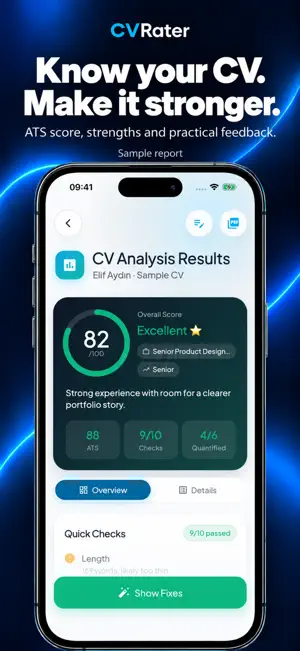
Build, edit and strengthen your resume for your next application with CVRater. CV Studio, AI resume analysis, job-specific tailoring and cover letters come together in one app. CV STUDIO Choose from 32 templates. See your resume in a live preview and tap a section to edit it. Customize colors, fonts, section order and layout, then export your resume as a PDF. TAILOR YOUR RESUME TO THE JOB Add a job posting as text, a PDF or screenshots. Select a saved resume, discover the keywords the role calls for and adapt how you describe your experience. Keep the tailored version as a separate resume. PERSONAL COVER LETTERS Create a cover letter using your resume and target role. Edit the text, save it and share it as a PDF. DETAILED RESUME ANALYSIS Upload a PDF or paste your resume text. Explore your overall assessment, ATS score, strengths and areas to work on. Use actionable suggestions to improve your resume. JOB MATCHING Compare your resume with a job’s requirements. Review matched and missing requirements, supporting evidence and recommended next steps in one report. YOUR WORK, ORGANIZED Keep drafts, saved resumes, cover letters and past analyses together. Work with English or Turkish interface support. AI features use credits, available through in-app purchases. Review AI-generated text before sending your application. PREMIUM SUBSCRIPTION CVRater Premium is offered as a monthly or yearly auto-renewable subscription. It unlocks the advanced CV Studio tools and adds 10 AI credits every month. Premium is not required to use AI features. Current prices are shown on the purchase screen. Payment is charged to your Apple Account when you confirm the purchase. The subscription renews automatically unless it is cancelled at least 24 hours before the end of the current period, and the renewal is charged within the 24 hours before the period ends. You can manage or cancel it in Settings > your Apple Account > Subscriptions. Privacy Policy: https://cvrating-production.up.railway.app/privacy?lang=en Terms of Use: https://cvrating-production.up.railway.app/terms?lang=en Apple Standard License Agreement (EULA): https://www.apple.com/legal/internet-services/itunes/dev/stdeula/
What’s new
Version 1.2.0 · Updated October 7, 2026
Meet the renewed CVRater! • CV Studio: Edit your resume from a live preview, customize templates, colors, fonts and layout, and export a PDF. • Job-specific resumes: Add a job posting, choose a saved resume and tailor how you present your experience to the role. • Cover letters: Create a personal letter using your resume and target role, edit it and share a PDF. • Explore more detailed resume analysis and requirement-by-requirement job match reports. • Find your work more easily with a refreshed Home screen, My CVs and Analyses tabs.
App privacy
The developer, Deniz Ata ES, reported these privacy practices to Apple.
Data Linked to You
The following data, which may be collected and linked to your identity, may be used for the following purposes:
- Purchases: Purchase History
- Contact Info: Email Address
- User Content: Other User Content
- Identifiers: User ID
Used for: App Functionality
Alternatives to CVRater
Looking for apps like CVRater? Here are 6 similar apps on the App Store. The highest rated is Trading Journal – Anti-Tilt (5.0/5), and all 6 are free to download.
-
 Numix - Random Generator Plus
-
 Trading Journal – Anti-Tilt
5.0
Trading Journal – Anti-Tilt
5.0
-
 Resume Builder & AI CV Maker
-
 Loud Alarm Clock - Can't be snoozed or stopped
3.4
Loud Alarm Clock - Can't be snoozed or stopped
3.4
-
 King Scoreboard
1.0
King Scoreboard
1.0
-
 Hera Charge
| App | Rating | Price | Last updated | Compare |
|---|---|---|---|---|
| CVRater | – | Free | October 7, 2026 | |
| Numix - Random Generator Plus | – | Free | Jun 20, 2026 | Compare |
| Trading Journal – Anti-Tilt | 5.0 / 5 (1) | Free | Apr 29, 2026 | Compare |
| Resume Builder & AI CV Maker | – | Free | Jan 7, 2026 | Compare |
| Loud Alarm Clock - Can't be snoozed or stopped | 3.4 / 5 (5) | Free | Aug 23, 2017 | Compare |
| King Scoreboard | 1.0 / 5 (1) | Free | Jan 31, 2025 | Compare |
| Hera Charge | – | Free | Jan 15, 2026 | Compare |
Compare CVRater with the top alternatives: ratings, updates, ASO score and keyword gaps →