

Tattoo Design: Try On & Editor
Usama Umar Lifestyle iPhoneiPadiPod touch
Tattoo Design: Try On & Editor is a free Lifestyle app for iPhone and iPad by Usama Umar. Rated 3.0/5 from 1 ratings. Requires iOS 15.0.
- Rating
- 3.0
- 1 ratings
- Price
- Free
- on the App Store
- Size
- 118 MB
- Age 4+
- Updated
- Oct 15
- 2026 · v1.5
Screenshots



About Tattoo Design: Try On & Editor
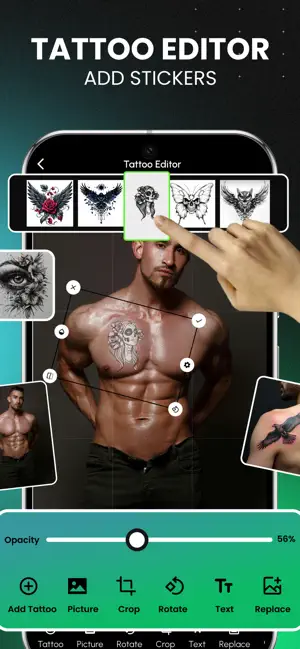
Try on tattoos before you get inked! Thinking about getting a tattoo but not sure how it will look? Tattoo Design: Try On & Editor helps you explore tattoo ideas, preview designs on your skin using your camera, and create tattoo looks using your favorite photos. Whether you're planning your first tattoo, exploring a new design, or just having fun with body art, you can experiment with different tattoos before making a permanent decision. TATTOO TRY ON – SEE IT BEFORE YOU INK Wondering how a tattoo might look on your arm, hand, shoulder, or another part of your body? Use the tattoo camera to place designs over your skin and experiment with different placements. - Preview tattoo designs using your camera - Move tattoos to your preferred position - Rotate designs to explore different angles - Adjust tattoo placement to find your favorite look - Explore tattoo ideas before visiting a tattoo artist TATTOO PHOTO EDITOR Turn your favorite photos into tattoo-inspired creations. Choose an existing photo from your gallery and use the tattoo editor to experiment with different designs and placements. - Add tattoo designs to your photos - Move and rotate tattoos - Combine multiple tattoos in one photo - Layer tattoo designs to create unique combinations - Experiment with different tattoo arrangements TATTOO DESIGNS & IDEAS Looking for tattoo inspiration? Explore the tattoo collection and discover designs that suit your personal style. Whether you prefer something simple or want to experiment with multiple designs, the app provides a convenient way to explore different tattoo looks. CUSTOMIZE YOUR TATTOO LOOK Finding the right tattoo is about more than choosing a design. Placement and arrangement can make a difference. With the tattoo editing tools, you can: - Adjust where tattoos appear - Rotate designs to match your preferred angle - Layer multiple tattoo designs - Experiment with combinations on your photos - Compare different tattoo placement ideas TATTOO SIMULATOR – EXPLORE BEFORE YOU DECIDE Not ready for permanent ink? Use the tattoo simulator to experiment with temporary-looking tattoo designs on your skin or photos. Explore different placements, try multiple tattoo ideas, and see how various designs might look together. The app is designed for anyone interested in tattoo inspiration, body art, or experimenting with tattoo designs. KEY FEATURES - Camera-based tattoo try-on - Tattoo simulator and preview - Tattoo photo editor - Import photos from your gallery - Adjustable tattoo placement - Tattoo rotation - Multiple tattoo layers - Tattoo design collections - Tattoo customization tools WHY CHOOSE TATTOO DESIGN: TRY ON & EDITOR? Explore tattoo ideas without committing to permanent ink. Use your camera to preview tattoo designs, edit tattoos on existing photos, and experiment with placement and combinations at your own pace. Whether you're searching for your next tattoo idea or simply want to explore different looks, Tattoo Design: Try On & Editor makes it easy to get creative. Try different designs. Find your favorite look. Preview before you ink. Download Tattoo Design: Try On & Editor and start exploring tattoo ideas today! Please note: Tattoo previews are digital simulations intended for visualization and entertainment. Actual tattoo results may vary depending on the design, placement, skin, and tattoo artist. Terms of Use: https://www.apple.com/legal/internet-services/itunes/dev/stdeula/
What’s new
Version 1.5 · Updated October 15, 2026
Performance improvements, and a smoother tattoo editing experience.
App privacy
The developer, Usama Umar, reported these privacy practices to Apple.
Data Used to Track You
The following data may be used to track you across apps and websites owned by other companies:
- Location: Coarse Location
- Usage Data: Advertising Data
Data Linked to You
The following data, which may be collected and linked to your identity, may be used for the following purposes:
- Location: Coarse Location
- Usage Data: Advertising Data
Used for: Third-Party Advertising
Alternatives to Tattoo Design: Try On & Editor
Looking for apps like Tattoo Design: Try On & Editor? Here are 6 similar apps on the App Store. The highest rated is Inkjin (5.0/5), and all 6 are free to download.
-
 Tattoo TryOn - AI Tattoo Maker
3.9
Tattoo TryOn - AI Tattoo Maker
3.9
-
 Inkjin
5.0
Inkjin
5.0
-
 INKHUNTER - AI Tattoo Design
4.7
INKHUNTER - AI Tattoo Design
4.7
-
 AI Tattoo Generator • INK
3.9
AI Tattoo Generator • INK
3.9
-
 Tattoo Design Try On - Inkspe
4.5
Tattoo Design Try On - Inkspe
4.5
-
 Tattoodo: Book Tattoo Artists
4.7
Tattoodo: Book Tattoo Artists
4.7
| App | Rating | Price | Last updated | Compare |
|---|---|---|---|---|
| Tattoo Design: Try On & Editor | 3.0 / 5 (1 rating) | Free | October 15, 2026 | |
| Tattoo TryOn - AI Tattoo Maker | 3.9 / 5 (12) | Free | May 20, 2026 | Compare |
| Inkjin | 5.0 / 5 (3) | Free | Nov 7, 2024 | Compare |
| INKHUNTER - AI Tattoo Design | 4.7 / 5 (25,074) | Free | Sep 10, 2026 | Compare |
| AI Tattoo Generator • INK | 3.9 / 5 (81) | Free | Oct 1, 2026 | Compare |
| Tattoo Design Try On - Inkspe | 4.5 / 5 (495) | Free | Oct 10, 2026 | Compare |
| Tattoodo: Book Tattoo Artists | 4.7 / 5 (7,184) | Free | Sep 29, 2026 | Compare |