

PaperRay - Secure Scanner
志业 方 Productivity iPhoneiPadiPod touch
PaperRay - Secure Scanner is a free Productivity app for iPhone and iPad by 志业 方. Rated 1.0/5 from 1 ratings. Requires iOS 18.5. Updated January 2, 2026.
- Rating
- 1.0
- 1 ratings
- Price
- Free
- on the App Store
- Size
- 2 MB
- Age 4+
- Updated
- Jan 2
- 2026 · v1.1
Screenshots

About PaperRay - Secure Scanner
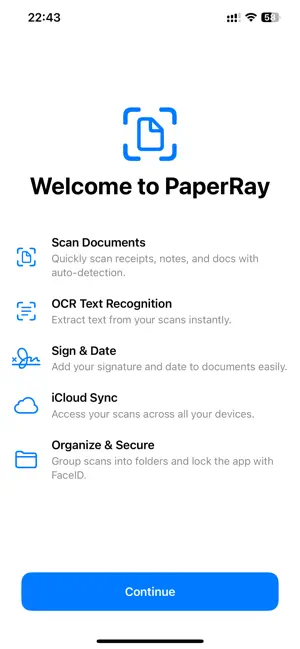
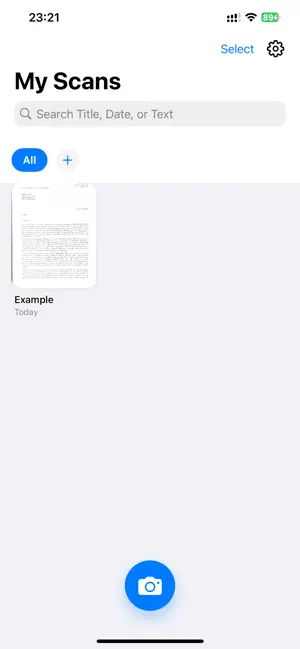
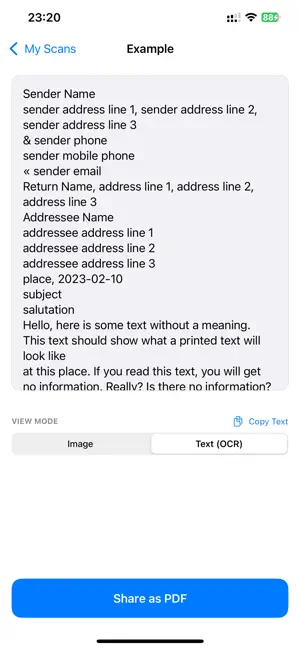
PaperRay: The Smart Scanner. Lifetime Privacy, Lifetime Value. PaperRay transforms your phone into a powerful, intelligent document manager. We combine professional scanning quality with absolute privacy and advanced organizational features. Pay once and own your scanner for life. INTELLIGENT & SEARCHABLE Offline OCR Search: Extract text from any scanned document right on your device. Search for keywords, names, or amounts across your entire library instantly. Text recognition is 100% private and happens offline. Copy Text: Tap to copy recognized text directly from your images. Smart Search: Find documents instantly by date, title, or the content within the scan. SECURITY & CLOUD SYNC (Pro Feature) iCloud Private Sync: Securely synchronize all your files, folders, and settings across your iPhone and iPad. Your data is protected by Apple's secure infrastructure and never touches our servers. App Lock: Protect sensitive documents using FaceID or TouchID protection upon app launch. PROFESSIONAL SCANNING & EDITING Enhanced Filters: Apply Magic Color (auto-enhance), Grayscale, or Black & White modes to create crisp, clear documents. Post-Scan Editing: Re-crop and rotate images even after the initial scanning session is complete. ORGANIZATION & MANAGEMENT Folders & Renaming: Keep your library organized by creating custom folders (e.g., Receipts, Taxes) and renaming files for clarity. Batch Actions: Select multiple scans to delete or export as a single merged PDF document. PRICING MODEL: SIMPLE & FAIR Say goodbye to monthly subscriptions. PaperRay offers a Lifetime Pro model. Pay once and receive permanent access to all advanced features—including OCR Search, iCloud Sync, App Lock, and organizational tools—with no recurring fees, ever. Download PaperRay and experience document management done right.
What’s new
Version 1.1 · Updated January 2, 2026
What's New in this Version (PaperRay V1.1) Smart OCR Text Recognition: Scanned content is now searchable and copiable. All recognition is done locally and offline to protect your privacy. iCloud Private Sync: Pro users can securely synchronize files and settings across all devices (iPhone/iPad). Data is never handled by our servers. App Access Lock: Added FaceID/TouchID protection to safeguard your sensitive documents. Folders and Renaming: Easily create folders to organize files and support custom file naming. Professional Image Filters: Added Magic Color (auto-enhance), Grayscale, and Black & White modes to make scans clearer and more professional. Post-Scan Editing: Ability to re-crop and rotate images anytime after the scan is complete. Batch Actions: Supports selecting multiple files for bulk deletion or merging and exporting as a single PDF.
App privacy
The developer, 志业 方, reported these privacy practices to Apple.
Data Linked to You
The following data, which may be collected and linked to your identity, may be used for the following purposes:
- Diagnostics: Crash Data, Performance Data, Other Diagnostic Data
- Purchases: Purchase History
- Identifiers: User ID, Device ID
Used for: Analytics, App Functionality
Alternatives to PaperRay - Secure Scanner
Looking for apps like PaperRay - Secure Scanner? Here are 6 similar apps on the App Store. The highest rated is Parchment: Agenda & Daily Note (4.8/5), and 5 of the 6 are free to download.
-
 Knut Book Scanner
-
 SalaTrack
-
 Smart Scan X
-
 Quip - Clipboard Supercharger
3.0
-
 Copy Better
4.3
-
 Parchment: Agenda & Daily Note
4.8
| App | Rating | Price | Last updated | Compare |
|---|---|---|---|---|
| PaperRay - Secure Scanner | 1.0 / 5 (1 rating) | Free | January 2, 2026 | |
| Knut Book Scanner | – | Free | Apr 8, 2026 | Compare |
| SalaTrack | – | Free | Jan 14, 2026 | Compare |
| Smart Scan X | – | Free | Sep 4, 2025 | Compare |
| Quip - Clipboard Supercharger | 3.0 / 5 (11) | Free | Oct 5, 2026 | Compare |
| Copy Better | 4.3 / 5 (38) | Free | Mar 28, 2024 | Compare |
| Parchment: Agenda & Daily Note | 4.8 / 5 (306) | 4.99 USD | Sep 18, 2026 | Compare |