

Photo Cleaner Swipe And Delete
Prime Organize Utilities iPhoneiPadiPod touch
Photo Cleaner Swipe And Delete is a free Utilities app for iPhone and iPad by Prime Organize. Rated 4.0/5 from 4 ratings. Requires iOS 15.0.
- Rating
- 4.0
- 4 ratings
- Price
- Free
- on the App Store
- Size
- 69 MB
- Age 4+
- Updated
- Sep 25
- 2026 · v1.0.8
Screenshots


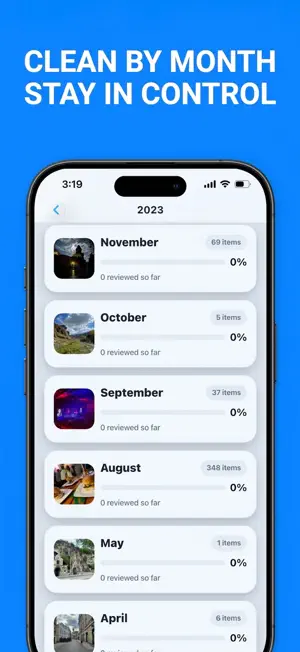
About Photo Cleaner Swipe And Delete
Photo Cleaner Swipe and Delete helps you clean up your iPhone photo library faster, reduce storage clutter, and stay organized — with a privacy-first, local-first experience. Review your photos and videos, find duplicates, remove large files, compress videos, track your cleanup progress, and keep control over what stays and what gets deleted. Your media stays on your device during cleanup. Photos and videos are not uploaded to a server for photo library scanning or cleanup decisions. Clean your gallery faster Large photo libraries can be difficult to manage. Photo Cleaner Swipe and Delete gives you simple tools to review your media, remove unnecessary items, and free up space without losing control. Use a swipe-based cleanup flow to quickly review photos one by one. Keep what matters, delete what you no longer need, and move through your library in a more focused way. Find duplicates and similar photos Duplicate and near-duplicate photos can take up space without you noticing. The app scans your photo library locally and groups similar items together so you can review them before deleting anything. You decide what to keep and what to remove. Find large videos taking up storage Videos are often the biggest reason your iPhone storage fills up. Photo Cleaner Swipe and Delete helps you identify large videos, sort them by size, and review them before deleting. This makes it easier to understand what is using the most space and clean up your library with confidence. Compress videos and save space Want to keep a video but reduce how much storage it uses? Use local video compression to make selected videos smaller while keeping them in your library. It is a practical way to save space without immediately deleting media you may still want. Track your cleanup progress Stay motivated with Recently Cleared, cleanup progress, streaks, milestone badges, and activity stats. See what you have cleaned, track your progress over time, and build a simple habit of keeping your gallery organized. Secure Folder for private media Move selected media into a protected area designed for private local protection. Keep chosen items separate and easier to manage inside the app. Restore when you change your mind The Bin / Recently Deleted flow helps you review deleted items, restore them when needed, or permanently remove them when you are sure. You stay in control throughout the cleanup process. Improve selected photos Use Photo Upscale to enhance selected photo quality with on-device processing. Save the improved result and choose what to do with the original afterward. Organize with albums Sort Photos and album tools help you organize your media more clearly. Create and manage albums so your library feels easier to navigate. Why users choose Photo Cleaner Swipe and Delete Swipe-based photo cleanup Duplicate and near-duplicate review Large video finder Local video compression Recently cleared activity and progress tracking Cleanup achievements and streaks Favorites for media you want to revisit Bin with restore and permanent delete options Secure Folder for selected private media Photo Upscale for selected images Album organization tools Privacy-first, local-first cleanup experience Built for privacy and control Photo Cleaner Swipe and Delete is designed around user-controlled cleanup. Media is processed locally on your device for cleanup features. Your photos and videos are not uploaded to a server for scanning or cleanup decisions. The app stores only local app data needed for features such as progress, achievements, and cleanup state. Clean your gallery, free storage, and organize your media with a modern, premium iPhone experience. Privacy Policy: https://gallery-cleaner.lovable.app/privacy Support: https://gallery-cleaner.lovable.app/support
What’s new
Version 1.0.8 · Updated September 25, 2026
Bug Fix!
App privacy
The developer, Prime Organize, reported these privacy practices to Apple.
Data Not Linked to You
The following data, which may be collected but is not linked to your identity, may be used for the following purposes:
- Usage Data: Product Interaction
Used for: Analytics
Alternatives to Photo Cleaner Swipe And Delete
Looking for apps like Photo Cleaner Swipe And Delete? Here are 6 similar apps on the App Store. The highest rated is ClusterSwipe: free up space (5.0/5), and all 6 are free to download.
-
 ClusterSwipe: free up space
5.0
ClusterSwipe: free up space
5.0
-
 Cash Register Event Simulator
2.0
Cash Register Event Simulator
2.0
-
 Convert Video to MP3: VidoTune
4.0
Convert Video to MP3: VidoTune
4.0
-
 Ai Media Recover photos videos
5.0
Ai Media Recover photos videos
5.0
-
 Palet: Color Palette Generator
4.5
Palet: Color Palette Generator
4.5
-
 Unicode: Math Symbol Keyboard
5.0
Unicode: Math Symbol Keyboard
5.0
| App | Rating | Price | Last updated | Compare |
|---|---|---|---|---|
| Photo Cleaner Swipe And Delete | 4.0 / 5 (4 ratings) | Free | September 25, 2026 | |
| ClusterSwipe: free up space | 5.0 / 5 (1) | Free | Sep 16, 2026 | Compare |
| Cash Register Event Simulator | 2.0 / 5 (1) | Free | Aug 4, 2026 | Compare |
| Convert Video to MP3: VidoTune | 4.0 / 5 (18) | Free | May 6, 2026 | Compare |
| Ai Media Recover photos videos | 5.0 / 5 (1) | Free | Jun 20, 2026 | Compare |
| Palet: Color Palette Generator | 4.5 / 5 (2) | Free | Jul 22, 2026 | Compare |
| Unicode: Math Symbol Keyboard | 5.0 / 5 (3) | Free | Oct 19, 2026 | Compare |