

loomlock
Loomlock Apps Productivity iPhoneiPadiPod touch
loomlock is a free Productivity app for iPhone and iPad by Loomlock Apps. Requires iOS 18.6. Updated August 20, 2026.
- Price
- Free
- on the App Store
- Size
- 43 MB
- Age 17+
- Updated
- Aug 20
- 2026 · v0.6.5
Screenshots
About loomlock
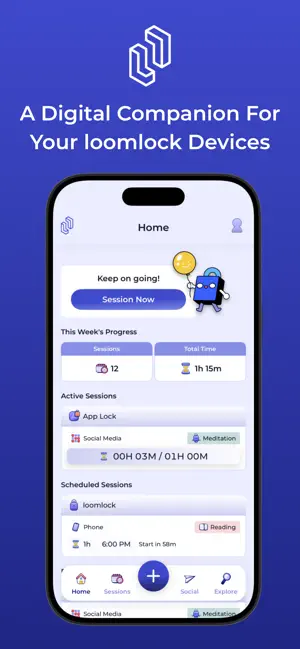
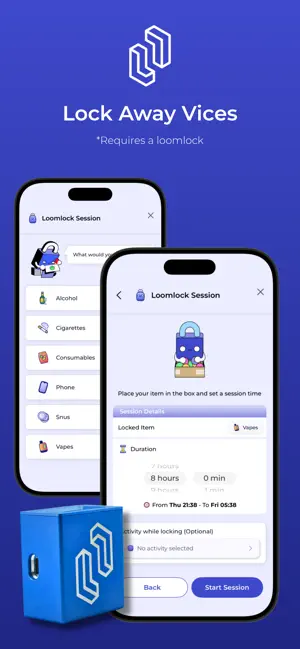
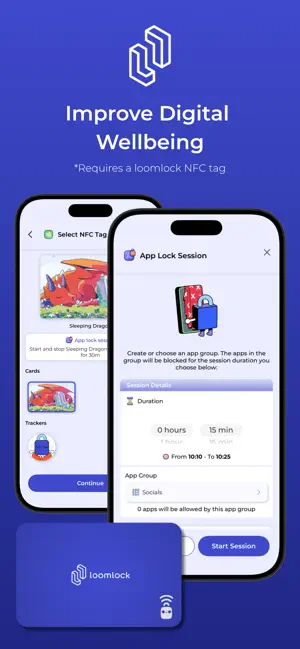
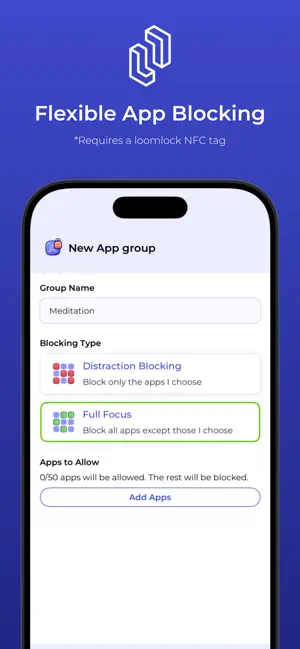
The ultimate companion app for your loomlock devices*. Tap your loomlock key to block apps and start focusing. Lock away distractions and temptations with your loomlock and start building better habits. Track every session, create accountability with friends, and break free from unwanted habits. **Flexible App Blocking** loomlock uses Apple's Screen Time API to block distracting apps during your focus sessions**, helping you cut down on doom-scrolling, build better habits, and become more productive. - App Groups: Create and customize your own lists of apps to block, or use ready-made groups like "Focus” and “Be Present” - Scheduled Blocking: Set recurring schedules to automatically block apps at specific times - Blocking Modes: Choose to block distracting apps or allow only those which are essential or productive - Quick and Easy Blocking: Assign app groups to your loomlock keys to block apps with just a few quick taps. **Session Logging and Journaling** Build self-awareness, understand your habits, and track your progress. - Log Sessions: Start and end sessions to track your focus and habit-building sessions - Write Journals: Reflect on each session with mood tracking and guided journal prompts - Session History: Track sessions over time, allowing you to view progress **loomlock Device Integration** Bridge the physical and digital by registering your loomlock products and customizing their functionality. - Register Your Products: Register your loomlock devices with the app - Customize loomlock keys: Assign specific app groups and settings to each loomlock key - Quick-Start Sessions: Tap your loomlock key to your phone to quickly block apps and start a timed session - Physical Connection: Using a physical loomlock key reinforces your commitment with every use. **Participate in loomlock Experiences** Tap in at participating venues to block distracting apps and be fully present, whether you're working out, socialising, or taking some time for yourself. No sign-in or loomlock device required. **Social Accountability (Lockers)** Stay motivated by sharing your journey with others. - Create Lockers: Create private groups for shared accountability - See Friends' Activity: See what your locker members are up to and cheer each other on. * At least one loomlock device (key or loomlock) is required ** Requires a loomlock key
What’s new
Version 0.6.5 · Updated August 20, 2026
- Adds web domain blocking to app groups - Bug fixes and improvements
App privacy
The developer, Loomlock Apps, reported these privacy practices to Apple.
Data Linked to You
The following data, which may be collected and linked to your identity, may be used for the following purposes:
- Identifiers: User ID, Device ID
Used for: App Functionality
Data Not Linked to You
The following data, which may be collected but is not linked to your identity, may be used for the following purposes:
- Usage Data: Product Interaction, Other Usage Data
- Diagnostics: Crash Data, Performance Data, Other Diagnostic Data
- Contact Info: Email Address
Used for: Analytics, App Functionality
Alternatives to loomlock
Looking for apps like loomlock? Here are 6 similar apps on the App Store. The highest rated is Do I? (5.0/5), and all 6 are free to download.
-
 Suro: Shared Plans
-
 Do I?
5.0
Do I?
5.0
-
 Organizea - Task Planner
-
 Cliq - Intune
-
 Max - Manage, Act, Excel
5.0
Max - Manage, Act, Excel
5.0
-
 Newsletter Reader
3.8
Newsletter Reader
3.8
| App | Rating | Price | Last updated | Compare |
|---|---|---|---|---|
| loomlock | – | Free | August 20, 2026 | |
| Suro: Shared Plans | – | Free | Sep 21, 2026 | Compare |
| Do I? | 5.0 / 5 (5) | Free | Apr 23, 2025 | Compare |
| Organizea - Task Planner | – | Free | Nov 5, 2025 | Compare |
| Cliq - Intune | – | Free | May 20, 2026 | Compare |
| Max - Manage, Act, Excel | 5.0 / 5 (3) | Free | Nov 3, 2024 | Compare |
| Newsletter Reader | 3.8 / 5 (62) | Free | Jul 7, 2026 | Compare |
Compare loomlock with the top alternatives: ratings, updates, ASO score and keyword gaps →