

ProducerPad
1AM STUDIOS LLC Photo & Video iPhoneiPadiPod touch
ProducerPad is a free Photo & Video app for iPhone and iPad by 1AM STUDIOS LLC. Rated 5.0/5 from 2 ratings. Requires iOS 18.0. Updated September 4, 2026.
- Rating
- 5.0
- 2 ratings
- Price
- Free
- on the App Store
- Size
- 23 MB
- Age 4+
- Updated
- Sep 4
- 2026 · v3.0
Screenshots


About ProducerPad
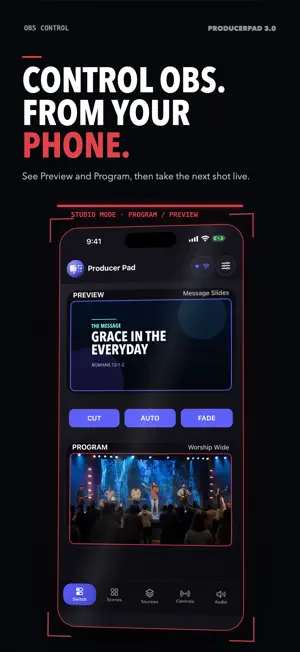
ProducerPad turns your iPhone or iPad into a focused OBS Studio control room. Connect directly to OBS on your local network to cue shots, manage scenes and sources, mix audio, and control live output beside your production computer. RUN THE SHOW • Use OBS Studio Mode with Preview and Program • Take Preview live with Cut, Auto, or Fade • Start and stop streaming • Start, stop, pause, and resume recording, with live status and timecodes • Start or stop Virtual Camera and Replay Buffer, and save replays • Monitor Program and Preview with ProducerPad Feed or NDI on supported setups BUILD AND MANAGE YOUR PRODUCTION • Create, rename, and delete scenes • Add supported Text, Media, Camera, Browser, and Audio sources • Edit supported source settings, including text, media, browser, camera, and audio options • Rename and reorder sources within a scene • Remove a source from one scene or delete it from OBS • Show or hide sources in Preview MIX AUDIO WITH CONFIDENCE • See real-time audio meters • Adjust source volume • Mute and unmute channels DESIGNED FOR IPHONE AND IPAD • Purpose-built iPhone and iPad layouts • Light, Dark, and Auto appearance • QR or manual OBS connection setup with saved profiles ProducerPad connects directly to OBS Studio 28 or later through OBS WebSocket. Your device and OBS computer must be on the same local network. No separate ProducerPad account is required. ProducerPad Feed monitoring requires the ProducerPad Feed OBS plugin. NDI monitoring requires a compatible NDI setup. Feature availability may vary with your OBS version, platform, plugins, and configuration. Built for creators, churches, podcasts, education, events, and small production teams. ProducerPad Pro is required for control-room access. Available purchase options and prices appear in the app. No ads. Support: [email protected] Terms: https://producerpad.app/terms Privacy: https://producerpad.app/privacy
What’s new
Version 3.0 · Updated September 4, 2026
ProducerPad 3.0 is a complete control-room rebuild for iPhone and iPad. • Create, rename, and delete OBS scenes • Add supported Text, Media, Camera, Browser, and Audio sources; edit settings, rename, reorder, remove from a scene, or delete from OBS • Use Studio Mode to prepare shots in Preview and take them to Program with Cut, Auto, or Fade • Mix audio with live meters, volume, and mute controls • Control and monitor streaming, recording, Virtual Camera, and Replay Buffer • Monitor Program and Preview through ProducerPad Feed or NDI on supported setups • New Blueprint design with Light, Dark, and Auto modes plus refined iPhone and iPad layouts
App privacy
The developer, 1AM STUDIOS LLC, reported these privacy practices to Apple.
Data Not Collected
The developer does not collect any data from this app.
Alternatives to ProducerPad
Looking for apps like ProducerPad? Here are 6 similar apps on the App Store. The highest rated is Switcher Pro (5.0/5), and all 6 are free to download.
-
 Switcher Pro
5.0
-
 BirdDog Wingman
4.6
-
 Mavis Studio: Live Production
3.8
-
 Mavis Monitor: Pro Display
1.0
-
 TopDirectorCam(NDI/SRT Camera)
4.5
-
 UVC Camera to NDI
3.0
| App | Rating | Price | Last updated | Compare |
|---|---|---|---|---|
| ProducerPad | 5.0 / 5 (2 ratings) | Free | September 4, 2026 | |
| Switcher Pro | 5.0 / 5 (1) | Free | Jun 26, 2026 | Compare |
| BirdDog Wingman | 4.6 / 5 (5) | Free | Oct 7, 2026 | Compare |
| Mavis Studio: Live Production | 3.8 / 5 (4) | Free | Sep 4, 2026 | Compare |
| Mavis Monitor: Pro Display | 1.0 / 5 (3) | Free | Oct 13, 2026 | Compare |
| TopDirectorCam(NDI/SRT Camera) | 4.5 / 5 (12) | Free | Jun 12, 2026 | Compare |
| UVC Camera to NDI | 3.0 / 5 (2) | Free | Apr 9, 2026 | Compare |
Compare ProducerPad with the top alternatives: ratings, updates, ASO score and keyword gaps →