

MindDory: Vocabulary & Grammar
Hynek Nesvara Education iPhoneiPadiPod touch
MindDory: Vocabulary & Grammar is a free Education app for iPhone and iPad by Hynek Nesvara. Requires iOS 17.6. Updated October 19, 2026.
- Price
- Free
- on the App Store
- Size
- 90 MB
- Age 17+
- Updated
- Oct 19
- 2026 · v3.0.19
Screenshots



About MindDory: Vocabulary & Grammar
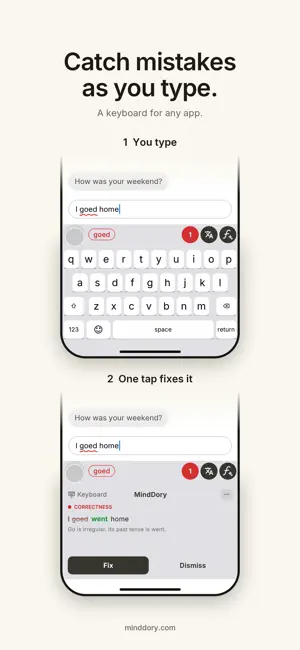
Learn from the words you meet and the mistakes you make. MindDory is a vocabulary and grammar builder that starts with your own language, not someone else's list: the words you run into while you read, and the mistakes you make while you write. You choose what to keep. MindDory brings it back until it sticks. WRITE IN ANY APP, LEARN FROM IT The MindDory keyboard works wherever you type: messages, email, work chat. Check a sentence, see how a fluent speaker would say it, or translate it. Grammar checks work in English, Spanish, German, French, Italian, Portuguese, Czech, Dutch and Polish, and every fix comes with an explanation. Your text changes only when you choose a fix. It never keeps whole sentences, and nothing is kept from password or payment fields. SEE THE MISTAKES YOU KEEP MAKING Turn on "Learn from my writing" in the keyboard settings, keep "Save mistakes to Grammar" on in Chrome, and every mistake you check lands in the Grammar tab. It shows which topics keep slipping and which you already get right. With it on, the keyboard also counts the English dictionary words you type, and Active Words shows them by topic and level. 138 English grammar topics from A1 to C1, each with the rule, what to watch out for, and what not to confuse it with. SAVE THE WORDS YOU MEET Snap any text with your camera, even a page from a book or a screen, and pick the words you do not know. Translate a word and save it in one tap, on your phone, on the web or in Chrome. Or connect MindDory to Claude, Cursor or another assistant that speaks the Model Context Protocol and save words straight from your conversations. Each word becomes a card with a translation and an example. SEE WHAT YOU KNOW AND WHAT COMES NEXT Start with the Language Test: a few quick questions and a CEFR level, A1 to C2 in six languages, A1 to B2 in Czech and Portuguese. The Word Map then estimates which words you already know from your level and your cards, and shows the words at your level you have not met yet, across more than 38,000 mapped words. NOTHING TO CONFIGURE. THE CARD COMES BACK ON ITS OWN. You only say whether a word was hard or easy. A hard word returns in three days, an easy one in a week, and the second time you call it easy, it stops asking. FOR THE WORDS THAT WILL NOT STICK Memory Cues turn a hard word into a picture you can remember. Story Mode puts your new words into a short story, so context does the heavy lifting. FEATURES Keyboard: grammar check, "say it fluently" and translation in any app Chrome extension: the same on any web page, plus saving words Grammar tab, Active Words, Scan to Cards, Word Map, Language Test Flashcards with spaced repetition, no settings to tune MCP Brain for Claude, Cursor and other AI assistants Learn in more than 60 languages. Word Map and Language Test go deep in eight: English, Spanish, German, French, Italian, Czech, Portuguese, Indonesian BUILT FOR Learners who already know the basics and meet the language in real life: at work, in what they read, with a partner or family who speak it, after moving to another country, or on the road. Privacy-first: your data is not sold, we ask before any cross-app tracking, and your cards sync across your devices. Your words. Your mistakes. Kept until they stick.
What’s new
Version 3.0.19 · Updated October 19, 2026
The + button for adding a word now sits in the middle of the bottom bar, right under your thumb. The bar floats above the page, and the tab you are on is easy to spot. It also fits large text sizes. Plus the usual round of fixes.
App privacy
The developer, Hynek Nesvara, reported these privacy practices to Apple.
Data Used to Track You
The following data may be used to track you across apps and websites owned by other companies:
- Identifiers: Device ID
- Usage Data: Product Interaction
Data Linked to You
The following data, which may be collected and linked to your identity, may be used for the following purposes:
- Identifiers: Device ID, User ID
- Usage Data: Product Interaction
- Contact Info: Email Address
- User Content: Other User Content
Used for: Third-Party Advertising, Analytics, App Functionality
Data Not Linked to You
The following data, which may be collected but is not linked to your identity, may be used for the following purposes:
- Diagnostics: Crash Data, Performance Data
Used for: App Functionality
Alternatives to MindDory: Vocabulary & Grammar
Looking for apps like MindDory: Vocabulary & Grammar? Here are 6 similar apps on the App Store. The highest rated is Clozemaster-Vocabulary Builder (4.8/5), and all 6 are free to download.
-
 Clozemaster-Vocabulary Builder
4.8
-
 Langua: AI language learning
4.6
-
 Readle: Learn Languages Daily
4.7
-
 LingQ | Learn Languages
4.7
-
 Lingopie: Learn a Language
4.4
-
 WordUp - Vocabulary Builder
4.8
| App | Rating | Price | Last updated | Compare |
|---|---|---|---|---|
| MindDory: Vocabulary & Grammar | – | Free | October 19, 2026 | |
| Clozemaster-Vocabulary Builder | 4.8 / 5 (2,079) | Free | Oct 15, 2026 | Compare |
| Langua: AI language learning | 4.6 / 5 (2,714) | Free | Sep 28, 2026 | Compare |
| Readle: Learn Languages Daily | 4.7 / 5 (1,508) | Free | Oct 10, 2026 | Compare |
| LingQ | Learn Languages | 4.7 / 5 (10,381) | Free | Oct 6, 2026 | Compare |
| Lingopie: Learn a Language | 4.4 / 5 (2,184) | Free | Oct 16, 2026 | Compare |
| WordUp - Vocabulary Builder | 4.8 / 5 (13,850) | Free | Sep 28, 2026 | Compare |