

ARGate
Rob Jackson Music iPhoneiPadiPod touchMac
ARGate is a paid Music app for iPhone and iPad by Rob Jackson. Requires iOS 12.0. Updated December 31, 2025.
- Price
- 1.99 USD
- on the App Store
- Size
- 12 MB
- Age 4+
- Updated
- Dec 31
- 2025 · v1.0.2
Screenshots



About ARGate
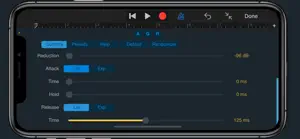
ARGate Attack / Release Gate Plugin (AUv3) ARGate is an audio effect plugin that can run standalone, or in any AU compatible host application such as Logic Pro or GarageBand. Overview - more than just a noise gate... ARGate is an audio gate utility with a few twists, with the addition of attack and hold times, plus support for hysteresis. At its core, ARGate uses an AHR (attack-hold-release) envelope to control gain adjustment of an incoming audio signal, with support for different threshold values to open and close the gate (hysteresis). ARGate can function as a noise gate for instrument or vocal audio tracks, but can also be used as an "auto-swell" effect on instruments such as electric guitar so you can leave that bulky volume pedal at home! ARGate can even be used to "tighten-up" drum and percussion loops by gating out the quieter elements. A G R Indicators Above the view selector are 3 indicators to show what state the gate is in: Attack, Gate (open) and Release. Each indicator will light when in that particular state. Please note these are not interactive buttons that you click on, even though they share the same fabulous color scheme :-) Note - if you see the R indicator flickering a lot, please consider increasing the Hold time slightly, as described below. Controls Active - Toggles the effect On or Off. Threshold - Sets the dB level of the signal required to open the gate. At its lowest setting, the gate will let pretty much everything through, and at the highest setting, none shall pass! For background noise reduction, set the Threshold to minimum, then slowly increase it until you see that the G indicator is not opening when there is only background noise in the input. Hysteresis - This sets the difference between the open gate and close gate threshold which is useful when you want to hear more of the decay sound once the gate has been triggered. The default of -6dB is a good place to start - this means that the close threshold will be 6dB less than the threshold to open the gate. This feature tends to avoid the "fluttering" effect you sometimes get with more basic noise gates. Reduction - Sets the amount of gain reduction applied when the gate is closed. At its lowest setting, this is effectively silence and is probably the setting you want to use in most applications. Alternatively, you might just want to attenuate background noise by a certain amount so the result doesn't sound obviously gated. Attack - Choose between a linear or exponential attack curve, then set an attack time. At zero, the gate will open as soon as the Threshold is hit. For auto-swell type effects, a long attack time around 1000ms and an exponential curve can work well. Hold - Sets a variable hold time which can also be useful for avoiding gate "fluttering" and works in tandem with the Hysteresis control. This time is essentially how long the input level has to remain below the close threshold (open threshold + hysteresis) before going into release mode. If the input level goes above the close threshold, then the hold timer is reset. This feature is especially useful for vocal and instrument gating, but can also be used to achieve some interesting rhythmic effects on drum loops and the like. Release - Chose between linear or exponential release curve, then set a release time. An exponential release curve might work better on percussive sounds if you need the gate to really "snap" shut. The minimum release time of 10ms is there to avoid pops or clicks when the gate closes. For more info and support please visit: www.waverley-instruments.com/robjackson
What’s new
Version 1.0.2 · Updated December 31, 2025
Changed threshold and gain reduction UI sliders to a linear response so it's easier to dial-in lower values. Just to confirm, this is a UI change only, and won't affect parameter values in your existing projects.
App privacy
The developer, Rob Jackson, reported these privacy practices to Apple.
Data Not Collected
The developer does not collect any data from this app.
Alternatives to ARGate
Looking for apps like ARGate? Here are 6 similar apps on the App Store. The highest rated is XenoVerb - Reverb Suite (5.0/5).
-
 FAC Polyflo
4.9
-
 XenoVerb - Reverb Suite
5.0
-
 MFX motto
4.5
-
 SpaceWalk - Chord Generator
4.8
-
 Parrot - Audio repeater
4.1
-
 SlowMoFX
3.8
| App | Rating | Price | Last updated | Compare |
|---|---|---|---|---|
| ARGate | – | 1.99 USD | December 31, 2025 | |
| FAC Polyflo | 4.9 / 5 (11) | 9.99 USD | Oct 11, 2025 | Compare |
| XenoVerb - Reverb Suite | 5.0 / 5 (3) | 14.99 USD | Oct 17, 2025 | Compare |
| MFX motto | 4.5 / 5 (2) | 14.99 USD | Oct 3, 2025 | Compare |
| SpaceWalk - Chord Generator | 4.8 / 5 (13) | 9.99 USD | Jun 5, 2026 | Compare |
| Parrot - Audio repeater | 4.1 / 5 (12) | 14.99 USD | Feb 26, 2026 | Compare |
| SlowMoFX | 3.8 / 5 (14) | 9.99 USD | Sep 8, 2025 | Compare |
Compare ARGate with the top alternatives: ratings, updates, ASO score and keyword gaps →