

Signature Maker: PDF Signature
Yassine IMGHARNE Utilities iPhoneiPadiPod touch
Signature Maker: PDF Signature is a free Utilities app for iPhone and iPad by Yassine IMGHARNE. Requires iOS 16.6. Updated November 21, 2025.
- Price
- Free
- on the App Store
- Size
- 11 MB
- Age 4+
- Updated
- Nov 21
- 2025 · v1.0
Screenshots


About Signature Maker: PDF Signature
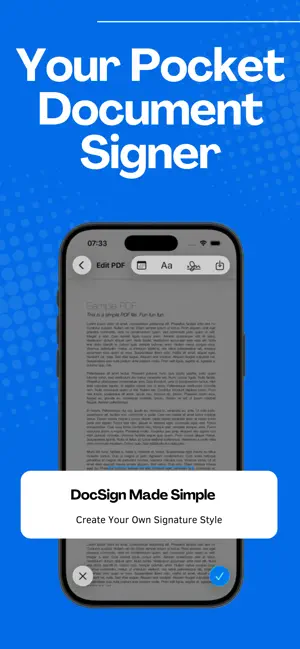
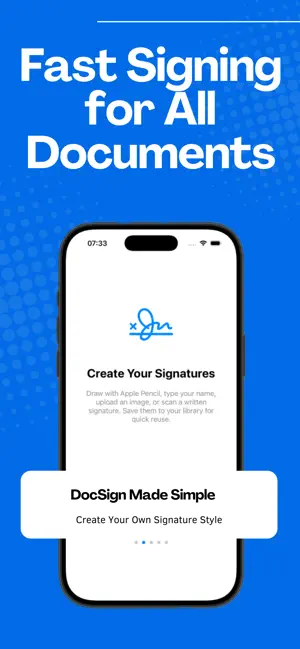
Signature Maker: PDF Signature is the easiest way to sign PDF documents, create electronic signatures, and complete forms in seconds. Whether you need to esign, approve contracts, fill paperwork, or send signed documents fast — this app gives you a smooth, powerful, and free document signer right on your iPhone. Designed for professionals, students, freelancers, and business owners, Signature Maker lets you create your own signature, save it, and apply it to any PDF instantly. No printing. No scanning. No delays. Key Features: • Sign PDFs instantly Import any PDF file and add your signature with one tap. Perfect for contracts, invoices, work documents, rental agreements, and more. • Create & save your electronic signature Use the signature creator to draw a natural, handwritten e-signature right on your screen. Save multiple signatures for different uses. • Sign Anywhere — Anytime Use the app as your all-in-one sign app to sign documents directly from your phone. No laptop or printer required. • Free PDF signing Enjoy a fully functional sign pdf free experience with unlimited signing options. • DocSign support Easily sign and send documents with professional formatting. Works like popular tools such as DocSign or SignNow, but faster and easier. • Smart PDF editor tools Resize, move, rotate, or adjust your signature for a clean and accurate look every time. • Sign multiple pages Apply signatures across pages to complete multi-page PDF forms effortlessly. • Secure and private Your signatures and documents stay on your device. No online upload, no tracking. Why Choose Signature Maker: PDF Signature? - Fast and easy sign now functionality - Accurate e-signature with pen-like smoothness - Works offline — sign anywhere - Professional esign and document approval - Ideal for contracts, business forms, HR documents, NDAs, financial paperwork, and school forms - A dependable doc sign solution for everyday tasks - 100% simple, intuitive, and reliable Perfect for users who need: - A signature maker to quickly sign PDF files - A docsign solution with simple steps - A free electronic signature creator - A fast sign app for work or personal documents - A sign in app alternative that works offline - A full-featured free document signer - A tool to esign documents anytime - A smooth doc sign and send workflow Sign PDFs in seconds — no account, no subscription, no limits. Download Signature Maker: PDF Signature and enjoy the easiest way to create and manage your digital signatures.
App privacy
The developer, Yassine IMGHARNE, reported these privacy practices to Apple.
Data Used to Track You
The following data may be used to track you across apps and websites owned by other companies:
- Usage Data: Advertising Data
Data Not Linked to You
The following data, which may be collected but is not linked to your identity, may be used for the following purposes:
- Usage Data: Advertising Data
Used for: Third-Party Advertising
Alternatives to Signature Maker: PDF Signature
Looking for apps like Signature Maker: PDF Signature? Here are 6 similar apps on the App Store. The highest rated is Signature Maker: Sign Document (4.5/5), and all 6 are free to download.
-
 PDF Office: Scan & Sign
-
 Signature Maker: Sign Document
4.5
-
 Gramo - PDF
-
 GV-Discover
-
 CheckOnce: Yes or No
-
 eSign: Digital Signature‧
| App | Rating | Price | Last updated | Compare |
|---|---|---|---|---|
| Signature Maker: PDF Signature | – | Free | November 21, 2025 | |
| PDF Office: Scan & Sign | – | Free | Jun 27, 2026 | Compare |
| Signature Maker: Sign Document | 4.5 / 5 (4) | Free | Sep 18, 2026 | Compare |
| Gramo - PDF | – | Free | Dec 10, 2025 | Compare |
| GV-Discover | – | Free | Apr 17, 2026 | Compare |
| CheckOnce: Yes or No | – | Free | Oct 6, 2026 | Compare |
| eSign: Digital Signature‧ | – | Free | Oct 16, 2026 | Compare |