

OnSiteCAMERA Pro -Field Photo
QAEE CONPUUTENG Photo & Video iPhoneiPadiPod touch
OnSiteCAMERA Pro -Field Photo is a free Photo & Video app for iPhone and iPad by QAEE CONPUUTENG. Requires iOS 15.0. Updated October 15, 2026.
- Price
- Free
- on the App Store
- Size
- 93 MB
- Age 4+
- Updated
- Oct 15
- 2026 · v1.3.4
Screenshots


About OnSiteCAMERA Pro -Field Photo
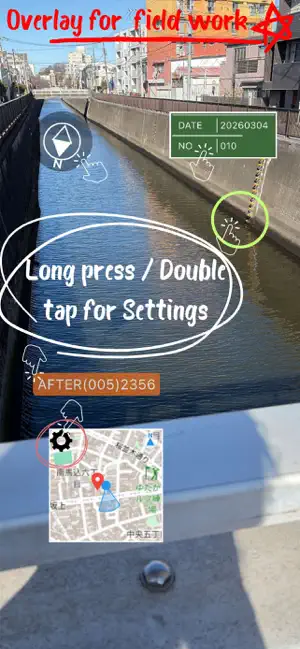
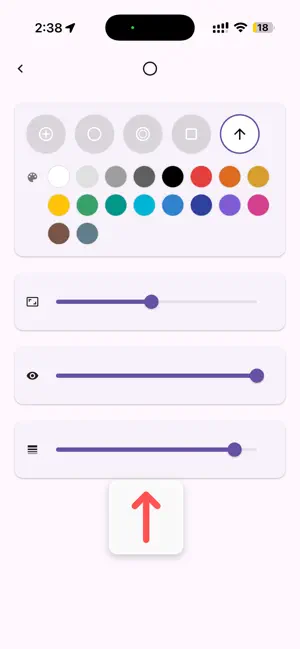
Born from a survey company, SiteCam Pro is a professional-grade field camera that handles everything the moment you shoot: file naming, folder sorting, and tagging, plus stamping markers, addresses, and maps directly onto your photos. No more relying on memory to sort and rename photos after you get back to the office. ■ Key Features 1. Maximize efficiency with "File Naming & Organization" ・[Auto Rename]: Automatically generate file names at the moment of capture by combining address, date, time, free text (site name), sequential numbers, and more. ・[Folder Creation]: Set up folders in advance for each site or work zone, and captured data is saved straight to that folder. No need to move files later. ・[Tagging]: Add tags like "site name," "inspected," or "date" to photos for easy searching later. ・[History & Pinning]: Recall previously used tags and text from history. Pin your favorites for quick access. 2. Shoot photos that communicate with "Markers & Editing" ・[Markers & Arrows]: Place arrow or frame stamps on the spot to highlight instructions or correction points. ・[Pen Input]: Tap the screen to add intuitive handwritten marks. ・[Keystone Correction]: Correct distortion when shooting documents or signs before saving. ・[Original Backup]: Keep the unmarked original photo alongside the annotated one, so you're safe even if an edit goes wrong. 3. Record site data with "HUD & Stamping" ・[Address & Map]: Display and stamp the address (town, block number) and a nearby map obtained from GPS in real time. ・[Compass & Blackboard]: Display and record the shooting direction (azimuth) and a construction blackboard (notes) as needed. 4. Field-friendly "Other Features" ・[Volume Button Shutter]: Use physical buttons like the volume button to release the shutter. Great for shooting with gloves on or when tapping the screen is difficult. ・[Flexible Output Settings]: Adjust "processing speed priority / image quality priority" to match your site or device specs. Detailed settings meet professional needs: toggle lat/long stamping on/off, save composite and original photos at once, add hash values on save, and more. ■ About Pricing Try all features free for 2 months. After that, an auto-renewing monthly or yearly subscription is required to keep using them. For fieldwork across construction, civil engineering, infrastructure inspection, disaster surveys, surveying, patrols, and sales. SiteCam Pro dramatically streamlines your site records. Terms of Use: https://www.apple.com/legal/internet-services/itunes/dev/stdeula/
What’s new
Version 1.3.4 · Updated October 15, 2026
- The screen now stays on while you shoot (you can turn this off in Settings). - Choose System, Natural, Light or Dark appearance, and the settings, subscription and other screens are now in German, French and Italian. - The GPS date and time written to photos is now correctly in UTC (it was previously local time, e.g. 9 hours off in Japan). - The map burned into photos now includes the Mapbox logo and attribution. - At the largest text size, plan prices no longer run off the screen. Restore Purchases now always shows a result, even when the app is already unlocked. - Fixed: settings headings and text were hard to see in dark appearance; settings, the subscription screen and the first screen now fit at the largest text size. The blackboard preview now sits at the bottom of its settings screen and no longer covers the fields.
App privacy
The developer, QAEE CONPUUTENG, reported these privacy practices to Apple.
Data Not Collected
The developer does not collect any data from this app.
Alternatives to OnSiteCAMERA Pro -Field Photo
Looking for apps like OnSiteCAMERA Pro -Field Photo? Here are 6 similar apps on the App Store. The highest rated is Fieldpost - Jobsite Photos (5.0/5), and all 6 are free to download.
-
 SiteMark: GPS Field Camera
-
 GPS Camera: Map Photo Stamp
-
 Field Photos App
-
 GPS Map Camera: Field Stamp
-
 Fieldpost - Jobsite Photos
5.0
Fieldpost - Jobsite Photos
5.0
-
 Folder Camera
2.0
Folder Camera
2.0
| App | Rating | Price | Last updated | Compare |
|---|---|---|---|---|
| OnSiteCAMERA Pro -Field Photo | – | Free | October 15, 2026 | |
| SiteMark: GPS Field Camera | – | Free | Apr 20, 2026 | Compare |
| GPS Camera: Map Photo Stamp | – | Free | Sep 19, 2026 | Compare |
| Field Photos App | – | Free | Oct 15, 2026 | Compare |
| GPS Map Camera: Field Stamp | – | Free | Oct 8, 2026 | Compare |
| Fieldpost - Jobsite Photos | 5.0 / 5 (9) | Free | Oct 20, 2026 | Compare |
| Folder Camera | 2.0 / 5 (1) | Free | Oct 21, 2026 | Compare |