

CheatIt: Watch Notes & AI
Ilija Ivkovic Utilities iPhoneiPadiPod touchApple Watch
CheatIt: Watch Notes & AI is a free Utilities app for iPhone and iPad by Ilija Ivkovic. Rated 4.0/5 from 2 ratings. Requires iOS 26.0.
- Rating
- 4.0
- 2 ratings
- Price
- Free
- on the App Store
- Size
- 75 MB
- Age 4+
- Updated
- Oct 13
- 2026 · v3.1
Screenshots


About CheatIt: Watch Notes & AI
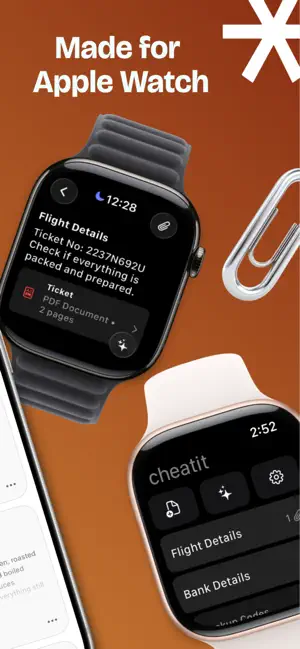
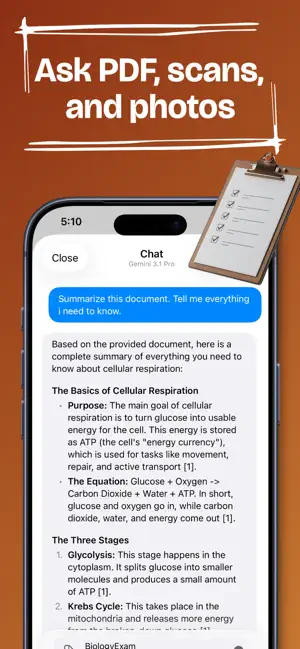
With CheatIt, you get notes, a PDF viewer, and AI chat on both your iPhone and Apple Watch. Write notes, save PDFs, scan paper, add photos, and keep everything with you. Open files on your Watch, zoom in to read small text, and ask AI about PDFs, scans, and photos when you need an answer. You can use CheatIt for class notes, lecture PDFs, formulas, diagrams, travel details, recipes, work documents, screenshots, tickets, lists, and anything else you want on your phone or wrist. WHAT YOU CAN DO • Create notes on iPhone or Apple Watch • Organize notes with folders • Add photos, take pictures, import PDFs, or scan paper into a PDF • View notes, photos, scans, and PDFs on Apple Watch • Zoom in to read even the smallest text • Ask AI anything from iPhone or Apple Watch • Attach PDFs, scans, and photos for summaries, explanations, and answers • See source citations for supported PDF answers • Continue chats across iPhone and Apple Watch • Choose the AI model that fits the job • Lock sensitive notes with Face ID • Use Blackout Mode on Apple Watch to hide notes fast NOTES, FILES, AND AI IN ONE APP CheatIt keeps notes, files, and AI together. Write something down, attach a file or photo, open it later on your Watch, and ask AI about it without moving everything between different apps or devices. CheatIt refers to cheat sheets: short personal notes for studying, work, and everyday use. This app is intended for productivity and learning. It is not intended to promote or assist with academic dishonesty or breaking rules. Terms of Service: https://dunitapps.github.io/cheat-it-docs/TermsOfService Privacy Policy: https://dunitapps.github.io/cheat-it-docs/PrivacyPolicy
What’s new
Version 3.1 · Updated October 13, 2026
Thanks for using CheatIt, and for all the feedback. Chats on Apple Watch can now use your notes, even without your iPhone nearby. Pick the notes you want in a chat and the answer comes from them. With no iPhone around, the Watch needs Wi-Fi or cellular. The sparkle button on a note now opens a chat about that note. Before, the note never made it into the chat, which wasn't much help. Answers on the Watch also list the notes they came from, and chats open at the newest message. Also fixed: • Voice questions recorded on the Watch no longer get cut off at the end. • Very large notes not appearing on the Watch's note list. • The message box stays usable if you leave the app just as an answer finishes. • A message that changes after syncing now updates on the other device too. Found a bug? [email protected]. We actually read those.
App privacy
The developer, Ilija Ivkovic, reported these privacy practices to Apple.
Data Linked to You
The following data, which may be collected and linked to your identity, may be used for the following purposes:
- Purchases: Purchase History
- User Content: Photos or Videos, Other User Content
- Identifiers: User ID
- Diagnostics: Other Diagnostic Data
Used for: App Functionality
Alternatives to CheatIt: Watch Notes & AI
Looking for apps like CheatIt: Watch Notes & AI? Here are 6 similar apps on the App Store. The highest rated is PDF Watch Go (5.0/5), and all 6 are free to download.
-
 WatchNotes: Wrist PDF Reader
4.0
WatchNotes: Wrist PDF Reader
4.0
-
 DocWatch: I tuoi PDF al polso
-
 PDF Watch Go
5.0
PDF Watch Go
5.0
-
 PDF Watch Viewer - Reader
5.0
PDF Watch Viewer - Reader
5.0
-
 Watch Notes | Sync Your Docs
-
 Wrist PDF: PDF Reader & Viewer
3.0
Wrist PDF: PDF Reader & Viewer
3.0
| App | Rating | Price | Last updated | Compare |
|---|---|---|---|---|
| CheatIt: Watch Notes & AI | 4.0 / 5 (2 ratings) | Free | October 13, 2026 | |
| WatchNotes: Wrist PDF Reader | 4.0 / 5 (1) | Free | Jun 24, 2026 | Compare |
| DocWatch: I tuoi PDF al polso | – | Free | Jun 19, 2026 | Compare |
| PDF Watch Go | 5.0 / 5 (1) | Free | Feb 6, 2026 | Compare |
| PDF Watch Viewer - Reader | 5.0 / 5 (3) | Free | May 5, 2026 | Compare |
| Watch Notes | Sync Your Docs | – | Free | Feb 5, 2025 | Compare |
| Wrist PDF: PDF Reader & Viewer | 3.0 / 5 (2) | Free | May 27, 2026 | Compare |