

PhotoSwift: Photo Compressor
Wuhan Jiange Technology Co., Ltd. Utilities iPhoneiPadiPod touchMac
PhotoSwift: Photo Compressor is a free Utilities app for iPhone and iPad by Wuhan Jiange Technology Co., Ltd. Rated 5.0/5 from 4 ratings. Requires iOS 17.
- Rating
- 5.0
- 4 ratings
- Price
- Free
- on the App Store
- Size
- 9 MB
- Age 4+
- Updated
- Oct 7
- 2026 · v1.2.5
Screenshots



About PhotoSwift: Photo Compressor
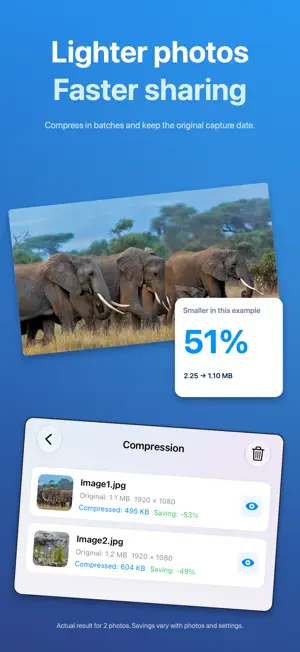
PhotoSwift is a batch image toolbox for iPhone and iPad, with support for turning video clips into GIFs. Compress images, import HEIC, JPEG, PNG, or TIFF and export converted files as JPEG, PNG, GIF, or TIFF, resize photos, create PDFs, add watermarks and frames, and build collages—all without uploading your media for processing. In supported image workflows, PhotoSwift preserves the original capture date so processed photos stay in the right order. Keeping location metadata is optional and off by default. Key Features: • Image Compression: Quickly reduce file size for easy sharing and storage • Format Conversion: Import HEIC, JPEG, PNG, or TIFF and export as JPEG, PNG, GIF, or TIFF • Resize: Batch modify image dimensions and aspect ratios • Crop: Crop images by common ratios or custom areas • Rotate: Quickly adjust image orientation • Image Stitching: Stitch multiple images horizontally or vertically • Photo Collage: Combine multiple photos into beautiful collages • Add Watermark: Quickly add text watermarks to protect your work • Filter Effects: Apply various filter styles to images • GIF Maker: Create animated GIFs from multiple images • Video to GIF: Trim a video clip and export it as an animated GIF • Image to PDF: Convert images into PDF documents • PDF to Image: Export PDF pages as images • ID Photo Maker: Quickly create standard-size ID photos • QR Code Generator: Generate QR codes from text or links • EXIF Info: View and process image metadata • Batch Rename: Quickly organize image file names by rules • Image Split: Create grid splits like nine-grid effects • Mosaic: Quickly blur sensitive content in images • Batch Image Frame: Apply frames to multiple photos without cropping the originals Core Advantages: • Local Processing: No image upload is required for processing • Batch Workflows: Apply one setup to multiple images • Clean and Easy-to-Use Interface: Focused on core functions, simple to learn • Works Offline: No internet needed for image processing • Supports iPhone and iPad Ideal For: • Compressing and resizing images before sharing on social media • Organizing and converting image assets for office documents • Content creators adding watermarks to their work • Privacy-conscious users processing personal photos locally Subscription & Purchase: PhotoSwift offers monthly subscriptions, annual subscriptions, and a one-time purchase option. Specific pricing will be displayed on the App Store purchase page based on your country or region. Subscriptions renew automatically until canceled. You can manage or cancel your subscription in your App Store account settings. Cancellation takes effect at the end of the current billing period. Privacy Policy: https://www.byrobin.app/privacy/photoswift Terms of Use: https://www.byrobin.app/terms/photoswift
What’s new
Version 1.2.5 · Updated October 7, 2026
• More ways to convert motion: Turn a video into a Live Photo, a Live Photo into a GIF, or a GIF into a video. Preview the result before saving. • A clearer home: Find tools in Frequent, Create, and More groups, with modern and classic layouts available. • Settings in groups: Switch between grouped settings for PDF, watermarks, and borders. Improved capture-date and location preservation in supported exports, plus file-size reporting. Processing stays on your device.
App privacy
The developer, Wuhan Jiange Technology Co., Ltd., reported these privacy practices to Apple.
Data Not Collected
The developer does not collect any data from this app.
Alternatives to PhotoSwift: Photo Compressor
Looking for apps like PhotoSwift: Photo Compressor? Here are 6 similar apps on the App Store. The highest rated is PicSeek: AI Photo Search (5.0/5), and all 6 are free to download.
-
 PicSeek: AI Photo Search
5.0
-
 MP3 Converter: Ringtone Maker+
5.0
-
 PDF Fox
1.0
-
 Smart Object Eraser AI Pro
3.4
-
 Smart Geo Position Finder
5.0
-
 Unrar - ZIP & Rar Extractor
4.5
| App | Rating | Price | Last updated | Compare |
|---|---|---|---|---|
| PhotoSwift: Photo Compressor | 5.0 / 5 (4 ratings) | Free | October 7, 2026 | |
| PicSeek: AI Photo Search | 5.0 / 5 (2) | Free | Sep 11, 2026 | Compare |
| MP3 Converter: Ringtone Maker+ | 5.0 / 5 (2) | Free | Jan 5, 2026 | Compare |
| PDF Fox | 1.0 / 5 (1) | Free | Feb 12, 2026 | Compare |
| Smart Object Eraser AI Pro | 3.4 / 5 (8) | Free | Dec 19, 2025 | Compare |
| Smart Geo Position Finder | 5.0 / 5 (2) | Free | Dec 19, 2025 | Compare |
| Unrar - ZIP & Rar Extractor | 4.5 / 5 (4) | Free | Dec 4, 2025 | Compare |