

Screen Time Learning Challenge
Domenic Talese Education iPhoneiPadiPod touch
Screen Time Learning Challenge is a free Education app for iPhone and iPad by Domenic Talese. Rated 5.0/5 from 3 ratings. Requires iOS 18.6.
- Rating
- 5.0
- 3 ratings
- Price
- Free
- on the App Store
- Size
- 498 MB
- Age 4+
- Updated
- Sep 25
- 2026 · v7.0
Screenshots

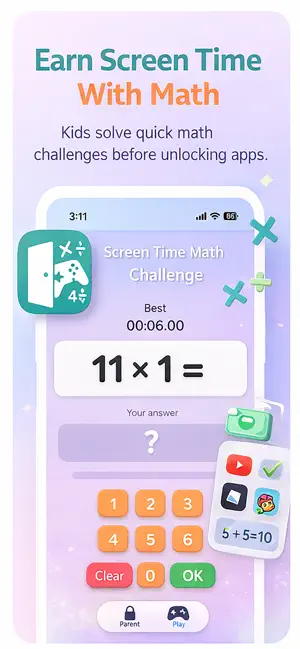


About Screen Time Learning Challenge
Screen Time Learning Challenge Turn screen time into learning time. Screen Time Learning Challenge lets parents choose which apps and categories to limit, then gives kids a simple way to earn access by completing math or spelling practice. Parents choose the learning activity, difficulty, number of correct answers, schedules, and apps to protect. Kids complete their challenge, make progress toward their goal, and unlock their apps when they finish. Math, Spelling, or Both Choose the type of learning that works best for your child. Math includes: Addition Subtraction Multiplication Division Mixed operations Facts through 12 Customizable challenge lengths Spelling lets parents create custom word lists using the exact words their child is learning. Spelling includes: Up to 50 custom spelling words Typed answers Word replay Built-in Natural Voice Multiple Natural Voice options Optional Apple Voice Adjustable challenge length Parents can choose math, spelling, or a combination of both. Natural Voice for Spelling Spelling practice includes Natural Voice for clearer, more natural-sounding word playback. Kids can hear each spelling word, replay it when needed, and practice with a voice designed to make listening and learning more comfortable. Control Which Apps Unlock Parents select individual apps or entire categories such as games, social media, and video. Once a learning challenge is completed, protected apps can unlock according to the rules you choose. Flexible Screen Time Controls Manual Shield Lock selected apps whenever you choose. Bedtime Create a strict bedtime schedule where protected apps remain unavailable even if a learning challenge is completed. Homework / Focus Time Create protected study periods where distracting apps stay locked. Re-Lock Schedules Automatically require another learning challenge after a selected amount of time. Parent Controls Parents can manage: Math, spelling, or both Math operations and difficulty Number of correct answers required Custom spelling lists Natural Voice selection Apps and categories to protect Bedtime schedules Homework / Focus schedules Re-Lock timing Device protection settings A secure Parent PIN helps prevent children from changing settings. Remote Management Premium Remote Management lets a parent configure a child’s settings from another device. Supported settings include: Learning activity Challenge length Math settings Spelling words Schedules Protected apps and categories Device Controls Manual Shield Device Controls Quick access to commonly used Screen Time protections helps parents manage settings such as: App installation App deletion In-app purchases Account changes Passcode changes Explicit content Kid-Friendly Experience Designed to keep practice simple and encouraging: Clear progress toward the unlock goal Custom math keypad Keyboard-friendly spelling input Optional sound effects Streak celebrations Positive feedback Completion celebrations Saved math best times Guided Parent Setup A step-by-step setup process helps parents create a PIN, authorize Screen Time, choose protected apps, select learning activities, configure schedules, and test that app locking and unlocking works. Subscription A subscription provides access to the complete Screen Time Learning Challenge experience. Eligible new subscribers may receive an introductory free trial through the App Store. Trial availability and length are shown before purchase. Subscriptions are managed through your Apple ID and can be canceled through Apple Subscriptions. Requirements Works on iPhone and iPad Requires iOS 18 or later Apple Screen Time authorization is required Parental setup is required Privacy Policy: https://screentimelearning.app/privacy-policy Terms of Use (EULA): https://www.apple.com/legal/internet-services/itunes/dev/stdeula
What’s new
Version 7.0 · Updated September 25, 2026
What’s New in Version 7.6 Added Natural Voice for clearer, more natural-sounding spelling word playback Added multiple Natural Voice options for spelling practice Improved the new-parent setup and onboarding experience Refreshed the launch and Parent Access screens Increased custom spelling lists to support up to 50 words Improved setup reliability and overall app stability Additional bug fixes and performance improvements
App privacy
The developer, Domenic Talese, reported these privacy practices to Apple.
Data Not Collected
The developer does not collect any data from this app.
Alternatives to Screen Time Learning Challenge
Looking for apps like Screen Time Learning Challenge? Here are 6 similar apps on the App Store. The highest rated is Matharoo: Math learning fun (5.0/5), and all 6 are free to download.
-
 Spell Ninja - AI Spell Coach
4.2
-
 Matharoo: Math learning fun
5.0
-
 Learn to Read - Sweet Phonics
4.1
-
 Gakku: AI Learning Coach
4.5
-
 Easyspell: Kids Spelling
3.8
-
 YOMU - Family Reading Habits
4.7
| App | Rating | Price | Last updated | Compare |
|---|---|---|---|---|
| Screen Time Learning Challenge | 5.0 / 5 (3 ratings) | Free | September 25, 2026 | |
| Spell Ninja - AI Spell Coach | 4.2 / 5 (34) | Free | Jun 7, 2026 | Compare |
| Matharoo: Math learning fun | 5.0 / 5 (1) | Free | Sep 10, 2026 | Compare |
| Learn to Read - Sweet Phonics | 4.1 / 5 (19) | Free | Oct 15, 2026 | Compare |
| Gakku: AI Learning Coach | 4.5 / 5 (37) | Free | Oct 15, 2026 | Compare |
| Easyspell: Kids Spelling | 3.8 / 5 (11) | Free | Oct 16, 2026 | Compare |
| YOMU - Family Reading Habits | 4.7 / 5 (101) | Free | Aug 5, 2026 | Compare |