

Handwriting to Text Scan
Mukesh Yadav Productivity iPhoneiPadiPod touch
Handwriting to Text Scan is a free Productivity app for iPhone and iPad by Mukesh Yadav. Requires iOS 13.0. Updated September 22, 2026.
- Price
- Free
- on the App Store
- Size
- 23 MB
- Age 9+
- Updated
- Sep 22
- 2026 · v1.1
Screenshots


About Handwriting to Text Scan
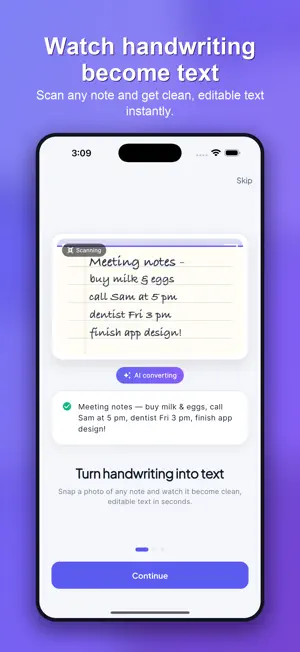
Transform handwritten notes into editable digital text with Hand to Text — a powerful handwriting to text OCR app designed for fast, accurate, and effortless note digitization. Hand to Text helps you scan handwriting, cursive writing, and printed notes and instantly convert them into searchable, editable text. Whether you are a student, professional, or writer, this handwriting recognition app saves time and boosts productivity. KEY FEATURES Handwriting to Text OCR Convert handwritten notes into digital text using advanced AI-powered handwriting recognition. Supports cursive and print handwriting and adapts to different writing styles. Scan Handwritten Notes Capture handwritten text using your camera or import images from your photo library. Get clean digital text from notebooks, letters, whiteboards, and documents. Fast and Accurate Conversion Process handwriting in seconds with optimized text recognition. Designed for reliable results even with messy or uneven handwriting. Copy, Share, and Export Copy recognized text instantly, share it with any app, or export it for further editing and storage. Keep all your scans organized in one place. Offline-Friendly Workflow Capture images anytime and manage your scanned text easily, even while on the go. Clean and Simple Design Enjoy a distraction-free interface built for speed and ease of use. No learning curve — just scan and convert. PRIVACY FIRST Your privacy matters. Hand to Text does not track users or collect personal data. All scans are handled securely and responsibly. PERFECT FOR Students converting handwritten notes into digital study material Professionals digitizing meeting notes and documents Writers preserving handwritten drafts and journals Anyone who wants to convert handwriting to text quickly HOW IT WORKS 1. Open the app 2. Capture handwritten text or choose an image 3. Scan and convert handwriting to text 4. Copy, share, or save your results WHY HAND TO TEXT Unlike generic OCR scanner apps, Hand to Text is optimized specifically for handwriting recognition. It understands cursive writing, varied handwriting styles, and real-world notes that traditional scanners struggle with. Download Hand to Text today and turn your handwritten notes into digital text with ease. Terms of Use (EULA): https://www.apple.com/legal/internet-services/itunes/dev/stdeula/ Privacy Policy: https://sites.google.com/view/handwriting-to-text-scan-priva/home
What’s new
Version 1.1 · Updated September 22, 2026
What's new in 1.1: • Brand-new, modern design with a clean light and dark theme • Redesigned onboarding that shows your handwriting turning into text • Faster, more accurate handwriting and cursive recognition • Multi-language recognition for 50+ languages • Batch scan — convert multiple pages at once • Pro plans: Monthly and Lifetime, with a generous free allowance to start • Numerous performance improvements and bug fixes Thanks for using Hand to Text!
App privacy
The developer, Mukesh Yadav, reported these privacy practices to Apple.
Data Not Collected
The developer does not collect any data from this app.
Alternatives to Handwriting to Text Scan
Looking for apps like Handwriting to Text Scan? Here are 6 similar apps on the App Store. The highest rated is Handwriting to text: OCR Scan (5.0/5), and all 6 are free to download.
-
 Handwriting to Text Scanner
-
 Handwriting to text: OCR Scan
5.0
-
 Unscribble Handwriting to Text
-
 Handwriting Scan - WriteScan
5.0
-
 AI Handwriting to Text Maker
-
 Hisab Ethiopia - Tax, VAT
| App | Rating | Price | Last updated | Compare |
|---|---|---|---|---|
| Handwriting to Text Scan | – | Free | September 22, 2026 | |
| Handwriting to Text Scanner | – | Free | Oct 2, 2026 | Compare |
| Handwriting to text: OCR Scan | 5.0 / 5 (1) | Free | Sep 8, 2026 | Compare |
| Unscribble Handwriting to Text | – | Free | Aug 6, 2026 | Compare |
| Handwriting Scan - WriteScan | 5.0 / 5 (1) | Free | Oct 6, 2026 | Compare |
| AI Handwriting to Text Maker | – | Free | Jul 13, 2026 | Compare |
| Hisab Ethiopia - Tax, VAT | – | Free | May 5, 2026 | Compare |