

Unzip Master: RAR 7Z Extractor
shellmob Productivity iPhoneiPadiPod touch
Unzip Master: RAR 7Z Extractor is a free Productivity app for iPhone and iPad by shellmob. Requires iOS 14.0. Updated May 27, 2026.
- Price
- Free
- on the App Store
- Size
- 204 MB
- Age 17+
- Updated
- May 27
- 2026 · v1.4.0
Screenshots


About Unzip Master: RAR 7Z Extractor
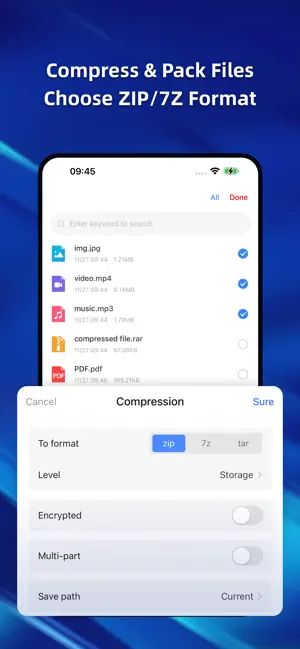
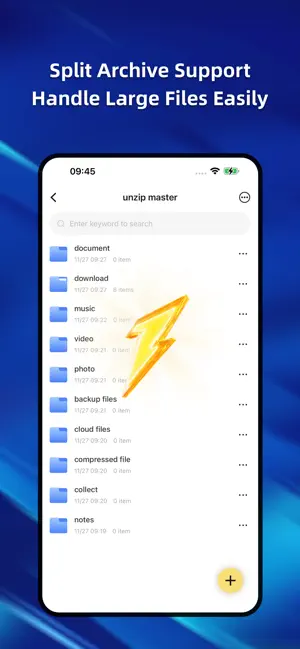
Unzip & ZIP Master brings a refined, desktop-class file experience to iPhone and iPad. Open archives instantly, create ZIP files with ease, and browse your storage with clarity and control. Instant Extraction -Extract ZIP, RAR, 7Z, TAR, ISO, and more with a single tap. -Preview photos, videos, audio, and documents without leaving the app. -Encrypted archives are supported with smooth, secure password entry. Thoughtful Compression Tools -Create ZIP files in seconds. -Choose compression levels, enable encryption, or split archives when needed. -Share files across devices and platforms with confidence. A File Manager Built for iOS -Clean, precise, and powerful. -Move, copy, rename, delete, and organize with familiar gestures. -Multi-tab browsing and structured views give you a clear picture of all your files. Cloud Drives, Seamlessly Connected -Access your content from Baidu Netdisk, Alibaba Cloud Drive, Dropbox, Google Drive, OneDrive, and the Files app. -Switch between local and cloud storage as naturally as turning a page. Wireless Transfer. Built-In Browser. -Send files between your phone and computer over Wi-Fi—no cables required. -Download documents and media through the integrated browser with stable, resumable transfers. Privacy, by Design -Your files stay on your device. -No uploads. No tracking. No compromises. -Secure sensitive content with Face ID or Touch ID. A More Capable Way to Work With Files -From documents to archives, from cloud drives to local folders, -Unzip & ZIP Master gives you a fast, elegant way to manage everything in one place. -Download now and experience a lighter, smarter approach to file handling. [Membership Subscription Instructions] Payment: Payment will be charged to your iTunes account upon confirmation of purchase. Renewal: Your Apple iTunes account will be charged within 24 hours prior to the expiration date. After successful payment, the subscription period will be extended by one cycle. Cancellation: You can manage your automatic subscription service by going to your Apple phone's "Settings" --> "iTunes Store & App Store" --> tap "Apple ID," selecting "View Apple ID," entering the "Account Settings" page, and tapping "Subscriptions." To cancel, simply cancel 24 hours before the end of each billing cycle. No further charges will be incurred within 24 hours prior to the expiration date. Privacy Policy: http://www.shellmob.com/yinsi/yasuo/yasuoyinsiiosen.html User Terms: http://www.shellmob.com/yinsi/yasuo/yasuoyonghuiosen.html
What’s new
Version 1.4.0 · Updated May 27, 2026
The following updates were included in this version: 1. iPad compatibility; 2. Optimized multi-part decompression and large file decompression; 3. Resolved known issues and improved user experience.
App privacy
The developer, shellmob, reported these privacy practices to Apple.
Data Not Collected
The developer does not collect any data from this app.
Alternatives to Unzip Master: RAR 7Z Extractor
Looking for apps like Unzip Master: RAR 7Z Extractor? Here are 6 similar apps on the App Store. The highest rated is Unzip – ZIP RAR 7Z Extractor (4.8/5), and all 6 are free to download.
-
 Zip File Extractor: RAR Opener
3.0
-
 Zip, RAR, 7z File Extractor
4.7
-
 zip unzip 7z rar dzip extract
3.9
-
 RAR Opener *
4.5
-
 Unzip – ZIP RAR 7Z Extractor
4.8
-
 ES File Explorer
4.6
| App | Rating | Price | Last updated | Compare |
|---|---|---|---|---|
| Unzip Master: RAR 7Z Extractor | – | Free | May 27, 2026 | |
| Zip File Extractor: RAR Opener | 3.0 / 5 (2) | Free | Feb 21, 2026 | Compare |
| Zip, RAR, 7z File Extractor | 4.7 / 5 (187) | Free | Oct 14, 2026 | Compare |
| zip unzip 7z rar dzip extract | 3.9 / 5 (24) | Free | Oct 9, 2026 | Compare |
| RAR Opener * | 4.5 / 5 (392) | Free | Aug 26, 2026 | Compare |
| Unzip – ZIP RAR 7Z Extractor | 4.8 / 5 (4,908) | Free | Oct 8, 2026 | Compare |
| ES File Explorer | 4.6 / 5 (15,327) | Free | Mar 24, 2026 | Compare |