

OmniTAK
Grant J Wylie Utilities iPhoneiPadiPod touch
OmniTAK is a free Utilities app for iPhone and iPad by Grant J Wylie. Rated 4.0/5 from 6 ratings. Requires iOS 15.0. Updated October 5, 2026.
- Rating
- 4.0
- 6 ratings
- Price
- Free
- on the App Store
- Size
- 138 MB
- Age 4+
- Updated
- Oct 5
- 2026 · v2.44.0
Screenshots



About OmniTAK
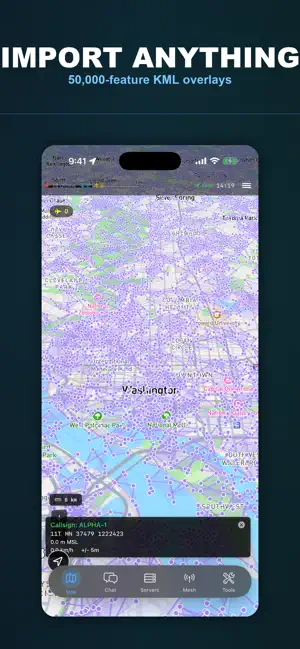
OmniTAK — ATAK-Style Tactical Awareness for iOS OmniTAK brings the power and familiarity of ATAK to your iPhone and iPad. Built with a high-performance Rust core and native iOS interface, OmniTAK delivers real-time situational awareness with the tactical UI that operators know and trust. Whether you're coordinating search and rescue, managing field teams, supporting emergency response, or training for tactical scenarios, OmniTAK provides blue force tracking, collaborative mapping, and secure communications—without being locked into a single server or network. ATAK-FAMILIAR INTERFACE OmniTAK mirrors the ATAK experience that millions of operators have trained on. The professional tactical theme, navigation drawer, bottom toolbar, and status bar feel immediately familiar. If you know ATAK, you know OmniTAK. Satellite, hybrid, and standard map views powered by native MapKit deliver smooth performance. Color-coded CoT markers display friendly, hostile, unknown, and neutral units in real-time. MULTI-SERVER ARCHITECTURE OmniTAK was built for multi-agency coordination and federated networks. Configure unlimited TAK server connections. Monitor connection status in real-time. Bridge jurisdictions during disaster response, maintain redundant connectivity, or aggregate feeds from multiple command posts—OmniTAK connects you to every network that matters. Supports TCP and UDP with optional TLS encryption. SECURE CERTIFICATE MANAGEMENT OmniTAK stores all client certificates in the iOS Keychain with hardware-backed protection. Import from .pem, .crt, .key, .p12, and .pfx files, or enroll directly from your TAK server using username/password authentication. View certificates with validity status and expiration tracking. Full mutual TLS authentication keeps your tactical data encrypted end-to-end. TACTICAL TOOLS Draw circles and polygons to mark areas of interest, search zones, or operational boundaries. All drawings persist across sessions with high-visibility tactical colors. Broadcast your position with configurable metadata. Filter units by affiliation for cleaner operational pictures. Navigate with bearing and distance tools built for tactical operations. EXTENSIBLE PLUGIN SYSTEM OmniTAK features a secure plugin architecture for extending functionality. Plugins run in sandboxed contexts with permission-based API access. Create custom CoT handlers, map overlays, UI components, and network integrations. INTEROPERABILITY Works with TAK Server, FreeTAKServer, Taky, OpenTAKServer, and any CoT-compatible infrastructure. Full interoperability with ATAK, WinTAK, iTAK, and WebTAK clients. FEATURES • ATAK-style tactical interface • Multi-server management with one-tap switching • Real-time CoT markers with unit filtering • GPS tracking with accuracy indicators • TCP/UDP with optional TLS • iOS Keychain certificate storage • Certificate enrollment and file import • Circle and polygon drawing tools • Persistent configurations • Haptic feedback and dark mode • Portrait and landscape support • Secure plugin system OmniTAK is an independent project not affiliated with the TAK Product Center, Department of Defense, or Department of Homeland Security.
Ratings & reviews
4.0
6 ratings
What’s new
Version 2.44.0 · Updated October 5, 2026
Offline maps, the marker list and Meshtastic, from field reports. Maps • MBTiles overlays now draw after import: the map switches to 2D and frames the tiles • An overlay whose file has gone missing stays in the list, is marked, and can be deleted • Files that hold vector tiles are refused at import with a clear message, not shown as a blank layer Markers • In the marker list one tap does one thing. Tapping broadcast could delete the marker before • Swipe a marker to delete it, with a confirmation Mesh and Meshtastic • The radio now tells the app when data is waiting, so mesh traffic no longer depends on a once a second poll and keeps arriving while OmniTAK is in the background
App privacy
The developer, Grant J Wylie, reported these privacy practices to Apple.
Data Not Collected
The developer does not collect any data from this app.
Alternatives to OmniTAK
Looking for apps like OmniTAK? Here are 6 similar apps on the App Store. The highest rated is Handi-Talky Commander (5.0/5), and all 6 are free to download.


| App | Rating | Price | Last updated | Compare |
|---|---|---|---|---|
| OmniTAK | 4.0 / 5 (6 ratings) | Free | October 5, 2026 | |
| goTenna Pro | 3.2 / 5 (26) | Free | Oct 16, 2025 | Compare |
| Handi-Talky Commander | 5.0 / 5 (5) | Free | Oct 14, 2026 | Compare |
| Beartooth MKII | 3.0 / 5 (2) | Free | Apr 18, 2026 | Compare |
| Vantij | 4.2 / 5 (5) | Free | Dec 17, 2025 | Compare |
| MeshScope | 3.7 / 5 (3) | Free | Jul 8, 2026 | Compare |
| PommeCore | 4.4 / 5 (5) | Free | Oct 4, 2026 | Compare |
Compare OmniTAK with the top alternatives: ratings, updates, ASO score and keyword gaps →