

PDF Maker : Photos to PDF App
Pratik Kadam Productivity iPhoneiPadiPod touch
PDF Maker : Photos to PDF App is a free Productivity app for iPhone and iPad by Pratik Kadam. Requires iOS 16.1. Updated November 29, 2025.
- Price
- Free
- on the App Store
- Size
- 5 MB
- Age 4+
- Updated
- Nov 29
- 2025 · v1.2
Screenshots


About PDF Maker : Photos to PDF App
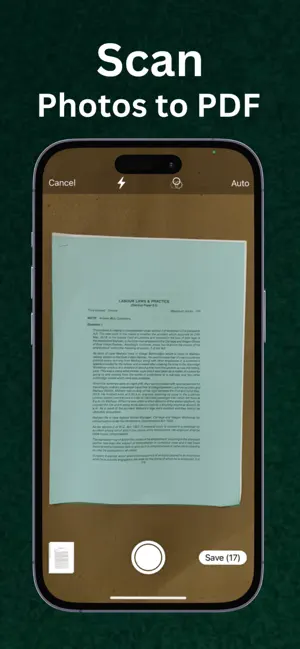
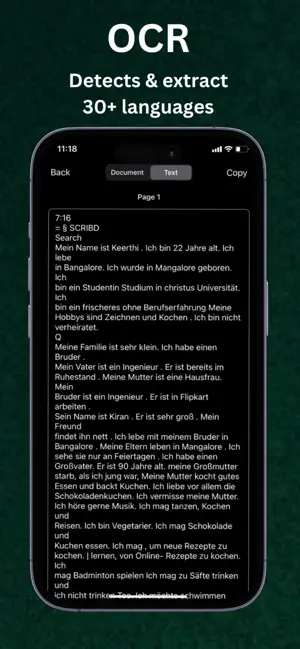
PDF Maker - PDF Scanner, Converter & Editor PDF Maker is a powerful PDF scanner and doc scanner app for iPhone that lets you scan, convert, edit, and share documents anytime, anywhere. With our all-in-one **PDF converter and editor, you can easily transform your paper documents, notes, receipts, or images into high-quality PDF files — fast, free, and secure. Whether you need a **document scanner, PDF reader, or PDF editor, PDF Maker is your go-to tool for creating professional digital files right from your iPhone. Key Features: Smart PDF Scanner & Doc Scanner : * Instantly scan any document, photo, ID card, receipt, or whiteboard. * Convert scans to PDF with crystal-clear quality. * Auto-detect borders, adjust brightness, and apply filters for perfect clarity. * Save or share as PDF or image formats. PDF Converter & File Tools : * Convert images to PDF and combine multiple scans into a single file. * Rearrange, rotate, crop, or delete pages with ease. * Merge PDFs or split large PDF files quickly. * Add or remove watermarks and backgrounds. PDF Editor & Annotation Tools : * Add text, notes, and highlights to any PDF. * Draw or annotate directly on your scanned pages. * Customize fonts, colors, and sizes for a professional finish. * Add custom watermarks and filters to enhance your files. Add Digital Signature : * Sign documents digitally right inside the app. * Draw or type your signature and adjust size, color, and rotation. * Save and reuse your e-signature for contracts, forms, and agreements. OCR Text Recognition : * Extract text from images and scanned PDFs using OCR (Optical Character Recognition). * Edit, copy, or share extracted text instantly. * Perfect for digitizing printed documents and making them searchable. Organize & Manage Files: * Rename, sort, and categorize your documents into custom folders. * Use the built-in search function to find files by name or keyword instantly. * Create subfolders to manage work, personal, and educational documents. Share & Backup Anywhere: * Save or share your PDFs via Dropbox, Google Drive, OneDrive, Email, or Airdrop. * Print directly using any WiFi printer. * Export scans to your Camera Roll or Files app. * Share to social media or messaging apps in one tap. Why Choose PDF Maker? * All-in-one PDF scanner, converter, and editor for iPhone. * Free to use basic tools — upgrade for pro-level features. * Create, edit, read, and share PDFs anytime you need. * Perfect for students, business professionals, and anyone who works with documents. Privacy Policy: - https://pdmakerconverterapp.blogspot.com/2025/11/pdf-maker-privacy-policy.html Terms of Use: - https://pdmakerconverterapp.blogspot.com/2025/11/pdf-maker-terms-of-use.html
What’s new
Version 1.2 · Updated November 29, 2025
Thanks for choosing PDF Maker App. This update contains : - Minor bug fixes - UI improvements.
App privacy
The developer, Pratik Kadam, reported these privacy practices to Apple.
Data Linked to You
The following data, which may be collected and linked to your identity, may be used for the following purposes:
- Identifiers: Device ID
- Usage Data: Advertising Data
Used for: Third-Party Advertising, App Functionality
Alternatives to PDF Maker : Photos to PDF App
Looking for apps like PDF Maker : Photos to PDF App? Here are 6 similar apps on the App Store.
-
 PDF Maker - Img to pdf covert
-
 MemflixAI
-
 EasyScan – Fast PDF Maker
-
 PDF Photo: PDF to Word Maker
-
 Global Resume Builder CV Maker
-
 Project Planer
| App | Rating | Price | Last updated | Compare |
|---|---|---|---|---|
| PDF Maker : Photos to PDF App | – | Free | November 29, 2025 | |
| PDF Maker - Img to pdf covert | – | Free | Jul 31, 2026 | Compare |
| MemflixAI | – | Free | Oct 29, 2025 | Compare |
| EasyScan – Fast PDF Maker | – | 1.99 USD | Nov 25, 2025 | Compare |
| PDF Photo: PDF to Word Maker | – | Free | Apr 24, 2026 | Compare |
| Global Resume Builder CV Maker | – | Free | Jan 7, 2026 | Compare |
| Project Planer | – | Free | Jan 18, 2026 | Compare |