

Droply - Fast File Transfer
Jay Shiyani Navigation iPhoneiPadiPod touch
Droply - Fast File Transfer is a free Navigation app for iPhone and iPad by Jay Shiyani. Rated 1.0/5 from 1 ratings. Requires iOS 15.0.
- Rating
- 1.0
- 1 ratings
- Price
- Free
- on the App Store
- Size
- 52 MB
- Age 4+
- Updated
- Oct 16
- 2026 · v2.0
Screenshots



About Droply - Fast File Transfer
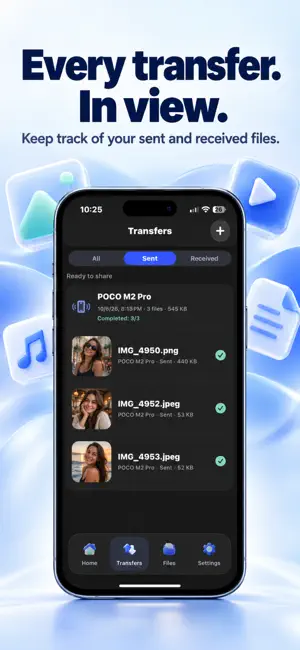
Share your files. Keep things simple. Droply makes it easy to transfer photos, videos, documents and more between your iPhone and iPad. Choose your files, connect your devices and start sharing—all in a few taps. No cables. No cloud uploads required. SHARE YOUR EVERYDAY FILES Send photos, videos, documents, contacts and supported music files. Select multiple items and review everything before sending. CONNECT WITH EASE Find devices running Droply on the same Wi-Fi network, scan a device QR code or use nearby sharing between your iPhone and iPad. TRANSFER WITHOUT INTERNET Share files stored on your device over a local connection without an internet connection. Wi-Fi sharing requires both devices to be on the same network. BRING YOUR COMPUTER ALONG Start browser sharing and open the local link on your computer to download selected files or upload files to your iPhone or iPad over the same Wi-Fi. FOLLOW EVERY TRANSFER See transfer progress, check your history and access received files to open or share again. MADE FOR EVERYDAY SHARING Send holiday photos to family, share documents with friends or move videos between your devices. Droply keeps the process straightforward. HOW IT WORKS 1. Choose the files you want to share. 2. Connect your devices and accept the sharing request. 3. Keep Droply open until the transfer finishes. Download Droply and make your next file transfer easier. Some files may need to download from iCloud before sharing. Protected music files cannot be transferred. FEEDBACK & SUPPORT We’d love to hear from you. Email: [email protected]
What’s new
Version 2.0 · Updated October 16, 2026
• Refreshed file selection and sharing interface. • Updated device discovery and QR connection screens. • Organized transfer progress and history. • Browser sharing over the same Wi-Fi network.
App privacy
The developer, Jay Shiyani, reported these privacy practices to Apple.
Data Used to Track You
The following data may be used to track you across apps and websites owned by other companies:
- Identifiers: Device ID
- Usage Data: Advertising Data
Data Not Linked to You
The following data, which may be collected but is not linked to your identity, may be used for the following purposes:
- Identifiers: Device ID
- Usage Data: Advertising Data
Used for: Third-Party Advertising
Alternatives to Droply - Fast File Transfer
Looking for apps like Droply - Fast File Transfer? Here are 6 similar apps on the App Store. The highest rated is Currency – Minimal Converter (4.7/5), and all 6 are free to download.
-
 Ziggo App
-
 CTG AAR E-Hail
3.0
CTG AAR E-Hail
3.0
-
 3D Earth Map : Satellite View
4.6
3D Earth Map : Satellite View
4.6
-
 3D Street View: Live Earth Map
-
 DGFERRY-Agent Booking Platform
-
 Currency – Minimal Converter
4.7
Currency – Minimal Converter
4.7
| App | Rating | Price | Last updated | Compare |
|---|---|---|---|---|
| Droply - Fast File Transfer | 1.0 / 5 (1 rating) | Free | October 16, 2026 | |
| Ziggo App | – | Free | Oct 20, 2026 | Compare |
| CTG AAR E-Hail | 3.0 / 5 (2) | Free | Jun 4, 2024 | Compare |
| 3D Earth Map : Satellite View | 4.6 / 5 (9) | Free | Oct 7, 2026 | Compare |
| 3D Street View: Live Earth Map | – | Free | Oct 13, 2026 | Compare |
| DGFERRY-Agent Booking Platform | – | Free | May 14, 2026 | Compare |
| Currency – Minimal Converter | 4.7 / 5 (276) | Free | Oct 1, 2026 | Compare |