

Web Canvas: Spatial Browser
Curious Cat Consulting, LLC Productivity iPhoneiPadiPod touch
Web Canvas: Spatial Browser is a free Productivity app for iPhone and iPad by Curious Cat Consulting, LLC. Rated 5.0/5 from 4 ratings. Requires iOS 16.4.
- Rating
- 5.0
- 4 ratings
- Price
- Free
- on the App Store
- Size
- 63 MB
- Age 17+
- Updated
- Sep 7
- 2026 · v1.0.4
Screenshots


About Web Canvas: Spatial Browser
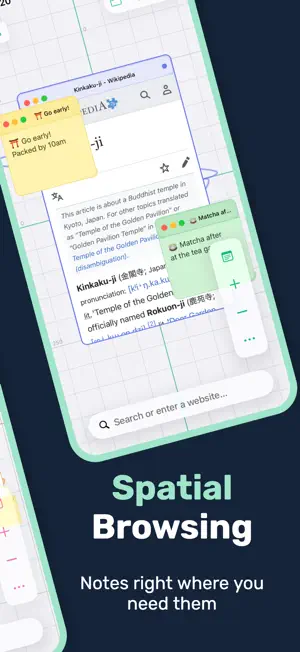
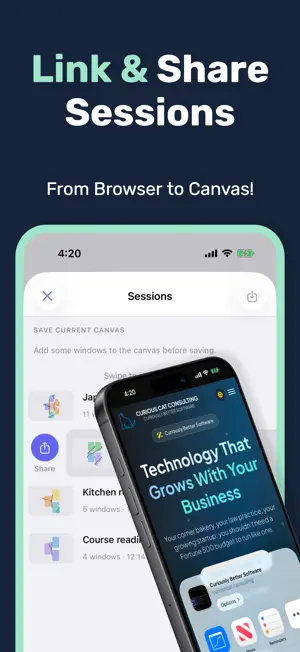
Drowning in browser tabs? Web Canvas gives the web room to breathe. Instead of juggling tabs, create an infinite canvas where websites, images, and your own notes live together in your own visual workspace; pan, zoom, and connect everything you're researching in one place. WORKING CANVAS • Pan and zoom freely across your workspace • See all your research and browsing at a glance • Navigate spatially instead of linearly through tabs • Turn on a canvas grid to stay oriented as you pan and zoom • Recenter with one tap to snap back to where you started • Sessions: name, save, and reload your canvases; return to your research anytime • Share a saved session link; tap it to reopen that canvas on your device VISUAL BROWSING • Add multiple browser windows to your canvas • Images show in your workspace • Sticky notes: jot a thought right next to the site it belongs to • Connect any two items with a line to map how your research fits together • Color-code anything: give windows a color to group by theme, priority, or status • Arrange everything exactly how you think DESIGNED FOR RESEARCH & EXPLORATION Whether you're researching a project, planning a trip, or diving deep into a topic, Web Canvas lets you organize the web your way. Keep related websites close together, leave yourself a note about why something matters, create visual clusters of information, and never lose track of that one tab again. NATURAL GESTURES • Drag windows anywhere on the canvas • Pinch to zoom in and out • Pan with one finger to navigate and the canvas glides to a smooth stop • Two-finger trackpad swipe to pan on iPad • Full-screen mode for focused reading • Read Mode / Lock: follow links in place without new windows POWERFUL FEATURES • Share a URL from another app and open it on your canvas in one step • Full web browsing and your favorite search engines • Search history that remembers your journey • Dark mode support • Optimized for both iPhone and iPad • Smooth 60fps animations MAKE IT YOURS • Pin and reorder the toolbar buttons you use most • Choose your primary color and theme • Pick your default search engine • Start of RTL handling and translations Perfect for: • Research projects and deep dives • Visual learners and thinkers • Anyone drowning in browser tabs • Students organizing study materials • Designers collecting inspiration • Writers gathering references Your research deserves more than a list of tabs. Give it space to breathe.
What’s new
Version 1.0.4 · Updated September 7, 2026
Your canvas can hold your own thoughts now, and show how they connect: • Sticky notes: jot a thought right next to the site it belongs to. • Connections: link any two items to map how your research fits together. • Color coding: give any window a color to group your canvas by theme, priority, or status. • New window button: a plus at the bottom of the canvas, so adding a window is within thumb's reach. Thanks for all the feedback! Keep it coming.
App privacy
The developer, Curious Cat Consulting, LLC, reported these privacy practices to Apple.
Data Not Collected
The developer does not collect any data from this app.
Alternatives to Web Canvas: Spatial Browser
Looking for apps like Web Canvas: Spatial Browser? Here are 6 similar apps on the App Store. The highest rated is PUB Reader for MS Publisher (5.0/5), and all 6 are free to download.
-
 DocuBox
-
 Hello-Mynah
-
 Sotto - Offline Auto Notetaker
-
 PUB Reader for MS Publisher
5.0
PUB Reader for MS Publisher
5.0
-
 Vizor – Web Sources
1.0
Vizor – Web Sources
1.0
-
 BetterHistory
5.0
BetterHistory
5.0
| App | Rating | Price | Last updated | Compare |
|---|---|---|---|---|
| Web Canvas: Spatial Browser | 5.0 / 5 (4 ratings) | Free | September 7, 2026 | |
| DocuBox | – | Free | May 28, 2026 | Compare |
| Hello-Mynah | – | Free | Aug 4, 2026 | Compare |
| Sotto - Offline Auto Notetaker | – | Free | Aug 24, 2026 | Compare |
| PUB Reader for MS Publisher | 5.0 / 5 (4) | Free | Sep 25, 2026 | Compare |
| Vizor – Web Sources | 1.0 / 5 (1) | Free | Apr 6, 2026 | Compare |
| BetterHistory | 5.0 / 5 (1) | Free | Oct 7, 2026 | Compare |