

Maintenance Schedule & Tracker
Gruffydd Johnston Productivity iPhoneiPadiPod touchMac
Maintenance Schedule & Tracker is a free Productivity app for iPhone and iPad by Gruffydd Johnston. Rated 3.0/5 from 2 ratings. Requires iOS 26.0.
- Rating
- 3.0
- 2 ratings
- Price
- Free
- on the App Store
- Size
- 19 MB
- Age 4+
- Updated
- Oct 15
- 2026 · v2.0.1
Screenshots



About Maintenance Schedule & Tracker
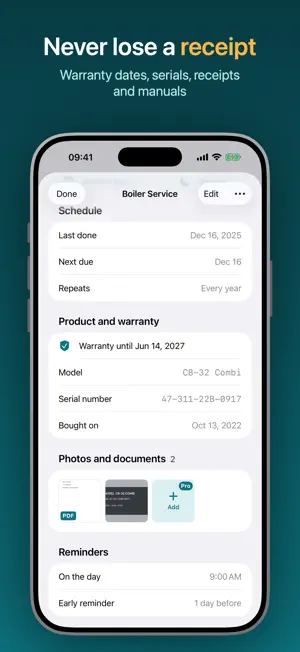
Know what needs doing, and when. Maintenance Schedule keeps track of everything that needs regular care: the HVAC filter, the car's oil change, the smoke alarm test, the gutters, the lawn, the dog's flea treatment. Each job gets a ring that fills as it comes due, so one look tells you what's overdue, what's due this week and what can wait. GET STARTED IN A MINUTE Pick what you look after (home, car, yard, pets, bike, health) and choose from ready-made schedules. Adjust how often, or when it was last done, and you're set. Or add anything else that repeats, every few days, weeks or months. ONE TAP TO MARK IT DONE Mark jobs done from the app, a notification, a Home Screen widget or Siri. The next due date works itself out, and if you tap by mistake, undo is right there. REMINDERS THAT FIT YOUR DAY Get a nudge a day or more before something is due, at the time you choose, with a follow-up if it slips. Snooze it to tomorrow or next week right from the notification. NEW: PRODUCT AND WARRANTY Keep the model, serial number, purchase date, store and warranty end for each appliance. You'll get a reminder a month before the warranty ends, in time for a repair or a claim. NEW: PHOTOS AND DOCUMENTS (PRO) Scan receipts and invoices, photograph the rating plate and keep the manual as a PDF, on the item and on each completion. Everything's at hand when the technician comes out or the shop asks. SEE WHAT'S COMING • Today: overdue, this week and later, with a summary ring • Calendar: every due date, including the repeats ahead • Insights: your on-time rate, streaks, a 12-month chart and a full history you can edit EVERYWHERE YOU ARE • Widgets for the Home Screen and Lock Screen, with a Done button • Control Center controls to add a job or see what's due • Siri and Shortcuts: "What's due in Maintenance?" • iPhone, iPad and Mac, kept in sync with iCloud • A menu bar list of what's due on Mac ORGANIZED YOUR WAY Categories with colors and symbols, tags, notes, archived items, search across everything, and CSV export. FREE AND PRO The free plan includes 2 active items with every feature except attachments. Maintenance Schedule Pro removes the limit and adds photos and documents. Pro is a monthly or yearly subscription with a free trial for new subscribers. Payment is charged to your Apple Account at confirmation and renews automatically unless canceled at least 24 hours before the end of the period. Manage or cancel in your App Store account settings. Terms of Use: https://www.apple.com/legal/internet-services/itunes/dev/stdeula/ Privacy Policy: https://maintentance-website.vercel.app/privacy
What’s new
Version 2.0.1 · Updated October 15, 2026
Fixes a crash when opening the Calendar on iPad.
App privacy
The developer, Gruffydd Johnston, reported these privacy practices to Apple.
Data Not Linked to You
The following data, which may be collected but is not linked to your identity, may be used for the following purposes:
- Usage Data: Product Interaction
Used for: Analytics
Alternatives to Maintenance Schedule & Tracker
Looking for apps like Maintenance Schedule & Tracker? Here are 6 similar apps on the App Store. The highest rated is Maintenance Grab Bag (5.0/5), and all 6 are free to download.
-
 FixNLog – Maintenance Manager
-
 Maintenance Grab Bag
5.0
Maintenance Grab Bag
5.0
-
 HomeKeep
-
 Progress - Productivity App
5.0
Progress - Productivity App
5.0
-
 Warmthly: Keep in Touch
-
 O Assessor
| App | Rating | Price | Last updated | Compare |
|---|---|---|---|---|
| Maintenance Schedule & Tracker | 3.0 / 5 (2 ratings) | Free | October 15, 2026 | |
| FixNLog – Maintenance Manager | – | Free | Nov 26, 2025 | Compare |
| Maintenance Grab Bag | 5.0 / 5 (2) | Free | Dec 13, 2023 | Compare |
| HomeKeep | – | Free | Oct 20, 2026 | Compare |
| Progress - Productivity App | 5.0 / 5 (1) | Free | Jul 16, 2026 | Compare |
| Warmthly: Keep in Touch | – | Free | Aug 7, 2026 | Compare |
| O Assessor | – | Free | Oct 21, 2026 | Compare |