

iTrain 6 remote
Berros Utilities iPhoneiPadiPod touch
iTrain 6 remote is a free Utilities app for iPhone and iPad by Berros. Requires iOS 15.6. Updated July 6, 2026.
- Price
- Free
- on the App Store
- Size
- 17 MB
- Age 4+
- Updated
- Jul 6
- 2026 · v6.0.1
Screenshots
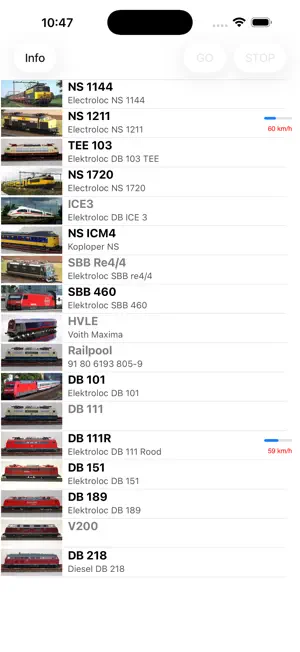

About iTrain 6 remote
The iTrain 6 remote is an App to control your model railroad trains. It connects as a client to the software iTrain 6 in Server mode and cannot be used on itself, but it is only a wireless remote control for this software. Before starting the App you have to configure the network settings in the Preferences of the device (so not in the App itself). You have to supply the name or IP address of the iTrain 6 Server. You can easily find the server address at the bottom of the main windows of the iTrain application. Just double-click on the icon before Clients. See the iTrain manual for more info. The buttons at the bottom on the left are for starting routes in Automatic and Semi-Automatic mode (green), Finishing the route (yellow) and Stopping the route (red). With the buttons at the bottom on the right side you can reserve the next block in the direction of the locomotive (+) or withdraw the reservation (-) when no route is active.
What’s new
Version 6.0.1 · Updated July 6, 2026
A few minor bug fixes and SVG images for the functions and some App icons.
App privacy
The developer, Berros, reported these privacy practices to Apple.
Data Not Collected
The developer does not collect any data from this app.
Alternatives to iTrain 6 remote
Looking for apps like iTrain 6 remote? Here are 6 similar apps on the App Store. The highest rated is ECoS Cab (4.0/5), and all 6 are free to download.


| App | Rating | Price | Last updated | Compare |
|---|---|---|---|---|
| iTrain 6 remote | – | Free | July 6, 2026 | |
| RocControl | – | Free | Oct 19, 2026 | Compare |
| ECoS Cab | 4.0 / 5 (5) | Free | Sep 28, 2026 | Compare |
| WiThrottle Cab | 1.0 / 5 (1) | Free | Sep 25, 2026 | Compare |
| DCC-EX Cab | 2.3 / 5 (6) | Free | May 4, 2026 | Compare |
| RailControl Pro | 3.3 / 5 (6) | Free | Oct 24, 2026 | Compare |
| DCC Commander | – | Free | Jul 31, 2026 | Compare |
Compare iTrain 6 remote with the top alternatives: ratings, updates, ASO score and keyword gaps →