

Usage for Claude
amir hayek Utilities iPhoneiPadiPod touchMacApple Watch
Usage for Claude is a free Utilities app for iPhone and iPad by amir hayek. Rated 4.2/5 from 5 ratings. Requires iOS 26.2. Updated September 18, 2026.
- Rating
- 4.2
- 5 ratings
- Price
- Free
- on the App Store
- Size
- 24 MB
- Age 4+
- Updated
- Sep 18
- 2026 · v3.4
Screenshots
About Usage for Claude
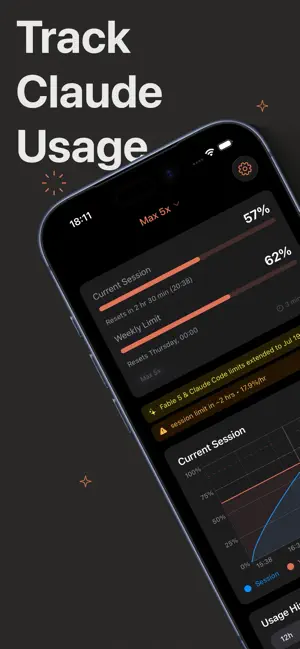
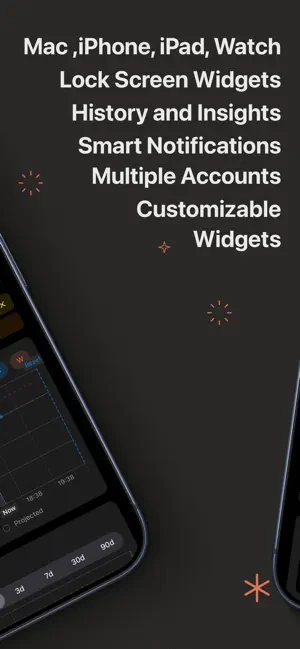
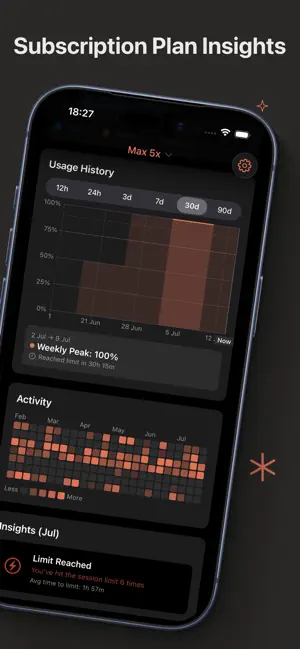
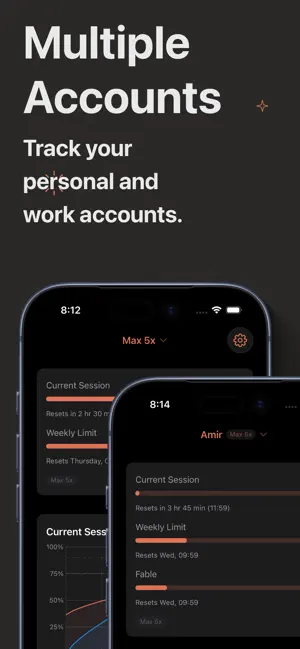
Usage for Claude is the iOS companion app for monitoring your Claude AI usage. See what you’ve used, spot trends over time, and stay aware of your limit. IMPORTANT: This app helps you monitor your Claude.ai usage limits. It requires you to sign in to your Claude account to fetch usage data. Independent app, not affiliated with Anthropic. FEATURES Current usage limits status. On the App, on Home Screen, Lock screen, and even Apple Watch. Real-Time Tracking Automatically refreshes your usage data so you always have the latest information. Smart refresh intervals adapt based on your activity. Full Dashboard A complete dashboard with live session charts, usage bars, and status banners — everything at a glance. Filter by 5 hours, 24 hours, 7 days, 30 days, or 90 days to understand your consumption patterns. Session History Browse your session history with an interactive bar chart. Filter by day or week to spot trends and understand how you use Claude over time. Activity Grid A GitHub-style contribution grid visualizes your daily usage patterns. Quickly identify your most active days and spot trends. Usage Insights Monthly insights with actionable metrics — averages, peaks, and patterns — presented in a fresh card design to help you optimize your workflow. Claude Alerts Get notified about off-peak hours, high-limit times, and credit offers from Claude so you never miss out. Alerts appear right in your menu bar and dashboard. Limit Notifications Receive notifications when approaching your session or weekly limits. Stay informed before you hit a wall in your important conversations. Claude Code Stats Optionally track your Claude Code CLI usage alongside your web usage for a complete picture of your Claude consumption. iOS Companion App Your usage history syncs automatically to iCloud. Download "Usage for Claude" on iOS to view your usage history on the go. Pull to refresh on iOS even triggers a fresh data fetch on your Mac. HOW IT WORKS 1. Launch the app and sign in to your Claude account 2. The app fetches your current usage from Claude 3. Usage data is saved locally and synced to iCloud 4. View your current usage anytime 5. Open the dashboard for detailed charts, insights, and alerts PRIVACY Your Claude credentials are handled securely through the official Claude website — we never see or store your password. Usage data is stored locally and optionally synced via your personal iCloud account. Anonymous, privacy-focused analytics help us improve the app. Questions or feedback? We'd love to hear from you via the in-app feedback. Terms of Use: https://www.apple.com/legal/internet-services/itunes/dev/stdeula/
Ratings & reviews
4.2
5 ratings
What’s new
Version 3.4 · Updated September 18, 2026
Every reset, right on the chart • Usage History now marks every reset of your session and weekly limits, including the early resets Anthropic sometimes rolls out. Tap a marker for the exact time and, for an early reset, when it was expected. • The current-session chart shows resets too, and extra weekly limits your plan reports are now plotted next to session and weekly usage. • Usage History has a new 14-day range, and taps on the charts now land exactly under your finger. Banners you can swipe away • Swipe a service-status banner away to turn off status monitoring. Turn it back on in Settings → Appearance → Alerts & Updates. Fixes: • An expired sign-in is now recognized on iPhone, so the app asks you to sign in again instead of showing numbers that quietly stop updating. • If claude.ai starts refusing requests, often after a VPN or network change, the app backs off and tells you why instead of retrying silently. • A limit your account doesn't report is no longer shown as 0% in widgets, on the Lock Screen or on Apple Watch.
App privacy
The developer, amir hayek, reported these privacy practices to Apple.
Data Linked to You
The following data, which may be collected and linked to your identity, may be used for the following purposes:
- Contact Info: Email Address
Used for: App Functionality
Data Not Linked to You
The following data, which may be collected but is not linked to your identity, may be used for the following purposes:
- Contact Info: Email Address
- Identifiers: Device ID
- Usage Data: Product Interaction
- Diagnostics: Performance Data, Crash Data, Other Diagnostic Data
Used for: Analytics, App Functionality
Alternatives to Usage for Claude
Looking for apps like Usage for Claude? Here are 6 similar apps on the App Store. The highest rated is iCodex: Claude & Codex Usage (5.0/5), and all 6 are free to download.
-
 AI Limits & Reset Tracker
-
 AI Usage
-
 iCodex: Claude & Codex Usage
5.0
iCodex: Claude & Codex Usage
5.0
-
 Sill – Mac Streaming
4.9
Sill – Mac Streaming
4.9
-
 Astropad Workbench
4.8
Astropad Workbench
4.8
-
 Unraid Deck - Server Manager
4.8
Unraid Deck - Server Manager
4.8
| App | Rating | Price | Last updated | Compare |
|---|---|---|---|---|
| Usage for Claude | 4.2 / 5 (5 ratings) | Free | September 18, 2026 | |
| AI Limits & Reset Tracker | – | Free | Oct 23, 2026 | Compare |
| AI Usage | – | Free | Sep 30, 2026 | Compare |
| iCodex: Claude & Codex Usage | 5.0 / 5 (1) | Free | Oct 14, 2026 | Compare |
| Sill – Mac Streaming | 4.9 / 5 (36) | Free | Oct 10, 2026 | Compare |
| Astropad Workbench | 4.8 / 5 (199) | Free | Sep 17, 2026 | Compare |
| Unraid Deck - Server Manager | 4.8 / 5 (26) | Free | Sep 24, 2026 | Compare |
Compare Usage for Claude with the top alternatives: ratings, updates, ASO score and keyword gaps →