

Atlas: Write and Collect
Daniel Griffin Productivity iPhoneiPadiPod touchMac
Atlas: Write and Collect is a free Productivity app for iPhone and iPad by Daniel Griffin. Rated 5.0/5 from 3 ratings. Requires iOS 18.0.
- Rating
- 5.0
- 3 ratings
- Price
- Free
- on the App Store
- Size
- 65 MB
- Age 4+
- Updated
- Oct 1
- 2026 · v1.8.0
Screenshots
About Atlas: Write and Collect
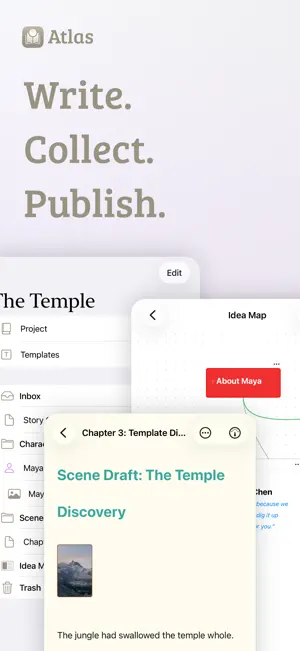
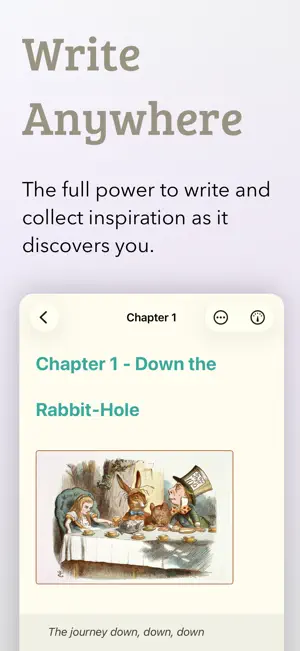
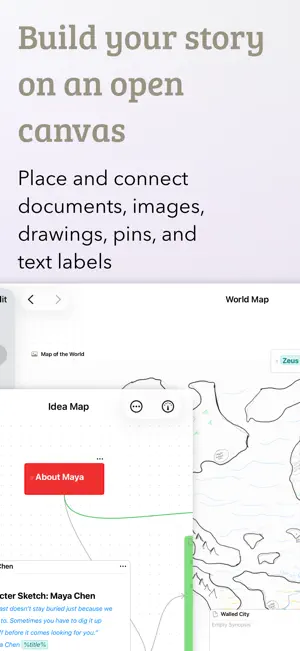
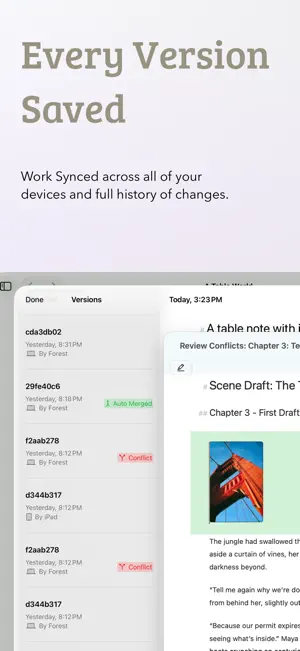
Atlas: Write. Collect. Publish. # Your creative workspace for ambitious projects. Atlas is where complex writing projects come together. Draft your novel, organize your research, outline your world, or build a personal knowledge base—all with tools designed for deep world-building and serious information gathering. Atlas adapts to how you work, not the other way around. # Everything in One Place Create projects that mirror how you think. Nest documents and folders to any depth, visualize connections on infinite canvases, sketch with Apple Pencil, and let smart wiki-style links keep everything connected as your project grows. Hierarchical tags tie related documents together, so a character, a source, or a loose thread never gets lost. # Markdown That Works With You Write with live formatting—headings, emphasis, and lists render as you type, with no separate preview mode. Images appear inline and resize with a drag. Links to other documents stay current when you rename them. Drop in Document Variables like title, author, and dates that fill themselves in. And shape the editor with the built-in theme editor until it feels like home—then share your themes with others. # Collect From Anywhere Research lives on the web, so Atlas brings it in cleanly. The Web Clipper captures articles as readable Markdown—images, metadata, and all—straight from Safari, and even pulls transcripts from YouTube videos. Snap a photo on your iPhone or share text from any app, and it's waiting in your project. # Think Visually Drop documents, images, and notes onto large canvases. Sketch maps, place labels, and draw connections between ideas. Arrange research beside your draft, map out story arcs, or build a mood board—and edit any document right on the canvas without breaking your flow. # Syncs Thoughtfully iCloud keeps your Mac, iPad, and iPhone in perfect sync. Start writing anywhere, continue everywhere. Automatic version history protects every draft, and intelligent conflict resolution merges changes for you—so simultaneous edits across devices simply work. # Publish On Your Terms When your work is ready for the world, export it your way: polished ePub eBooks with custom chapter breaks, print-ready PDFs down to trade-paperback layouts, clean HTML, RTF, or plain Markdown. A live preview shows exactly what you'll get before you export. # Built for Hard Work and Play Atlas is a native Mac, iPad, and iPhone app for writers, researchers, and creators tackling ambitious projects. Whether you're writing a novel, world-building, managing academic research, or building a personal wiki, Atlas fits the way you work. -- Learn more at https://contagious.dev/atlas -- Start free with a free project (with a document count restriction) or a 7-day unlimited project and document subscription trial. Atlas requires a single lifetime, monthly, or yearly subscription to unlock access across all devices and unlimited projects and documents. A limited-time Lifetime purchase is available periodically. Privacy Policy: https://contagious.dev/privacy-policy/atlas/ Terms of Use (EULA): https://contagious.dev/terms-of-use/atlas/
What’s new
Version 1.8.0 · Updated October 1, 2026
Note: This is a highlight list, see https://contagious.dev/blog/atlas-1-8-0-rebuilt-canvas-and-free-preview for the full list! ## Canvas **Look & performance** - Canvas rebuilt on a native engine on iOS and Mac: much smoother scrolling, zooming, and dragging, even on large canvases - Redesigned elements, fuller Liquid Glass adoption (OS 26+), softer card colors, themed borders, and updated dark-mode defaults - New canvas accent color (Canvas Options > Accent Color) **New: Groups** - Labeled frames that gather related items; create from the selection bar, background menu, Editor > Canvas > Add to Canvas, or ⌃⌘G - Overlapping cards, text blocks, and pins belong to the group; groups can nest - Dragging or locking a group affects its contents - Actions: Rename, Change Color, Select Contents, Resize to Fit Contents, Align Contents, Delete Group - Connections can attach to groups - Groups appear in previews, the Inspector, search, Spotlight, and Shortcuts, and are preserved in JSON Canvas import/export **Folders** - Folder cards show contents as a live outline: expand/collapse rows, double-click to open a document, or drag a row onto the canvas - Keyboard navigation, iPad and iPhone support, and Contents or Synopsis display **New: Align, Arrange, Distribute & Nudge** - Live preview; find them in the multi-selection bar or Editor > Canvas > Align (⌃⌥⌘ chords) - Nudge with arrow keys (hold Shift for more) - Snap to Grid is now a global setting, on by default; hold ⌘ to invert it for one drag **Navigation & zoom** - Fit to Selection (⌘2), Fit Contents (⌘1), and Center to Canvas - Editable zoom percentage (10-300%) and ⌘-scroll zoom - Overview mode at about 30% zoom or less shows icons and titles - Auto-scroll when dragging to the edge; selected text cards scroll **Selection & editing** - Drag a selection box or ⌘/Shift-click to multi-select, with a new floating selection bar on every platform - ⌥-resize from center; hold ⌥ in a card menu for Remove Card and Document - Inline text card editing with full editor support; Convert to Text Document - Quick Look for media cards; Escape cancels drags and connections **Connections & pins** - "Edges" are now "Connections": easier to grab and reattach, cleaner curves, Start/End Arrow toggles, editable labels, and colors synced across Mac and iOS - Pins update live, with a color menu and Convert to Document **Adding content** - Rebuilt add bar: document, text block, pin, and media (Photos, Files, Webpage); click or drag to place - Tap the background on iOS or right-click on Mac for an add menu, including Create Group - Web cards are live only when solely selected, with floating controls **Previews & export** - Rebuilt preview pipeline matches the canvas more closely, including nested canvases and groups - Export as PNG (Full Canvas or Current View) or Bundle; PDF export removed - New Items view in the Inspector ## Projects - Icon or List view, sortable by name, last opened, or date created - Archive projects and browse them in Archived Projects - New projects open automatically ## Shortcuts & keyboard - Move to Trash is now ⌘Delete - New canvas shortcuts for groups, fit, nudge, and align; Shortcuts can add groups ## Editor & Inspector - Markdown editor fixes for paste, selection, find, undo, tables, and blockquotes - Mac Inspector: segmented section picker and row dividers - Lower memory use and better performance in Outline Views - Fixed placeholder, color, tag layout, and List text option issues ## Preview Mode - Added a free preview mode Also fixes several canvas crashes, hangs, and performance issues.
App privacy
The developer, Daniel Griffin, reported these privacy practices to Apple.
Data Not Linked to You
The following data, which may be collected but is not linked to your identity, may be used for the following purposes:
- Purchases: Purchase History
- Identifiers: User ID, Device ID
- Usage Data: Product Interaction
- Diagnostics: Other Diagnostic Data
Used for: Analytics
Alternatives to Atlas: Write and Collect
Looking for apps like Atlas: Write and Collect? Here are 6 similar apps on the App Store. The highest rated is Novel Writing: Candlelight (5.0/5), and all 6 are free to download.
-
 Novel Writing: Candlelight
5.0
Novel Writing: Candlelight
5.0
-
 AYCM Manuscript
4.8
AYCM Manuscript
4.8
-
 Novalist - Novel Writing
4.5
Novalist - Novel Writing
4.5
-
 Prism Notes
4.9
Prism Notes
4.9
-
 pensiv: Writing app for novels
4.5
pensiv: Writing app for novels
4.5
-
 Novela: Writing app for novels
1.0
Novela: Writing app for novels
1.0
| App | Rating | Price | Last updated | Compare |
|---|---|---|---|---|
| Atlas: Write and Collect | 5.0 / 5 (3 ratings) | Free | October 1, 2026 | |
| Novel Writing: Candlelight | 5.0 / 5 (7) | Free | Dec 2, 2024 | Compare |
| AYCM Manuscript | 4.8 / 5 (6) | Free | Sep 15, 2026 | Compare |
| Novalist - Novel Writing | 4.5 / 5 (2) | Free | Sep 23, 2026 | Compare |
| Prism Notes | 4.9 / 5 (30) | Free | Oct 5, 2026 | Compare |
| pensiv: Writing app for novels | 4.5 / 5 (4) | Free | Oct 3, 2026 | Compare |
| Novela: Writing app for novels | 1.0 / 5 (1) | Free | Jun 2, 2026 | Compare |