

OrthoMeasure
Hadi Altabatabaae Utilities iPhoneiPadiPod touch
OrthoMeasure is a free Utilities app for iPhone and iPad by Hadi Altabatabaae. Rated 5.0/5 from 2 ratings. Requires iOS 17.6. Updated November 26, 2025.
- Rating
- 5.0
- 2 ratings
- Price
- Free
- on the App Store
- Size
- 3 MB
- Age 12+
- Updated
- Nov 26
- 2025 · v1.51
Screenshots
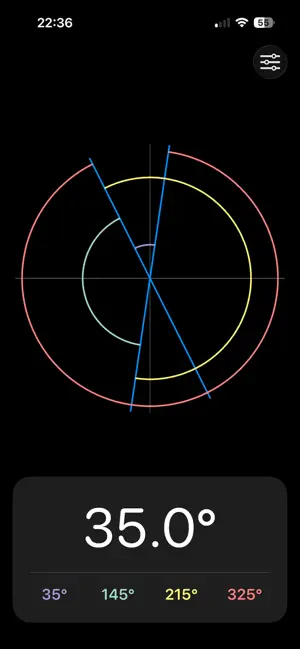

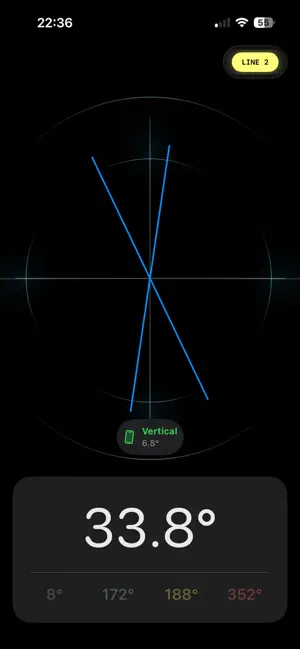
About OrthoMeasure
Measure clinical angles with precision and ease. OrthoMeasure turns your iPhone into a fast, accurate digital goniometer, perfect for measuring angles on X-rays, during clinical examinations, or anywhere you need a reliable reading. Stop guessing or relying on bulky physical tools. OrthoMeasure uses your device's advanced motion sensors to calculate angles with just two simple taps. HOW IT WORKS: Align First Line: Hold your iPhone parallel to the first line (e.g., the top of the spinal curve). Tap to Set: Tap the screen to lock the first angle. Align Second Line: Hold your iPhone parallel to the second line (e.g., the bottom of the curve). Tap to Measure: Tap a final time. OrthoMeasure instantly calculates all four corresponding angles (e.g., 35°, 145°, 215°, 325°) and displays them clearly. FEATURES: High Precision: Uses your device's core motion sensors for accurate, repeatable measurements. Simple 2-Tap System: No complex buttons. Align, tap, align, and tap again. Visual Guide: See the lines you've measured drawn on the screen. Full Angle Display: Instantly get the acute, obtuse, and reflex angles for a complete picture. Clean Interface: A beautiful, dark-mode-friendly interface that stays out of your way. Designed for orthopedic surgeons, chiropractors, physiotherapists, and medical students, OrthoMeasure is the modern, simple way to get the angle you need.
What’s new
Version 1.51 · Updated November 26, 2025
This update brings a complete visual overhaul and significant accuracy improvements to OrthoMeasure. New "Precision Mode" & Tilt Monitoring • Tilt Warning System: To ensure clinical accuracy, the app now monitors device tilt. You will get a real-time warning if the device is tilted too far from the vertical plane. • Signal Smoothing: We’ve added advanced signal filtering to eliminate needle jitter, making it easier to capture exact angles. All-New Interface • A redesigned measurement screen featuring a high-contrast result card and clear status indicators. • Dark Mode: The app now enforces a native Dark Theme for better visibility and reduced eye strain. • Interactive Guide: A brand new, dynamic tutorial and a "How it Works" guide to help you get the best results. Improvements • streamlined the results view to focus on the most relevant angles. • Improved tap responsiveness and haptic feedback. • Performance optimizations and stability fixes.
App privacy
The developer, Hadi Altabatabaae, reported these privacy practices to Apple.
Data Not Collected
The developer does not collect any data from this app.
Alternatives to OrthoMeasure
Looking for apps like OrthoMeasure? Here are 6 similar apps on the App Store. The highest rated is Angulus Pro - Precision Angle (4.6/5), and 4 of the 6 are free to download.
-
 Angle Protractor Finder Tool
-
 Angle Meter & Cobb Angle Meter
-
 Angulus Pro - Precision Angle
4.6
Angulus Pro - Precision Angle
4.6
-
 Housekeeper Bee
-
 ModelPrompt: Prompt Optimizer
-
 Pio Picker
| App | Rating | Price | Last updated | Compare |
|---|---|---|---|---|
| OrthoMeasure | 5.0 / 5 (2 ratings) | Free | November 26, 2025 | |
| Angle Protractor Finder Tool | – | Free | Jul 17, 2025 | Compare |
| Angle Meter & Cobb Angle Meter | – | 9.99 USD | Jan 28, 2026 | Compare |
| Angulus Pro - Precision Angle | 4.6 / 5 (27) | Free | Sep 20, 2026 | Compare |
| Housekeeper Bee | – | Free | Apr 20, 2026 | Compare |
| ModelPrompt: Prompt Optimizer | – | Free | Jan 9, 2026 | Compare |
| Pio Picker | – | 3.99 USD | Aug 26, 2025 | Compare |
Compare OrthoMeasure with the top alternatives: ratings, updates, ASO score and keyword gaps →