

Vita: Screen Time Control
Syntrix NeuroSpatial Inc. Productivity iPhoneiPadiPod touch
Vita: Screen Time Control is a free Productivity app for iPhone and iPad by Syntrix NeuroSpatial Inc. Requires iOS 17.4. Updated May 29, 2026.
- Price
- Free
- on the App Store
- Size
- 113 MB
- Age 4+
- Updated
- May 29
- 2026 · v1.0.2
Screenshots

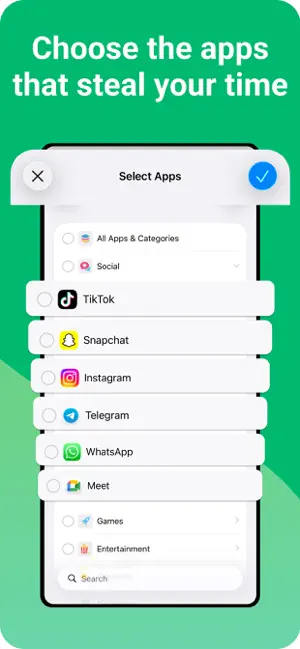


About Vita: Screen Time Control
Your phone is a tool. Not a trap. Vita Screen helps you turn distracting screen time into intentional action. Instead of only blocking apps, Vita Screen gives you something better to do before you scroll. Choose the apps that pull you off track, then choose how you want Vita Screen to interrupt them: - Study Mode: Turn your class material into something you can actually learn from. Generate flashcards, practice questions, and quizzes from your notes, PDFs, photos, and study material in seconds. Review cards, answer questions, get instant feedback, and earn your way back to distracting apps through real study. - Focus Mode: Create a real task, start a guided focus session, and make meaningful progress before you unlock. Instead of bouncing back into the feed, Vita helps you use that moment for deep work, priorities, and follow-through. - Bible Mode: Read the Bible before you scroll. Open today's passage, stay connected to your reading rhythm, and turn a distracted unlock into time in God's Word. - Emotion Mode: Track your emotion before you unlock. Use the emotion wheel to name what you're feeling, build self-awareness, and interrupt the autopilot loop before it takes over. - Movement Mode: Reset with guided movement before you scroll. Complete a short movement break and turn a phone habit into action instead of staying stuck in the feed. - Gratitude Mode: Record a quick gratitude entry by text or voice before opening a distracting app. Replace reflexive scrolling with reflection and train your attention toward what is good. How Vita Screen works: 1. Block the noise Choose the apps that steal your time. 2. Pick your mode Study, focus, read the Bible, track your emotion, practice gratitude, or move. 3. Unlock with intention Complete your chosen mode, then decide whether you still want the app. Why Vita Screen is different: Most screen time apps only tell you to stop. Vita Screen creates intentional friction and gives you something meaningful to do instead. That means less autopilot, less doomscrolling, and more reclaimed time for what actually matters. Built for real life: • Native app gating • Offline-first core flows • Progress, streaks, and milestones • Personal modes for different goals and seasons • Designed for students, professionals, Christians, and anyone trying to use their phone more intentionally If you're tired of opening your phone for one thing and losing an hour to the feed, Vita helps you take that choice back. Private and safe: Vita Screen uses Apple's Screen Time API to monitor and block the apps you choose. Core flows are designed to work offline-first, and your personal browsing data stays on your device. Terms of Service: https://joinvita.app#terms-of-service Privacy Policy: https://joinvita.app#privacy-policy
What’s new
Version 1.0.2 · Updated May 29, 2026
Improved study material generation.
App privacy
The developer, Syntrix NeuroSpatial Inc., reported these privacy practices to Apple.
Data Linked to You
The following data, which may be collected and linked to your identity, may be used for the following purposes:
- Diagnostics: Other Diagnostic Data
Used for: Analytics, App Functionality
Data Not Linked to You
The following data, which may be collected but is not linked to your identity, may be used for the following purposes:
- Health & Fitness: Health, Fitness
- Financial Info: Payment Info
- Identifiers: User ID, Device ID
- Usage Data: Product Interaction, Other Usage Data
- Diagnostics: Crash Data, Performance Data
- Contact Info: Email Address, Name
Used for: Analytics, App Functionality
Alternatives to Vita: Screen Time Control
Looking for apps like Vita: Screen Time Control? Here are 6 similar apps on the App Store. The highest rated is Momentum - Daily Habits (5.0/5), and all 6 are free to download.
-
 Momentum - Daily Habits
5.0
Momentum - Daily Habits
5.0
-
 Ahead Ai
5.0
Ahead Ai
5.0
-
 PathRank: Goal Planner
5.0
PathRank: Goal Planner
5.0
-
 HabitCam: Video Habit Tracker
5.0
HabitCam: Video Habit Tracker
5.0
-
 Nerve Manifest
4.7
Nerve Manifest
4.7
-
 Habit Tracker - Elevate
4.8
Habit Tracker - Elevate
4.8
| App | Rating | Price | Last updated | Compare |
|---|---|---|---|---|
| Vita: Screen Time Control | – | Free | May 29, 2026 | |
| Momentum - Daily Habits | 5.0 / 5 (1) | Free | Feb 26, 2026 | Compare |
| Ahead Ai | 5.0 / 5 (1) | Free | Oct 19, 2026 | Compare |
| PathRank: Goal Planner | 5.0 / 5 (6) | Free | Oct 3, 2026 | Compare |
| HabitCam: Video Habit Tracker | 5.0 / 5 (1) | Free | Apr 8, 2026 | Compare |
| Nerve Manifest | 4.7 / 5 (46) | Free | Sep 30, 2026 | Compare |
| Habit Tracker - Elevate | 4.8 / 5 (49) | Free | Aug 10, 2026 | Compare |