

Video Compressor: ShrinkFile
金标 李 Photo & Video iPhoneiPadiPod touchMac
Video Compressor: ShrinkFile is a free Photo & Video app for iPhone and iPad by 金标 李. Rated 4.6/5 from 9 ratings. Requires iOS 18. Updated October 2, 2026.
- Rating
- 4.6
- 9 ratings
- Price
- Free
- on the App Store
- Size
- 53 MB
- Age 4+
- Updated
- Oct 2
- 2026 · v2.12.0
Screenshots


About Video Compressor: ShrinkFile
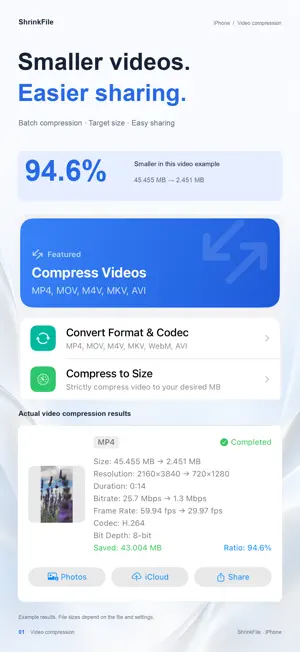
Compress and convert images, videos, and audio locally with pro-grade speed and total privacy. Whether you're a professional creator, developer, or just looking to free up storage space, this all-in-one video compressor provides a comprehensive, offline-first suite to handle all your daily media tasks. WHY CHOOSE OUR APP? Everything happens on your device! Harnessing the power of your device's hardware acceleration (VideoToolbox), your files are processed lightning fast. Best of all? No internet connection is required, meaning your data never leaves your device. 100% privacy guaranteed. PRO VIDEO TOOLS • Video Compression: A powerful video compressor to shrink MOV, MP4, M4V, and MKV files. We preserve the original video codec (H.264, HEVC, VP9, AV1) ensuring no unnecessary transcoding. Features smart bitrate control (Auto/Custom) and adjustable resolutions up to 4K. • Format Conversion: Batch convert MP4 ↔ MOV ↔ M4V ↔ WebM ↔ MKV ↔ AVI with lossless options, smart audio copying, and bitrate preservation. • Video to Animation: Turn your videos into high-quality animated WebP, AVIF, or GIFs. • Audio Extraction: Rip audio tracks from any video to MP3, M4A, AAC, FLAC, WAV, or OGG. POWERFUL IMAGE TOOLS • Smart Compression: Support for JPEG, JPEG XL, PNG, HEIC, WebP, AVIF, and GIF. Powered by MozJPEG and Zopfli for the highest quality compressions. Adjustable quality and resolution. • Animated Image Support: Intelligently auto-detects animated images (WebP/AVIF/GIF) with frame-by-frame compression while preserving timeline information. • Format Conversion: Batch convert instantly: JPEG ↔ JPEG XL ↔ PNG ↔ WebP ↔ HEIC ↔ AVIF ↔ GIF ↔ APNG. COMPREHENSIVE AUDIO TOOLS • Audio Compression: Reduce file sizes for MP3, M4A, FLAC, OGG, and WAV. Full control over bitrates (32-320 kbps), sample rates, and mono/stereo channels. • Format Conversion: Batch convert MP3 ↔ M4A ↔ FLAC ↔ WAV ↔ WebM ↔ CAF ↔ OGG ↔ M4R effortlessly. ENHANCED SMART FEATURES • Smart Decision Making: Automatically preserves the original file if the compressed version happens to be larger. • ETA Display: View accurate estimated time remaining for heavy, long-running tasks. • Batch Processing: Save time by converting or compressing multiple files simultaneously. Terms of Use (EULA): https://www.apple.com/legal/internet-services/itunes/dev/stdeula/
Ratings & reviews
4.6
9 ratings
What’s new
Version 2.12.0 · Updated October 2, 2026
Product experience improvements.
App privacy
The developer, 金标 李, reported these privacy practices to Apple.
Data Not Linked to You
The following data, which may be collected but is not linked to your identity, may be used for the following purposes:
- Identifiers: Device ID
- Usage Data: Product Interaction
- Diagnostics: Crash Data, Performance Data, Other Diagnostic Data
Used for: Analytics, App Functionality
Alternatives to Video Compressor: ShrinkFile
Looking for apps like Video Compressor: ShrinkFile? Here are 6 similar apps on the App Store. The highest rated is Realtime Filter (5.0/5), and all 6 are free to download.
-
 BlurPass: Face Blur & Censor
-
 Just Smile - Smile Camera
4.0
-
 Realtime Filter
5.0
-
 PicMate Collection Manager
5.0
-
 Montaj - Video Editor
3.0
-
 Video 2 GIF - Simple & Fast
5.0
| App | Rating | Price | Last updated | Compare |
|---|---|---|---|---|
| Video Compressor: ShrinkFile | 4.6 / 5 (9 ratings) | Free | October 2, 2026 | |
| BlurPass: Face Blur & Censor | – | Free | Jul 25, 2026 | Compare |
| Just Smile - Smile Camera | 4.0 / 5 (2) | Free | Aug 20, 2026 | Compare |
| Realtime Filter | 5.0 / 5 (1) | Free | Mar 11, 2026 | Compare |
| PicMate Collection Manager | 5.0 / 5 (2) | Free | Jul 26, 2026 | Compare |
| Montaj - Video Editor | 3.0 / 5 (2) | Free | May 28, 2026 | Compare |
| Video 2 GIF - Simple & Fast | 5.0 / 5 (1) | Free | Mar 28, 2026 | Compare |