

Trip Computêr
Orkun Karaduman Navigation iPhoneiPadiPod touch
Trip Computêr is a free Navigation app for iPhone and iPad by Orkun Karaduman. Requires iOS 15.0. Updated October 1, 2026.
- Price
- Free
- on the App Store
- Size
- 26 MB
- Age 4+
- Updated
- Oct 1
- 2026 · v1.6
Screenshots


About Trip Computêr
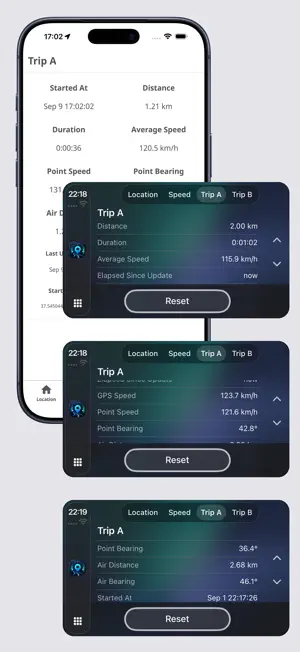
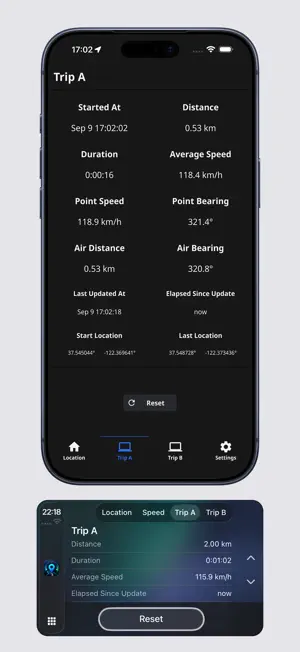
TRIP COMPUTER Trip Computer turns your iPhone and iPad into a practical GPS-based trip computer, giving you quick access to distance traveled by your car, average trip speed, real-time speed, direction, location, and trip information. DESIGNED FOR APPLE CARPLAY Trip Computer supports CarPlay, allowing you to access driving information from your car's display. Just like an in-vehicle trip computer, it provides Trip A / Trip B / Speed tabs. You can also access all GPS information from the Location tab. When connected to a compatible CarPlay display, you can view your trip distance, average speed during the trip, trip duration, current speed and direction, real-time location information, and other useful trip data. Whether you're on a long journey or simply tracking your current driving information, Trip Computer provides everything you need in a simple and easy-to-read interface. TRIP A & TRIP B Trip A and Trip B are two independent trip computers that can be used to track different journeys, routes, or different sections of the same trip. Each trip can display useful driving statistics such as: • Distance traveled • Average speed • Trip duration • Air distance • Air bearing • Start time • Start location • Last location • Last update time • Time elapsed since the last update • Point speed • Point bearing Trip A and Trip B can be reset independently. This allows you to use them for different purposes. For example, you can track your entire journey with Trip A while using Trip B to monitor a specific section of your route. Trip A and Trip B are separate one-time In-App Purchases. Each purchase permanently unlocks the corresponding trip computer. No subscription is required. REAL-TIME LOCATION View detailed GPS and location data, including: • Latitude and longitude • Current speed • Altitude • Course and direction • Location accuracy • Speed accuracy • Course accuracy • Location timestamp • Coordinates in Decimal Degrees format • Coordinates in Degrees Decimal Minutes format • Coordinates in Degrees Minutes Seconds format See exactly where you are and access useful location information whenever you need it. IPHONE AND IPAD INTERFACE Trip Computer works on both iPhone and iPad, allowing you to clearly and easily monitor detailed GPS and trip information on your mobile devices across different screen sizes. From checking your exact coordinates to tracking your trip statistics, Trip Computer provides a simple and practical way to keep your location and trip data close at hand. Terms of Use (EULA): https://www.apple.com/legal/internet-services/itunes/dev/stdeula/ Notes: CarPlay is an official trademark of Apple.
What’s new
Version 1.6 · Updated October 1, 2026
Bug fixes.
App privacy
The developer, Orkun Karaduman, reported these privacy practices to Apple.
Data Not Collected
The developer does not collect any data from this app.
Alternatives to Trip Computêr
Looking for apps like Trip Computêr? Here are 6 similar apps on the App Store. The highest rated is Watch Speedometer Pro CarPlay (3.0/5), and 5 of the 6 are free to download.
-
 Classic Tripmaster
-
 Nostalgisch Rijden
-
 Master-Trip
-
 Car,Play CarSync Speedometer
-
 Watch Speedometer Pro CarPlay
3.0
-
 ΚΤΕΛ Ημαθίας
| App | Rating | Price | Last updated | Compare |
|---|---|---|---|---|
| Trip Computêr | – | Free | October 1, 2026 | |
| Classic Tripmaster | – | Free | Sep 17, 2026 | Compare |
| Nostalgisch Rijden | – | Free | Oct 28, 2026 | Compare |
| Master-Trip | – | 3.99 USD | May 30, 2025 | Compare |
| Car,Play CarSync Speedometer | – | Free | Sep 11, 2026 | Compare |
| Watch Speedometer Pro CarPlay | 3.0 / 5 (1) | Free | Oct 19, 2026 | Compare |
| ΚΤΕΛ Ημαθίας | – | Free | Jan 22, 2026 | Compare |
Compare Trip Computêr with the top alternatives: ratings, updates, ASO score and keyword gaps →