

GPlay - Private Video Player
罡 刘 Utilities iPhoneiPadiPod touchMac
GPlay - Private Video Player is a free Utilities app for iPhone and iPad by 罡 刘. Requires iOS 15.0. Updated September 11, 2026.
- Price
- Free
- on the App Store
- Size
- 70 MB
- Age 4+
- Updated
- Sep 11
- 2026 · v1.0.22
Screenshots

About GPlay - Private Video Player
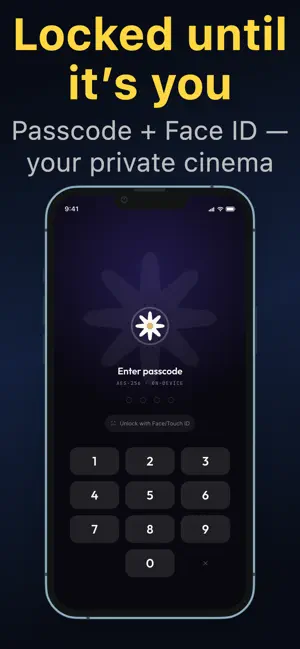
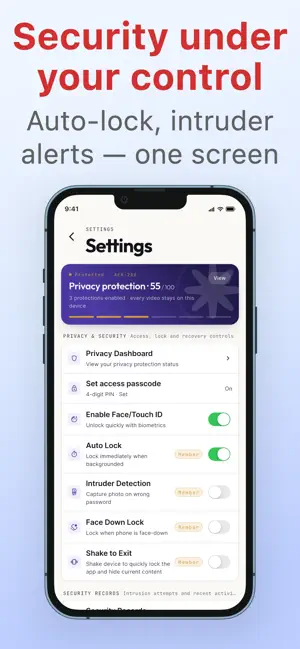
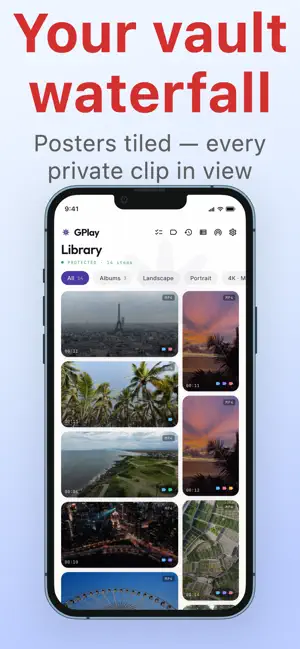
GPlay is a privacy-first video player for your personal videos. Import your own videos into an in-app private vault, protect them with a passcode plus Face ID / Touch ID, and stop worrying when a family member, coworker, or friend borrows your phone for a moment. Core Security • Passcode + biometric lock: passcode on first launch, then instant unlock with Face ID / Touch ID • Auto-lock: the app locks automatically when backgrounded; your identity is re-verified on return • Intruder detection: the front camera captures a snapshot after repeated wrong-passcode attempts • Panic gesture: flip the phone face down to instantly lock (the PiP window closes too) • Private storage: imported videos live inside the app, fully isolated from the system photo library Powerful Playback • Free formats: MP4, MOV, M4V • Premium formats: MKV, AVI, WMV, FLV, WebM, and more • Continuous playback: tap any video on the home screen to auto-build a queue, auto-advance to the next, and keep controlling via the MiniPlayer after returning home • External subtitles: SRT / VTT with auto-discovery of matching files and in-player switching • Watch history: browse records by date, resume, delete single items, or clear all • Gesture controls for brightness and progress, variable playback speed • Picture-in-Picture: keep watching in a floating window while using other apps • AirPlay: cast to compatible devices with a global status strip and disconnect control Smart Management • Albums + custom tags for quick organization • Wi-Fi transfer for batch import of videos and matching subtitle files • Waterfall grid with smart portrait/landscape layout • Recycle bin — recover accidentally deleted videos • Privacy Dashboard: at-a-glance view of active protections and security event timeline 【Privacy Commitment】 All videos are stored only on your device. GPlay does not upload, access, or collect any video content or user data. Face ID / Touch ID data is managed by the system and is not accessible to the app.
What’s new
Version 1.0.22 · Updated September 11, 2026
GPlay 1.0.22 (iPhone / iPad / Mac) Fixed an issue that could cause membership activation conflicts when the same Apple Account was used on multiple devices.
App privacy
The developer, 罡 刘, reported these privacy practices to Apple.
Data Not Collected
The developer does not collect any data from this app.
Alternatives to GPlay - Private Video Player
Looking for apps like GPlay - Private Video Player? Here are 6 similar apps on the App Store. The highest rated is Secure Media Player (5.0/5), and all 6 are free to download.
-
 Secure Media Player
5.0
Secure Media Player
5.0
-
 Video Player - My Local Player
-
 Veilspace
-
 Cassette Air
-
 SecuroBox - Private Vault
-
 VoicePicNote
| App | Rating | Price | Last updated | Compare |
|---|---|---|---|---|
| GPlay - Private Video Player | – | Free | September 11, 2026 | |
| Secure Media Player | 5.0 / 5 (1) | Free | Jul 24, 2026 | Compare |
| Video Player - My Local Player | – | Free | Oct 9, 2026 | Compare |
| Veilspace | – | Free | Oct 5, 2026 | Compare |
| Cassette Air | – | Free | Sep 10, 2026 | Compare |
| SecuroBox - Private Vault | – | Free | Jul 22, 2026 | Compare |
| VoicePicNote | – | Free | Oct 16, 2026 | Compare |