

Loovie: AI Video Generator
CultivX Pty Ltd Photo & Video iPhoneiPadiPod touch
Loovie: AI Video Generator is a free Photo & Video app for iPhone and iPad by CultivX Pty Ltd. Rated 4.8/5 from 4 ratings. Requires iOS 16.0.
- Rating
- 4.8
- 4 ratings
- Price
- Free
- on the App Store
- Size
- 132 MB
- Age 4+
- Updated
- Oct 16
- 2026 · v2.1
Screenshots
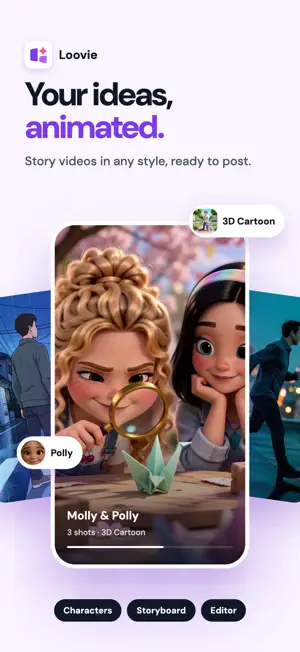


About Loovie: AI Video Generator
Turn your imagination into a visual story. Loovie is the AI storytelling app that takes you from a single idea to a finished, multi-scene video, right on your phone. No film crew, no editing experience needed. Build your cast, write your scenes, add effects and cut it all together in one app. Loovie brings AI video generation, a character library, visual effects and a full editing suite together, so you stay the storyteller from first idea to final export. Made for filmmakers, TikTok, Instagram and YouTube creators, writers, kids' book authors and brands with a story to tell. BUILD YOUR CHARACTER LIBRARY Create your characters once and cast them in every scene and every video, so the same face, outfit and style show up every time. Save your locations to a background library too. Perfect for series, recurring heroes, ongoing stories and consistent branding. TELL YOUR STORY, SCENE BY SCENE Describe what happens and Loovie turns it into cinematic shots. Write a story and let AI break it into multiple scenes, or direct each shot yourself. Pick up the next scene from the last frame of the one before for seamless continuity, and bridge scenes with AI transitions. Choose portrait or landscape to fit any platform. ADD VFX AND DIRECT THE ACTION Change the weather, swap the background, add effects or change what a character is wearing, all by describing it. Swap a character right on your timeline to try a new look in the same scene. Film yourself acting it out and use Motion Reference to direct how your characters move. EDIT IT YOUR WAY A real timeline editor built for mobile, with a landscape editor on iPad. Trim, split and reorder clips, adjust speed, add captions, and combine every scene into one seamless story. Export and share on TikTok, Instagram and YouTube. GIVE YOUR STORY A VOICE AND A SOUNDTRACK Record narration over any scene, add captions so every word lands, and generate original music to match the mood of your story. Join storytellers everywhere turning ideas into videos worth sharing. Download Loovie and start building your story today. Privacy: https://loovie.app/privacy Terms: https://www.apple.com/legal/internet-services/itunes/dev/stdeula/
What’s new
Version 2.1 · Updated October 16, 2026
Version 2.0 threw the party. Version 2.1 brought the polish cloth, and we went over everything twice: your captions, your exports, your edits, and a fair few corners you probably never noticed were scuffed. CAPTIONS GET A PROPER STYLE SHEET This is the headline. Looks, Font, Color and Effects now live together in one Style sheet, so you stop hopping between panels to dress a single line of text. Start from 12 built-in looks, then tweak one until it is yours and save it as your own look, up to 20 of them, ready to drop onto the next project in one tap. Stack strokes, glows and shadows on top of each other for text that really pops off the frame. And captions no longer wrap on their own: line breaks come only from what you type, so a caption breaks exactly where you pressed return and nowhere else. On tablets, the side inspector picks up Looks and Effects too. EXPORTS THAT GET IT RIGHT What you hear in the editor is what you get in the file: per-clip audio no longer drifts out of sync on export. Captions in Chinese, Japanese, Korean, Arabic, Devanagari, Thai and Hebrew now draw correctly in your exported video, every character in place. And caption animations keep an even rhythm on clips that are not 30fps, so nothing stutters on footage shot at other frame rates. SPEAKS YOUR LANGUAGE, FITS YOUR SCREEN The timeline editor and its ruler labels are now translated, so the whole editor speaks your language. French and Spanish labels stop getting clipped mid word. And the credit pill slimmed down so it takes up less room. PLUS A ROUND OF FIXES Repeat taps no longer trigger duplicate credit purchases. You get a clear message when the microphone is busy with something else. A stale image can no longer sneak into the motion reference video player. Background prompts stay within your tier's limit. Music titles show up in your projects. And your feedback reaches us even when something is off with your account behind the scenes. Update, open a project, and give your captions a new Look.
App privacy
The developer, CultivX Pty Ltd, reported these privacy practices to Apple.
Data Not Linked to You
The following data, which may be collected but is not linked to your identity, may be used for the following purposes:
- User Content: Other User Content, Photos or Videos
- Identifiers: User ID
- Usage Data: Product Interaction
- Contact Info: Email Address
- Diagnostics: Crash Data, Performance Data, Other Diagnostic Data
Used for: Analytics, Product Personalization, App Functionality
Alternatives to Loovie: AI Video Generator
Looking for apps like Loovie: AI Video Generator? Here are 6 similar apps on the App Store. The highest rated is AI Video Generator: Vydeob (5.0/5), and all 6 are free to download.
-
 AI Video Generator: Vydeob
5.0
AI Video Generator: Vydeob
5.0
-
 Gen AI Studio: Image & Video
5.0
Gen AI Studio: Image & Video
5.0
-
 Prism: AI Text to Video Maker
5.0
Prism: AI Text to Video Maker
5.0
-
 AI Video Generator: Vidoa
5.0
AI Video Generator: Vidoa
5.0
-
 Project Genie, AI Video Create
4.6
Project Genie, AI Video Create
4.6
-
 AI Video Generator ・AI Video
3.0
AI Video Generator ・AI Video
3.0
| App | Rating | Price | Last updated | Compare |
|---|---|---|---|---|
| Loovie: AI Video Generator | 4.8 / 5 (4 ratings) | Free | October 16, 2026 | |
| AI Video Generator: Vydeob | 5.0 / 5 (1) | Free | Oct 12, 2026 | Compare |
| Gen AI Studio: Image & Video | 5.0 / 5 (1) | Free | Sep 9, 2026 | Compare |
| Prism: AI Text to Video Maker | 5.0 / 5 (1) | Free | Aug 25, 2026 | Compare |
| AI Video Generator: Vidoa | 5.0 / 5 (6) | Free | Oct 15, 2026 | Compare |
| Project Genie, AI Video Create | 4.6 / 5 (9) | Free | Feb 23, 2026 | Compare |
| AI Video Generator ・AI Video | 3.0 / 5 (2) | Free | Sep 9, 2025 | Compare |