

Public WiFi & eSIM Safety Scan
GONUL TIKIL Utilities iPhoneiPadiPod touch
Public WiFi & eSIM Safety Scan is a free Utilities app for iPhone and iPad by GONUL TIKIL. Requires iOS 15.1. Updated October 23, 2026.
- Price
- Free
- on the App Store
- Size
- 45 MB
- Age 4+
- Updated
- Oct 23
- 2026 · v2.0.2
Screenshots
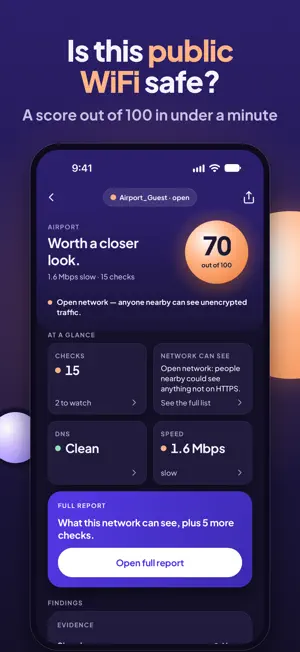


About Public WiFi & eSIM Safety Scan
Is this public WiFi safe? SentryFi is a WiFi security checker for hotel WiFi, airport WiFi and your travel eSIM. In about a minute you get a 0–100 score, the reasons behind it and plain next steps before banking, email or work. WIFI SECURITY CHECK, STEP BY STEP Watch each check finish, one by one: • Open or locked network, and how it is encrypted • Captive portal: is there a WiFi login page, where does it come from, is it encrypted (HTTPS)? Open it with one tap • DNS check: does this network answer the same as trusted encrypted DNS? • Certificates and unchanged pages, signs of an HTTPS downgrade or a hidden proxy • Speed, latency and packet loss • 30 popular sites tested, to reveal hotel, school or work filters MOBILE DATA & TRAVEL eSIM CHECK Not on WiFi? Check your SIM or eSIM line too. • Line identity: the country and network your traffic exits through, for everyone. Handy abroad, since many travel eSIMs route data through another country. Pro adds shared IP (CGNAT), IPv6 and DNS privacy • Carrier tracking: does your carrier add tracking headers to your traffic? Everyone sees the result; Pro names the header. "None found" means not detected in this test, not a guarantee • Blocked sites: 30 popular sites tested on your line. Count and first 3 for everyone, the full list in Pro. Info only, never lowers your score • Speed and latency: good enough for video calls, gaming or 4K? WHO IS ON MY WIFI? A SIMPLE NETWORK SCANNER In about 30 seconds the SentryFi WiFi scanner lists the devices answering on this network by type (phone, computer, TV, printer, router, smart home) and tells you whether they can reach your phone. Pro shows every device by name, IP and type. Home alerts: see what joined your home WiFi each time you open the app. HOTEL, AIRPORT, CAFÉ SentryFi explains what this network can and can't see about you, with tips for the place you are in. If a network you checked before comes back with different DNS, encryption or login page, SentryFi tells you it looks different. It could be the venue, it could be a copycat network. Siri and Shortcuts: say "Check this Wi-Fi", or add SentryFi to a Shortcuts automation so it opens each time you join WiFi. WHEN TO USE IT • Before you sign in to hotel WiFi or airport WiFi • When the captive portal login page of a public WiFi won't open • On café, train or campus public WiFi, before banking • After landing, to check your travel eSIM and mobile data • At home, to see who is on your WiFi SENTRYFI PRO (YEARLY, 3-DAY TRIAL) • Full report: certificates, DNS signing, speed and every finding, shareable as PDF • Every blocked site and the name of each tracking header • Unlimited history and a 90-day line log with weekly charts • No ads, every report opens instantly Pro is one yearly auto-renewing subscription with a 3-day trial. Payment is charged to your Apple ID when the trial ends. It renews unless you cancel at least 24 hours before the period ends, in your App Store account settings. NETWORK SECURITY WITHOUT A VPN SentryFi doesn't change your connection or sell you a VPN. No account, no sign-up, no VPN profile. We never ask for your WiFi password, and your history stays on your phone. It checks, shows what is there and lets you decide: stay, take care, or switch networks. Results are risk signals, not a guarantee. The basic version shows ads (Google AdMob); Pro has none. Terms of Use (EULA): https://www.apple.com/legal/internet-services/itunes/dev/stdeula/ Privacy policy: https://srofia.com/sentryfi-privacy
What’s new
Version 2.0.2 · Updated October 23, 2026
New in SentryFi • WiFi scan, step by step: watch each check finish, then 30 popular sites tested for hotel, school or work blocks • Mobile data check: line identity (exit network and country), carrier tracking headers and blocked sites on your SIM or eSIM • Speed and latency: good enough for video calls, gaming or 4K? • Who is on this WiFi: devices by type and whether they can reach your phone • Fixes and polish
App privacy
The developer, GONUL TIKIL, reported these privacy practices to Apple.
Data Used to Track You
The following data may be used to track you across apps and websites owned by other companies:
- Identifiers: Device ID
- Usage Data: Product Interaction, Advertising Data
Data Linked to You
The following data, which may be collected and linked to your identity, may be used for the following purposes:
- Identifiers: Device ID, User ID
- Usage Data: Product Interaction, Advertising Data
- Purchases: Purchase History
Used for: Third-Party Advertising, Analytics, App Functionality
Data Not Linked to You
The following data, which may be collected but is not linked to your identity, may be used for the following purposes:
- Location: Coarse Location
- Diagnostics: Crash Data, Performance Data, Other Diagnostic Data
Used for: Third-Party Advertising, Analytics, App Functionality
Alternatives to Public WiFi & eSIM Safety Scan
Looking for apps like Public WiFi & eSIM Safety Scan? Here are 6 similar apps on the App Store. The highest rated is SpyX: Phone Monitoring (4.7/5), and all 6 are free to download.
-
 MeduzaVPN: Your Personal VPN
3.2
MeduzaVPN: Your Personal VPN
3.2
-
 Wifi Password + Wifi Finder
4.5
Wifi Password + Wifi Finder
4.5
-
 WiFi Network Scanner, Analyzer
4.2
WiFi Network Scanner, Analyzer
4.2
-
 SpyX: Phone Monitoring
4.7
SpyX: Phone Monitoring
4.7
-
 Home Security - Wi-Fi Scanner
4.4
Home Security - Wi-Fi Scanner
4.4
-
 IP Scanner
4.6
IP Scanner
4.6
| App | Rating | Price | Last updated | Compare |
|---|---|---|---|---|
| Public WiFi & eSIM Safety Scan | – | Free | October 23, 2026 | |
| MeduzaVPN: Your Personal VPN | 3.3 / 5 (4) | Free | Oct 25, 2026 | Compare |
| Wifi Password + Wifi Finder | 4.5 / 5 (1,478) | Free | Sep 3, 2025 | Compare |
| WiFi Network Scanner, Analyzer | 4.2 / 5 (215) | Free | Jul 8, 2026 | Compare |
| SpyX: Phone Monitoring | 4.7 / 5 (148) | Free | Sep 14, 2026 | Compare |
| Home Security - Wi-Fi Scanner | 4.4 / 5 (874) | Free | Jan 5, 2026 | Compare |
| IP Scanner | 4.6 / 5 (893) | Free | Oct 4, 2026 | Compare |