

Cash Flow Calendar App
Insivika Finance iPhoneiPadiPod touch
Cash Flow Calendar App is a free Finance app for iPhone and iPad by Insivika. Rated 5.0/5 from 3 ratings. Requires iOS 15.1. Updated October 18, 2026.
- Rating
- 5.0
- 3 ratings
- Price
- Free
- on the App Store
- Size
- 60 MB
- Age 4+
- Updated
- Oct 18
- 2026 · v1.12.0
Screenshots

About Cash Flow Calendar App
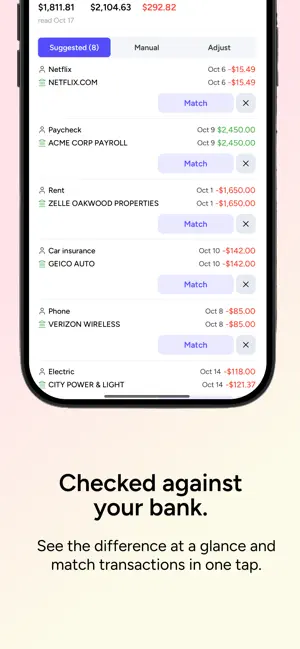
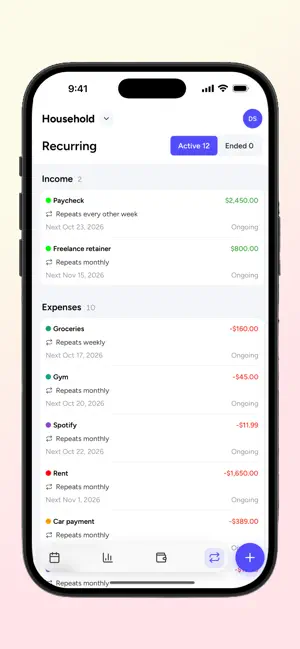
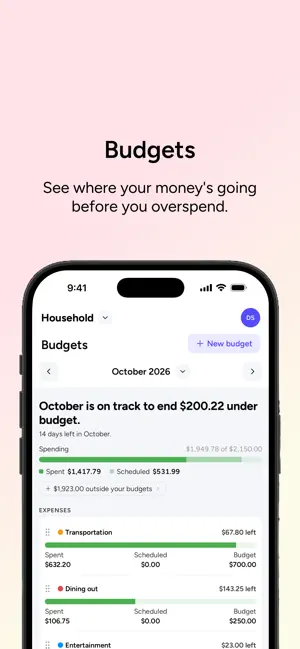
Cash Flow Calendar helps you visualize income and expenses on a calendar so you can plan ahead, avoid surprises, and stay in control—especially when your cash flow isn't predictable. Free to download. A subscription is required to use the app. A 2-week free trial is available. Spreadsheets and traditional budgeting apps fall apart when money doesn't arrive on a fixed schedule. Cash Flow Calendar shows you when money comes in and goes out, and whether each month is on track, so you can make better decisions with confidence. How it works • View your income and expenses directly on a calendar • See future balances update automatically as events occur • Set monthly budgets by category and track them as the month unfolds • Plan weeks or months ahead at a glance • Understand cash flow timing, not just totals Instead of guessing, you'll know exactly what your balance will look like on any day. Budgets that look ahead Most budgets only tell you what you've already spent. Cash Flow Calendar also counts what's still scheduled, so you can see an overspend coming before it happens. • Give any category a monthly budget, for this month only or ongoing • See spent, scheduled, and remaining for every category at a glance • Know if the month is on track to end over or under budget • Spot spending that has no budget or category, so nothing slips through • Drag categories into the order that matters to you Built for real life Cash Flow Calendar is ideal for anyone with variable income or irregular expenses, including freelancers, contractors, small business owners, hourly workers, and households managing shared finances. If your money doesn't follow a neat pattern, this app was built for you. Key features (subscription required) • Calendar-based view of income and expenses • Monthly category budgets that include scheduled spending • One-time and recurring transactions • Automatic future balance calculations • Category and time-based reports • Bank syncing or manual entry • Multiple calendars for different accounts or purposes • Simple, distraction-free design • Mobile and desktop access Why a calendar? Because timing matters. Knowing how much you make isn't enough. Cash Flow Calendar helps you see when money is coming and going, so you can: • Avoid overdrafts • Stay within your monthly budgets • Plan purchases confidently • Prepare for upcoming bills • Reduce financial stress Subscription details • Free to download • Subscription required to use the app • 2-week free trial included • Subscription options are presented in the app Start planning today Whether you're managing unpredictable income, irregular bills, or just want a clearer view of your finances, Cash Flow Calendar helps you stay ahead—one day at a time. Terms of Use (EULA): https://www.apple.com/legal/internet-services/itunes/dev/stdeula/
What’s new
Version 1.12.0 · Updated October 18, 2026
New in 1.12.0 • A refreshed design: each day shows the balance it ends on, and days below zero are tinted red. • Tap the Calendar tab again to jump back to today. • See when your calendar is off from your bank and reconcile in one tap. • Drag to reorder categories and budgets. • Easier-to-read text, new icons, and cleaner sheets throughout. Also new since the last update • Budgets has a new header: spending and planned against your budgets, plus income received and expected. • See how much you spent outside your budgets, and jump straight to it. • New "Count in budgets" switch on each category to leave it out of your budgets. • Create a category right from New budget.
App privacy
The developer, Insivika, reported these privacy practices to Apple.
Data Used to Track You
The following data may be used to track you across apps and websites owned by other companies:
- Purchases: Purchase History
- Identifiers: Device ID
- Usage Data: Product Interaction
Data Linked to You
The following data, which may be collected and linked to your identity, may be used for the following purposes:
- Purchases: Purchase History
- Identifiers: Device ID, User ID
- Usage Data: Product Interaction
- Financial Info: Other Financial Info
- Contact Info: Email Address, Name
- User Content: Customer Support
Used for: Third-Party Advertising, Analytics, App Functionality
Data Not Linked to You
The following data, which may be collected but is not linked to your identity, may be used for the following purposes:
- Identifiers: User ID
- Other Data: Other Data Types
- Diagnostics: Crash Data
Used for: Analytics, App Functionality
Alternatives to Cash Flow Calendar App
Looking for apps like Cash Flow Calendar App? Here are 6 similar apps on the App Store. The highest rated is JayCK Flow: Money Calendar (5.0/5), and all 6 are free to download.
-
 JayCK Flow: Money Calendar
5.0
JayCK Flow: Money Calendar
5.0
-
 Money Forecast: CashFlow
4.4
Money Forecast: CashFlow
4.4
-
 CalendarBudget: Budget Planner
4.0
CalendarBudget: Budget Planner
4.0
-
 Income Tracker - Real Growth
-
 Foreseenly™ Cash Flow Forecast
4.7
Foreseenly™ Cash Flow Forecast
4.7
-
 Dollarbird - Budget Calendar
4.7
Dollarbird - Budget Calendar
4.7
| App | Rating | Price | Last updated | Compare |
|---|---|---|---|---|
| Cash Flow Calendar App | 5.0 / 5 (3 ratings) | Free | October 18, 2026 | |
| JayCK Flow: Money Calendar | 5.0 / 5 (3) | Free | Sep 24, 2026 | Compare |
| Money Forecast: CashFlow | 4.4 / 5 (76) | Free | Sep 22, 2026 | Compare |
| CalendarBudget: Budget Planner | 4.0 / 5 (43) | Free | Sep 9, 2026 | Compare |
| Income Tracker - Real Growth | – | Free | Jun 5, 2026 | Compare |
| Foreseenly™ Cash Flow Forecast | 4.7 / 5 (170) | Free | Oct 14, 2026 | Compare |
| Dollarbird - Budget Calendar | 4.7 / 5 (3,488) | Free | Aug 14, 2026 | Compare |