

ChemNotes
SOROOSH GHAREHGOZLO Education iPhoneiPadiPod touch
ChemNotes is a free Education app for iPhone and iPad by SOROOSH GHAREHGOZLO. Requires iOS 18.0. Updated March 2, 2026.
- Price
- Free
- on the App Store
- Size
- 4 MB
- Age 4+
- Updated
- Mar 2
- 2026 · v1.0.4
Screenshots
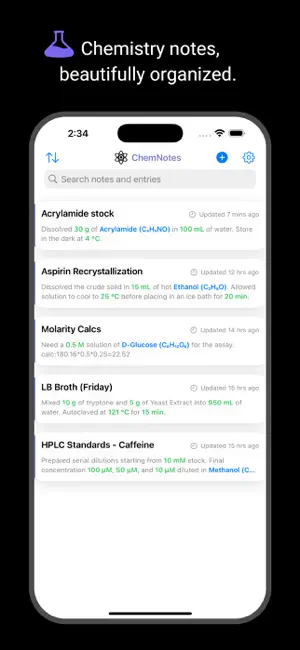

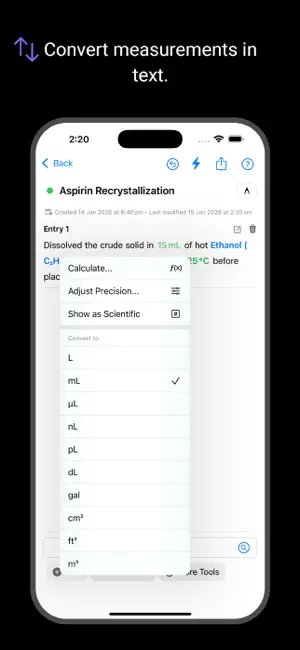

About ChemNotes
ChemNotes is a digital lab notebook designed to streamline how you record research and perform calculations. The app doesn’t treat your notes as static text. Instead, ChemNotes identifies chemicals and measurements as interactive data, bringing essential laboratory tools directly into your writing workflow. Chemical Data & Structures: Type the name of a common chemical (use a hyphen instead of a space e.g. “Sulfuric-acid”, or molecular formulas e.g. H2SO4), and the app allows you to link it to data retrieved from PubChem. You can view 2D chemical structures, molecular formulas, and physical properties, such as molecular weight, directly within your notes. Interactive Measurement Tokens - Simply type a measurement (like "50 mL" or "10 mM") and watch it transform. ChemNotes automatically detects these values, converting them into smart, interactive tokens. - Convenient Conversions: Tap any token to instantly swap between relevant units (e.g., mass to moles, volume to microliters). - Context Aware: If a measurement is linked to a specific chemical, the app utilizes the fetched molecular weight to perform molar conversions automatically. Integrated Lab Tools: Perform common laboratory calculations without ever leaving your notebook. ChemNotes includes a range of tools designed to assist with unit management: Dilution Calculator: Solve C1V1 = C2V2 equations quickly. The calculator handles cross-unit math, allowing you to mix inputs (like mL and L, or M and mM) to help streamline your workflow. - Centrifugation: Easily convert between speed (RPM) and g-force (RCF) based on your specific rotor radius. - Scientific Calculator: A built-in calculator lets you perform math and insert the result directly into your line of text as a new token. Sketch & Draw: For setups that require visual explanation, use the built-in canvas. You can sketch apparatus diagrams or reaction mechanisms directly alongside your text. The drawing tool features customizable stroke widths and colors. Organize your research, calculations, and data in one place with ChemNotes.
What’s new
Version 1.0.4 · Updated March 2, 2026
UI improvements and bug fixes
App privacy
The developer, SOROOSH GHAREHGOZLO, reported these privacy practices to Apple.
Data Not Linked to You
The following data, which may be collected but is not linked to your identity, may be used for the following purposes:
- User Content: Other User Content
- Search History: Search History
Used for: App Functionality
Alternatives to ChemNotes
Looking for apps like ChemNotes? Here are 6 similar apps on the App Store. The highest rated is Geology Homework & Quiz Solver (5.0/5), and all 6 are free to download.
-
 Mineralia
-
 Geology Homework & Quiz Solver
5.0
-
 Chemistry AI: Homework Solver
4.3
-
 Chirality-2
4.6
-
 Bug Identifier Spider Insect
3.9
-
 MedEntry
| App | Rating | Price | Last updated | Compare |
|---|---|---|---|---|
| ChemNotes | – | Free | March 2, 2026 | |
| Mineralia | – | Free | Jul 8, 2026 | Compare |
| Geology Homework & Quiz Solver | 5.0 / 5 (1) | Free | Apr 21, 2026 | Compare |
| Chemistry AI: Homework Solver | 4.3 / 5 (13) | Free | Dec 9, 2025 | Compare |
| Chirality-2 | 4.6 / 5 (14) | Free | Mar 18, 2024 | Compare |
| Bug Identifier Spider Insect | 3.9 / 5 (25) | Free | Jun 28, 2024 | Compare |
| MedEntry | – | Free | Oct 15, 2026 | Compare |
Compare ChemNotes with the top alternatives: ratings, updates, ASO score and keyword gaps →