

My Portfolio: Money & Property
Jesse Thomson Finance iPhoneiPadiPod touch
My Portfolio: Money & Property is a free Finance app for iPhone and iPad by Jesse Thomson. Rated 3.0/5 from 1 ratings. Requires iOS 15.0.
- Rating
- 3.0
- 1 ratings
- Price
- Free
- on the App Store
- Size
- 13 MB
- Age 4+
- Updated
- Aug 21
- 2026 · v1.5.5
Screenshots

About My Portfolio: Money & Property
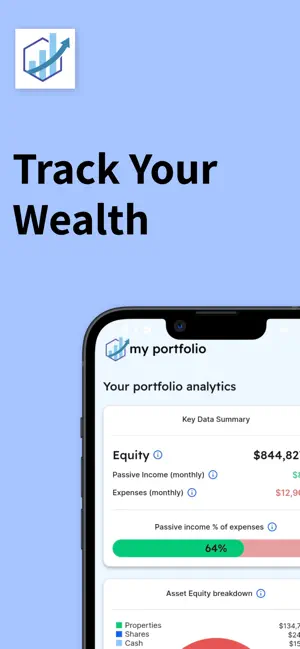
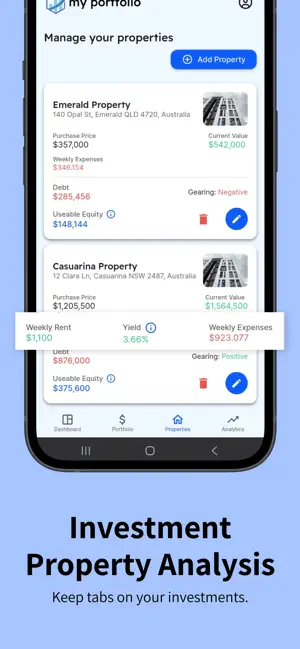
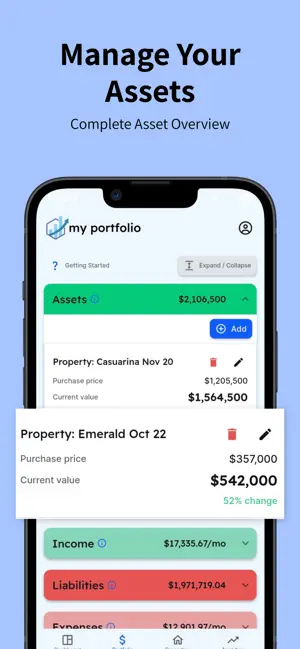
Track your household's money without connecting a bank. You type what you own, what you owe, what comes in and what goes out, and My Portfolio does the arithmetic. No figure comes from a bank, a broker or a listing site. It is free. Every screen, nothing to pay for. CHOOSE WHAT YOU SEE FIRST Pick property, passive income, budgeting or everything, and change it any time. Two people sharing one portfolio each get their own, and nothing is hidden — what moves down stays under "Show everything". PASSIVE INCOME AGAINST YOUR BILLS Your bills are listed cheapest first, and every one your passive income reaches is lit up. Type an amount you could add each period and the gap is divided by it: the climb as periods still to find, and what each bill still needs. No growth rate and no date — long division on two figures you supplied. PROPERTY • Available equity at 80% of value less debt, never below zero — the usual ceiling before lenders mortgage insurance. Your own arithmetic, not what a lender will advance • What it costs to hold: running costs plus loan interest against the rent • Where each repayment goes: the interest part, and the part that comes off what you owe • What each place has been worth: your recorded figures, dated, with the change since the first • What you paid and when, so growth runs from the purchase, not from install day • Point a cash or savings account at a loan that carries a rate, from the property's own screen, and interest is charged on the reduced balance • A screen for each place: value, equity, rent, running costs, debt, gross and net yield • Enter a place with its rent, costs and loan in one sheet, not five screens BUDGETING • Your savings: every income line against the same bills • Your biggest bills, largest first, so one large line is not hidden in a category total • Where the rest of it goes, by category • A household spending more than it earns sees a negative, not a zero YOUR OWN WORDS ON ANY LINE Put a note on anything — "fixed until March 27", "tenant lease ends June". It shows wherever that record is listed, and goes into the export. BUILT FOR AUSTRALIAN HOUSEHOLDS Rent weekly, a wage fortnightly, a bill monthly, rates yearly — type each as it is quoted and the conversion is done. One toggle restates every figure as a week, fortnight or month. Eighteen expense categories built for Australia, and 144 bill names inside them to tap instead of type: council rates, strata fees, body corporate, registration, BAS payments, PAYG instalments, TAFE fees. EXPORT YOUR FIGURES, FREE From More, in two files: a spreadsheet with a sheet each for Assets, Liabilities, Income and Expenses, written as real numbers so a column adds up in Excel, Numbers or Sheets, plus a JSON copy. Both carry only what you typed. SHARE ONE PORTFOLIO Send one invitation and a second person signs in with their own account and edits the same figures. It works once, lapses after 14 days, and can be cancelled — full access, not a partial view. Sign in with email, Google or Apple. No phone number and no SMS codes. Your figures are held on the device, so every screen works offline. HOW IT COUNTS Coverage rounds down and a shortfall rounds up, so no figure flatters you. Press and hold for the exact percentage. Anything without a figure is left out of the totals and reported, never counted as zero. WHAT IT DOES NOT DO • It does not connect to your bank. No consent screen to authorise, and nobody else holding a key to your accounts. • It does not forecast. Nothing is drawn past your last saved position. • It does not say whether you are on track, and does not rate or rank anything. • It is a record-keeping tool, doing arithmetic on figures your household typed. My Portfolio is not financial advice and does not hold an Australian Financial Services Licence. Nothing in the app is for sale. If you paid for anything in an earlier version, deleting your account here does not cancel it — that is done in your Apple account.
What’s new
Version 1.5.5 · Updated August 21, 2026
EVERY PROPERTY HAS ITS OWN SCREEN, AND IT WORKS NOW Open a place and add income, a running cost, a loan, an equity loan or an offset account without leaving it. Tap any row to edit it. A back control and an edit control that look like controls. WHAT EACH PLACE HAS BEEN WORTH Each figure you record is kept with its date, listed newest first, with the change since the first reading. Recording twice in one day replaces that day's figure rather than adding a second. Nothing is drawn past your last saved figure — no trend line, no projection. If you moved across from the old app, the purchase price and date it held are read back, so the history starts when you bought rather than when you installed this. WHAT YOU PAID Enter the purchase price and date on any asset. A NOTE ON ANY LINE The free-text box is back, on every add and edit sheet: "fixed until March 27", "tenant lease ends June", "Dad's share, do not sell". Notes typed in the old app were already held and are now shown. They appear under the name wherever the record is listed, and in the export. OFFSET ACCOUNTS YOU CAN SEE Point a cash or savings account at a loan from the property's own screen, and the account is named on the debt card with its balance instead of being alluded to. An account offsets one loan, so linking one already against another says so first. WHAT A DEBT STARTED AT For a loan carried across from the old app, the starting figure it held is read back and the card states what has come off. It says nothing where the balance has not fallen — redraw and capitalised interest are ordinary, and a negative "paid off" would be an accusation. DATES THAT WERE BLANK "When was this last valued" read a field nothing ever wrote, so it said "Not valued yet" about properties whose figures the app had been holding for a year. It now reads what you actually recorded. AMOUNTS TYPED WITH A COMMA Typing "1234,56" stored one hundred times the amount, silently. Separators are now read by shape rather than by locale. This fixes what you type from here on; it cannot find and repair a figure already stored, so check any amount that looks wrong by a factor of a hundred. ALSO • Every row that opens a sheet now looks like it does • Running cost and debt rows on a property opened nothing, then showed the wrong sheet next time you opened one • The "as at" date came back for households that moved across from the old app • Clearer wording in several places, and the goal switcher looks like what it does
App privacy
The developer, Jesse Thomson, reported these privacy practices to Apple.
Data Linked to You
The following data, which may be collected and linked to your identity, may be used for the following purposes:
- Contact Info: Email Address, Name
Used for: App Functionality
Data Not Linked to You
The following data, which may be collected but is not linked to your identity, may be used for the following purposes:
- Financial Info: Other Financial Info
Used for: App Functionality
Alternatives to My Portfolio: Money & Property
Looking for apps like My Portfolio: Money & Property? Here are 6 similar apps on the App Store. The highest rated is Net Worth Tracker - Worth it (4.6/5), and all 6 are free to download.
-
 Wealth Compass Tracker
-
 Taxtopia
-
 Net Worth Horizon
-
 Money Manager FinanceWallet #1
-
 NetWorth Pro 2
4.5
NetWorth Pro 2
4.5
-
 Net Worth Tracker - Worth it
4.6
Net Worth Tracker - Worth it
4.6
| App | Rating | Price | Last updated | Compare |
|---|---|---|---|---|
| My Portfolio: Money & Property | 3.0 / 5 (1 rating) | Free | August 21, 2026 | |
| Wealth Compass Tracker | – | Free | Oct 28, 2026 | Compare |
| Taxtopia | – | Free | Feb 16, 2026 | Compare |
| Net Worth Horizon | – | Free | Nov 17, 2025 | Compare |
| Money Manager FinanceWallet #1 | – | Free | Sep 15, 2025 | Compare |
| NetWorth Pro 2 | 4.5 / 5 (11) | Free | Dec 10, 2025 | Compare |
| Net Worth Tracker - Worth it | 4.6 / 5 (20) | Free | Oct 28, 2026 | Compare |