

OBDify Car Diagnostic
OBDify Utilities iPhoneiPadiPod touch
OBDify Car Diagnostic is a free Utilities app for iPhone and iPad by OBDify. Requires iOS 15.0. Updated October 17, 2026.
- Price
- Free
- on the App Store
- Size
- 64 MB
- Age 4+
- Updated
- Oct 17
- 2026 · v1.0.18
Screenshots
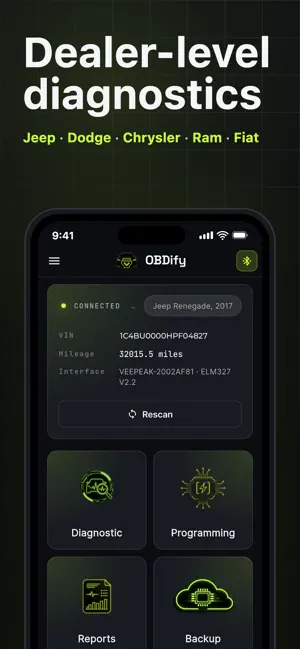
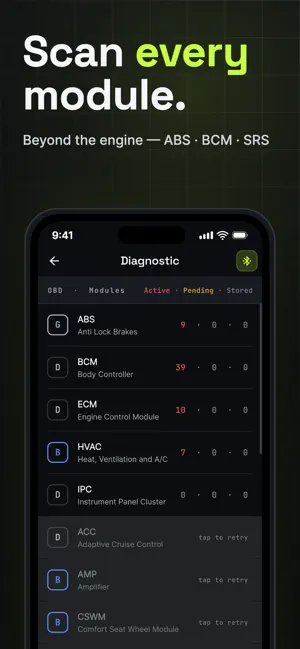
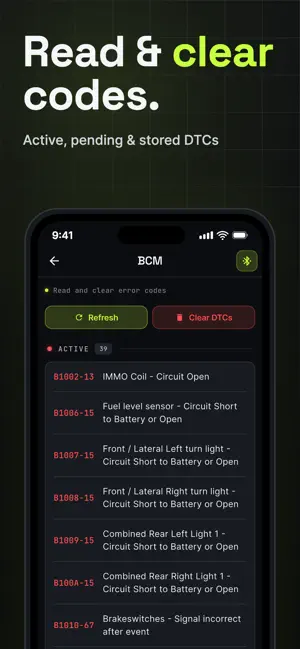

About OBDify Car Diagnostic
OBDify is a professional diagnostic and programming application for FCA / Mopar vehicles — Jeep, Dodge, RAM and Chrysler. Connect a compatible Bluetooth OBD-II adapter (e.g. ELM327, vLinker MS or OBDLink MX+) for dealer-level access to module information, fault codes, live data, actuator tests and 175+ guided procedures. The app communicates directly with supported control modules and offers clear, structured tools for reading faults, monitoring live data, testing components, editing configurations and following guided service procedures. With its intuitive interface, OBDify is suitable for both drivers and workshops who need fast, reliable access to FCA diagnostics — no laptop, no dealer visit. ---------- PLANS FREE - Read configuration parameters - Read error codes (DTCs) - Shareable diagnostic reports PREMIUM — subscription, unlimited vehicles - Everything in Free - Read & clear error codes - Live data monitoring - Actuator tests - Works on every car you plug into VEHICLE UNLOCK — one-time purchase, one vehicle, no subscription - Everything in Premium, for one vehicle - Edit configuration parameters - Guided service procedures - Configuration backup & restore Choose Premium for core diagnostics across unlimited cars, or unlock the complete app for a single vehicle with a one-time payment — no subscription required. ---------- SUPPORTED VEHICLES OBDify works with OBD-II compatible vehicles, with extended functionality for: Jeep, Dodge, RAM, Chrysler, Alfa Romeo, Fiat, Lancia, Maserati and other FCA-based platforms. For support: [email protected] ---------- SUBSCRIPTION INFORMATION - OBDify Premium is an auto-renewable subscription, available in Monthly and Annual plans - A free trial is available with each plan - The exact price and trial length are shown in the app, in your local currency, before you confirm - Subscription automatically renews unless cancelled at least 24 hours before the end of the current period - Manage or cancel anytime in your device Account Settings - Vehicle Unlock is a one-time purchase, not a subscription Privacy Policy: https://obdify.net/privacy/ Terms of Use (EULA): https://www.apple.com/legal/internet-services/itunes/dev/stdeula/ Vehicle Use Terms: https://obdify.net/terms/
What’s new
Version 1.0.18 · Updated October 17, 2026
vLinker MS • vLinker MS now also reaches modules that need the grey adapter, so you don't have to switch to it. Live data • Charts scroll smoothly and are taller, with clear labels for the window edges and min and max values. • Full screen: choose a chart window from 5 seconds to 5 minutes, and swipe to the next chart. • Long parameter names no longer hide under the full screen buttons. • With one or two parameters, the tiles fill the screen. • A single failed reading no longer changes the value you see. • If your adapter loses its settings, Live data stops and asks you to rescan instead of showing errors. Fault codes • The app explains why fault codes could not be read, and declining a cable switch no longer looks like an error. • The app asks for the cable switch as soon as you open a module. • Fault codes are read once per visit to a module and are cleared when you disconnect or switch vehicles. • Reports mark modules that could not be read instead of calling the vehicle healthy. Other • The Security Gateway (SGW) row on the vehicle card now says the bypass cable is needed for changes. • Clearer message after a partial backup. • The procedures list stays on screen when you return to the tab. • Fixed a crash when you declined a cable switch while saving changes to a module. • Fixed the links in adapter error messages and long labels in the module tabs. • Bug fixes and improvements.
App privacy
The developer, OBDify, reported these privacy practices to Apple.
Data Used to Track You
The following data may be used to track you across apps and websites owned by other companies:
- Purchases: Purchase History
- Identifiers: Device ID
- Usage Data: Product Interaction
Data Linked to You
The following data, which may be collected and linked to your identity, may be used for the following purposes:
- Usage Data: Product Interaction, Other Usage Data
- Purchases: Purchase History
- Contact Info: Email Address
- Identifiers: User ID
Used for: Analytics, App Functionality
Data Not Linked to You
The following data, which may be collected but is not linked to your identity, may be used for the following purposes:
- Purchases: Purchase History
- Identifiers: Device ID
- Usage Data: Product Interaction
- Diagnostics: Crash Data, Performance Data
- Location: Precise Location
Used for: Third-Party Advertising, Analytics, App Functionality
Alternatives to OBDify Car Diagnostic
Looking for apps like OBDify Car Diagnostic? Here are 6 similar apps on the App Store. The highest rated is LELink Scanner (5.0/5), and all 6 are free to download.
-
 OBDify - OBD2 Car Scanner
-
 OBD2 Car Scanner – Torque FixD
4.8
OBD2 Car Scanner – Torque FixD
4.8
-
 Multiecuscan
2.8
Multiecuscan
2.8
-
 OBD2 AI SKANR: Car Scanner ELM
-
 Car Scanner ELM OBD2 327
3.5
Car Scanner ELM OBD2 327
3.5
-
 LELink Scanner
5.0
LELink Scanner
5.0
| App | Rating | Price | Last updated | Compare |
|---|---|---|---|---|
| OBDify Car Diagnostic | – | Free | October 17, 2026 | |
| OBDify - OBD2 Car Scanner | – | Free | Oct 21, 2026 | Compare |
| OBD2 Car Scanner – Torque FixD | 4.8 / 5 (5) | Free | Jan 5, 2026 | Compare |
| Multiecuscan | 2.8 / 5 (14) | Free | Aug 11, 2026 | Compare |
| OBD2 AI SKANR: Car Scanner ELM | – | Free | Mar 6, 2026 | Compare |
| Car Scanner ELM OBD2 327 | 3.5 / 5 (18) | Free | Dec 16, 2025 | Compare |
| LELink Scanner | 5.0 / 5 (1) | Free | Mar 26, 2025 | Compare |