

MakQuick
MAKNON PRIVATE LIMITED Business iPhoneiPadiPod touch
MakQuick is a free Business app for iPhone and iPad by MAKNON PRIVATE LIMITED. Requires iOS 13.0. Updated October 18, 2026.
- Price
- Free
- on the App Store
- Size
- 66 MB
- Age 4+
- Updated
- Oct 18
- 2026 · v2.0.38
Screenshots
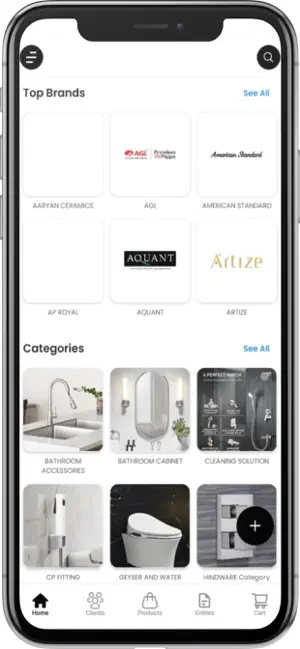


About MakQuick
Create and Share Quotations Instantly – From 5 Lakh+ Products This app is designed specifically to help businesses create professional quotations and send them to clients instantly through WhatsApp or other platforms. With a vast catalog of more than 5 lakh products, you can create detailed and customized quotations in just a few taps. Whether you're a wholesaler, retailer, distributor, or a service provider, this app makes it easier than ever to handle your day-to-day sales processes. Key Features: Add Products with Ease: Add new products to your catalog quickly, complete with descriptions, pricing, images, and categories. You can also create and manage your own custom product categories for better organization and faster quotation building. Create Client Profiles: Easily create and manage client details within the app. Store important information like name, contact number, email, company name, and address—so you never lose track of your leads or customers. Generate Quotations in Seconds: Once products and client details are added, generating a quotation is as simple as selecting items and sending. No paperwork, no delays—just fast, accurate, and professional quotations sent directly to your clients. Selections Made Simple: You can create product selections or combos that your clients can choose from. This feature is great for showcasing tailored offers or packages based on customer needs. Send via WhatsApp or Share Anywhere: With built-in sharing options, you can send your quotations or product selections directly to clients via WhatsApp, email, or any other communication platform with just one tap. Manage Your Clients & Products in One Place: No need for spreadsheets or multiple apps. All your client information, products, categories, and quotations are stored and managed within the app—securely and efficiently. Create Your Own Categories: Organize your products better by creating custom categories. This makes it easier to find items, build quotations, and present selections in a more professional way. Whether you're handling 10 or 1000 clients, this app is designed to save your time and streamline your sales process. From the moment a lead shows interest, you can quickly build a quotation, send it across, and close the deal faster.
What’s new
Version 2.0.38 · Updated October 18, 2026
Product Alternate Names: Add personalized alternate names to products for easier identification and faster searching. Custom Charges: Create custom charge types and conveniently add them to quotations as needed. Improved UI & Experience: Enjoy a refreshed interface with a cleaner design, smoother navigation, and an improved user experience.
App privacy
The developer, MAKNON PRIVATE LIMITED, reported these privacy practices to Apple.
Data Linked to You
The following data, which may be collected and linked to your identity, may be used for the following purposes:
- Contact Info: Email Address, Name, Phone Number, Physical Address
- User Content: Photos or Videos, Emails or Text Messages
Used for: Analytics, Product Personalization, App Functionality
Data Not Linked to You
The following data, which may be collected but is not linked to your identity, may be used for the following purposes:
- Financial Info: Payment Info
- Contact Info: Other User Contact Info
- Identifiers: User ID, Device ID
- Diagnostics: Crash Data, Performance Data, Other Diagnostic Data
Used for: App Functionality
Alternatives to MakQuick
Looking for apps like MakQuick? Here are 6 similar apps on the App Store.
-
 Kohler Elite Konnect
-
 VisualEz: AI Tile Visualizer
-
 GTI Directory
-
 SixOrbit
-
 Welmica
-
 OTUS: 360° Tile Visualizer
| App | Rating | Price | Last updated | Compare |
|---|---|---|---|---|
| MakQuick | – | Free | October 18, 2026 | |
| Kohler Elite Konnect | – | Free | May 21, 2026 | Compare |
| VisualEz: AI Tile Visualizer | – | Free | Sep 8, 2026 | Compare |
| GTI Directory | – | Free | Mar 26, 2026 | Compare |
| SixOrbit | – | Free | Oct 15, 2026 | Compare |
| Welmica | – | Free | Sep 1, 2026 | Compare |
| OTUS: 360° Tile Visualizer | – | Free | Oct 17, 2026 | Compare |
Compare MakQuick with the top alternatives: ratings, updates, ASO score and keyword gaps →