

WordClock Widget - Text Clock
Tobias Weissert Utilities iPhoneiPadiPod touch
WordClock Widget - Text Clock is a paid Utilities app for iPhone and iPad by Tobias Weissert. Rated 4.5/5 from 2 ratings. Requires iOS 17.0.
- Rating
- 4.5
- 2 ratings
- Price
- 1.99 USD
- on the App Store
- Size
- 1 MB
- Age 4+
- Updated
- Feb 24
- 2026 · v1.1.6
Screenshots

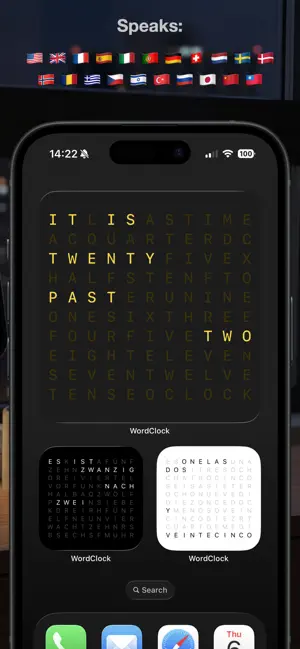

About WordClock Widget - Text Clock
Turn your iPhone into an elegant word clock that displays time in beautiful typography. See the current time expressed in natural language, right on your home screen. BEAUTIFUL TYPOGRAPHY Word Clock transforms the way you see time. Instead of traditional digits, time is displayed as elegant words arranged in a grid. Each minute, the display updates to show the current time in a visually stunning way. MULTIPLE LANGUAGES Choose from 20+ languages including English, German, French, Spanish, Italian, Japanese, Chinese, and more. Each language has its own unique way of expressing time, making Word Clock perfect for language learners and multilingual users. CUSTOMIZABLE THEMES Personalize your clock with beautiful themes. Choose from light, dark, neon, and color-themed options. Each theme features carefully selected colors that make the active words pop while keeping inactive words subtle. HOME SCREEN WIDGET Keep time visible at all times with beautiful home screen widgets. Available in small and large sizes, Word Clock widgets update automatically and blend seamlessly with your home screen design. STAND BY MODE Perfect for nightstand use, Word Clock supports StandBy mode on iPhone. Display time elegantly while your phone charges, creating a beautiful ambient clock for your bedroom. KEY FEATURES • Word-based time display in elegant typography • Support for 20+ languages • Multiple beautiful themes • Home screen widgets (small and large) • StandBy mode support • Real-time updates every minute • Clean, minimalist interface • No ads, no subscriptions PRIVACY FIRST Word Clock doesn't collect any data. Everything runs locally on your device. No tracking, no analytics, no external servers. Whether you're looking for a unique way to display time, want to practice reading time in different languages, or simply appreciate beautiful design, Word Clock brings elegance to your iPhone. Start experiencing time differently today!
What’s new
Version 1.1.6 · Updated February 24, 2026
Bug fixes and small improvements.
App privacy
The developer, Tobias Weissert, reported these privacy practices to Apple.
Data Not Collected
The developer does not collect any data from this app.
Alternatives to WordClock Widget - Text Clock
Looking for apps like WordClock Widget - Text Clock? Here are 6 similar apps on the App Store. The highest rated is Word Clock · Text Time Widget (5.0/5), and 3 of the 6 are free to download.
-
 Word Clock Pro: Widget
4.0
Word Clock Pro: Widget
4.0
-
 Word Clock · Text Time Widget
5.0
Word Clock · Text Time Widget
5.0
-
 Text Clock Widget
-
 A Word Clock
-
 Custom Word Clock - TextTime
5.0
Custom Word Clock - TextTime
5.0
-
 Minimal Countdown Pro
| App | Rating | Price | Last updated | Compare |
|---|---|---|---|---|
| WordClock Widget - Text Clock | 4.5 / 5 (2 ratings) | 1.99 USD | February 24, 2026 | |
| Word Clock Pro: Widget | 4.0 / 5 (2) | 3.99 USD | Sep 8, 2026 | Compare |
| Word Clock · Text Time Widget | 5.0 / 5 (2) | Free | Dec 2, 2025 | Compare |
| Text Clock Widget | – | 0.99 USD | Sep 30, 2026 | Compare |
| A Word Clock | – | 0.99 USD | Oct 2, 2026 | Compare |
| Custom Word Clock - TextTime | 5.0 / 5 (4) | Free | Sep 9, 2026 | Compare |
| Minimal Countdown Pro | – | Free | Jul 22, 2026 | Compare |