

Genie Crystals
Arunesh Dwivedi Graphics & Design iPhoneiPadiPod touch
Genie Crystals is a free Graphics & Design app for iPhone and iPad by Arunesh Dwivedi. Requires iOS 18.4. Updated March 22, 2026.
- Price
- Free
- on the App Store
- Size
- 6 MB
- Age 4+
- Updated
- Mar 22
- 2026 · v3.0
Screenshots
About Genie Crystals
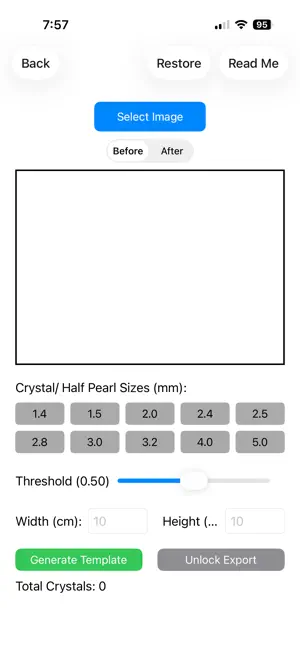
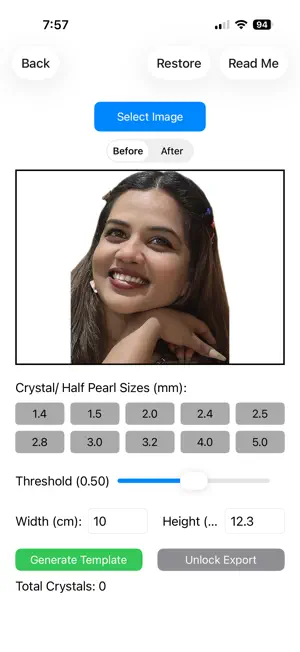
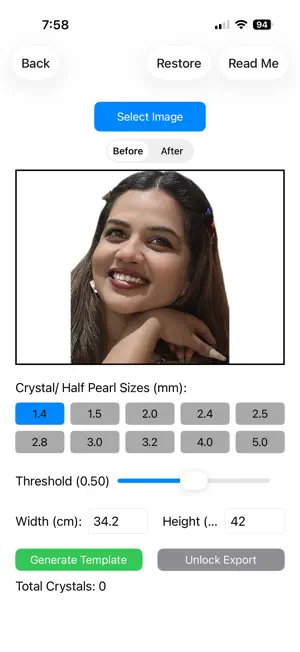
Genie Crystals turns your favorite photos into stunning crystal and half-pearl portrait templates — the kind you see in luxury mosaic artwork, framed portraits, and handcrafted gifts. Simply pick a photo, let the built-in AI analyse it, and watch your image transform into a precise dot-placement template ready to print and bring to life with real crystals. How it works Upload any photo from your gallery. The image editor lets you fine-tune brightness, contrast, sharpness, and saturation before generation. Remove the background with a single tap and set a custom background colour using the built-in colour wheel — great for isolating a face against a clean black backdrop for maximum crystal impact. Once your image is ready, Genie Crystals' AI engine analyses the tonal distribution across every pixel and suggests three key settings automatically: Crystal Density — how many crystals fill the frame overall Contour Separation — how dramatically the crystal density shifts between tonal zones, creating visible depth Contrast Layers — how many distinct brightness bands the AI detected in your photo Tap Apply and generate. The AI suggestions are calibrated to your specific image, not a generic preset — bright portraits get different treatment from dark ones, faces are handled differently from flat graphics. Zoom, pan, and crop Pinch to zoom and drag to reposition your photo inside the canvas before generating. Only the visible portion is used — so you can frame exactly the crop you want without editing the original. Your PDF template After generating, purchase the Unlock Export to download a four-page PDF: Page 1 — your original source image for reference Page 2 — the monochrome working template: black background, white dots at exact physical size Page 3 — a colour-coded version with each crystal size shown in a different colour Page 4 — crystal counts per size, so you know exactly how many to order Print at Actual Size (100%) — not Fit to Page — and the template matches your frame dimensions to the millimetre. Default frame size is A3 (29.7 × 42 cm), the ideal starting size for a crystal portrait. Multiple crystal sizes Choose from ten standard crystal and half-pearl sizes (1.4mm to 5.0mm). The AI-powered placement engine prevents overlap between crystals of different sizes by checking actual physical radii — so a 3.0mm crystal next to a 1.4mm crystal will never touch. Saved templates Every purchased template is saved to iCloud and accessible from My Templates at any time. Genie Crystals is made by the same team behind Genie Strings — the string art portrait generator trusted by crafters around the world.
What’s new
Version 3.0 · Updated March 22, 2026
This release introduces a completely rebuilt AI analysis engine that makes Genie Crystals smarter than ever. AI-powered suggestions When you load or re-edit a photo, the app now automatically analyses the full tonal distribution of your image and suggests three values — Crystal Density, Contour Separation, and the number of Contrast Layers — tuned specifically to your photo. Tap Apply to use them instantly, or adjust manually. Percentile-based contrast layers The AI now divides your image's brightness range into equal-population segments rather than fixed boundaries. This means every contrast layer — from highlights to deep shadows — contains a meaningful share of your image's pixels, ensuring rich tonal gradation across the entire portrait. Overlap-free multi-size placement Crystal placement now checks the actual physical radius of each crystal, not a fixed spacing. Mixing sizes like 1.4mm and 3.0mm no longer produces overlaps. Zoomable template canvas The generated template is now fully pan-and-zoomable — pinch in to inspect individual crystal positions before exporting. PDF orientation fix All four PDF pages now render in the correct orientation regardless of the original photo's EXIF rotation. UI refinements A3 (29.7 × 42 cm) is now the default frame size. The AI suggestion banner collapses after you apply settings, keeping the screen clean. Crystal sizes and slider values reset automatically when a new photo is loaded.
App privacy
The developer, Arunesh Dwivedi, reported these privacy practices to Apple.
Data Not Collected
The developer does not collect any data from this app.
Alternatives to Genie Crystals
Looking for apps like Genie Crystals? Here are 6 similar apps on the App Store. The highest rated is StoneLab (5.0/5), and all 6 are free to download.
-
 String Art Maker - AI Craft
-
 StoneLab
5.0
StoneLab
5.0
-
 Spatar: Photo String Art
-
 Cordsy - String Art Guide DIY
-
 Halftone dot art
5.0
Halftone dot art
5.0
-
 Portrait String Art Maker
5.0
Portrait String Art Maker
5.0
| App | Rating | Price | Last updated | Compare |
|---|---|---|---|---|
| Genie Crystals | – | Free | March 22, 2026 | |
| String Art Maker - AI Craft | – | Free | Sep 9, 2026 | Compare |
| StoneLab | 5.0 / 5 (1) | Free | Oct 22, 2026 | Compare |
| Spatar: Photo String Art | – | Free | May 26, 2026 | Compare |
| Cordsy - String Art Guide DIY | – | Free | Apr 20, 2026 | Compare |
| Halftone dot art | 5.0 / 5 (1) | Free | Jul 16, 2025 | Compare |
| Portrait String Art Maker | 5.0 / 5 (4) | Free | Oct 22, 2026 | Compare |
Compare Genie Crystals with the top alternatives: ratings, updates, ASO score and keyword gaps →