

Foldie Links
Dr. Garbers Softwareentwicklung Productivity iPhoneiPadiPod touchMac
Foldie Links is a free Productivity app for iPhone and iPad by Dr. Garbers Softwareentwicklung. Requires iOS 18.4. Updated December 14, 2025.
- Price
- Free
- on the App Store
- Size
- 9 MB
- Age 4+
- Updated
- Dec 14
- 2025 · v1.2
Screenshots


About Foldie Links
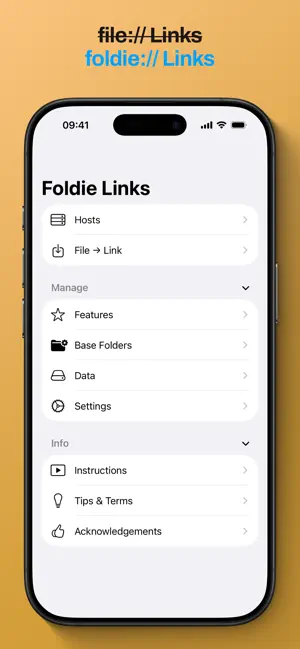
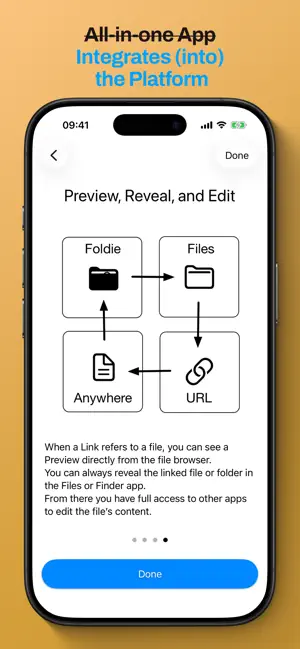
Foldie Links lets you create links to your personal files and folders. You can embed these links in text-based documents and access them with a simple tap or mouse click. The app then opens and displays the linked file or folder. You can create links either manually or using the built-in file browser. You can embed links in documents from apps including: - Apple Notes and Notes from other companies. - Apple Pages, Keynote, and Numbers. - Microsoft Word, PowerPoint, and Excel. Why is this useful? You can quickly and easily access the files that are relevant to you in a specific context. For example, you can: - Create a list of downloaded PDFs for a school project, display them as needed, and use the links as source citations. - Create a gig list of scores for an orchestral performance as links and quickly open the next score with a tap. - Reference files in shared (read-only) folders as well as personal annotation files for a work project and access them from a presentation when needed for discussion. How does it work? You create so-called Base Folders in the app using drag and drop or via the file dialog. This grants the app access to the folder and all its subfolders. In the built-in file browser, you can view the files and subfolders of the Base Folder and create links to them. Subelements are referenced using a relative file path. How secure is it? When creating links to files in cloud services, you often have to create a public link to the files. With Foldie Links, you can create links without making a file publicly accessible on the internet. The permission associated with the Base Folders applies only to the app and only on the specific device. Is it foolproof to use? Generally, the app only accesses your file system in read-only mode. But you can easily be redirected to the not-so-foolproof Files or Finder app. Working with the shared file system and links also requires particular care because the file system can change, and links can become invalid or change their meaning. Can Foldie Links be used with multiple devices? Yes. You just need to set up the basic folders similarly on the other device. It's best to use a few basic folders and several virtual folders. Data stored in the app is synced via iCloud. Productivity Packs The app basically works without them. However, the extra packs offer additional benefits. For example, you can: - Create link lists, embed links directly in notes, link links together using metadata, and use widgets. - Simulate symbolic links and create overlays with virtual folders. - Use the Shortcuts app to process links or access the app (for advanced users only).
What’s new
Version 1.2 · Updated December 14, 2025
Append #t=5 to audio or video links and #p=5 to pdf links to preview specific media position. And bug fixes.
App privacy
The developer, Dr. Garbers Softwareentwicklung, reported these privacy practices to Apple.
Data Not Collected
The developer does not collect any data from this app.
Alternatives to Foldie Links
Looking for apps like Foldie Links? Here are 6 similar apps on the App Store. The highest rated is X Widget (5.0/5), and 4 of the 6 are free to download.
-
 SupaDots
-
 Linkbinder: URL Organizer
-
 exBrowser
-
 Link and Bookmark Organizer
-
 Linkloft - Link & URL Manager
-
 X Widget
5.0
X Widget
5.0
| App | Rating | Price | Last updated | Compare |
|---|---|---|---|---|
| Foldie Links | – | Free | December 14, 2025 | |
| SupaDots | – | Free | Aug 21, 2026 | Compare |
| Linkbinder: URL Organizer | – | Free | Aug 17, 2026 | Compare |
| exBrowser | – | 4.99 USD | Dec 4, 2025 | Compare |
| Link and Bookmark Organizer | – | Free | Mar 6, 2026 | Compare |
| Linkloft - Link & URL Manager | – | Free | Jun 18, 2026 | Compare |
| X Widget | 5.0 / 5 (4) | 0.99 USD | Apr 16, 2025 | Compare |
Compare Foldie Links with the top alternatives: ratings, updates, ASO score and keyword gaps →