

Trackers - Time Tracking
Nutty Pixel Productivity iPhoneiPadiPod touchMac
Trackers - Time Tracking is a free Productivity app for iPhone and iPad by Nutty Pixel. Requires iOS 16.4. Updated October 22, 2026.
- Price
- Free
- on the App Store
- Size
- 21 MB
- Age 4+
- Updated
- Oct 22
- 2026 · v2026.9
Screenshots



About Trackers - Time Tracking
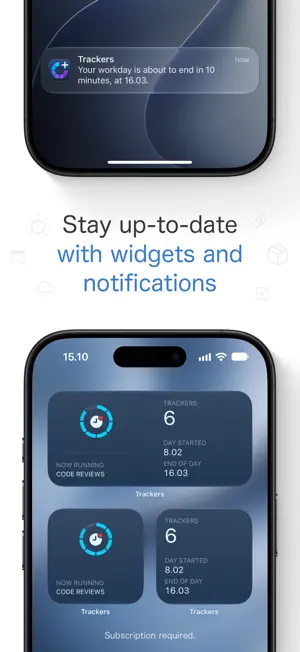
Track your work hours with Trackers! Start with a one-month free trial. Trackers makes it easy to track your work during the day. Create new trackers and switch from one tracker to another as you move from one task to the next. Tracking the time spent on tasks is helpful when you’re required to report the time afterwards. Time tracking is also useful when your work time is flexible and you want to make sure you are meeting your work requirement and not accidentally exceeding it! Trackers can additionally estimate when your workday will end and notify you when it’s time to wrap things up for the day. A subscription is required for using Trackers. Choose either a monthly or a yearly subscription. A single subscription provides access to all app features and includes Trackers on all supported platforms. You can begin a subscription when you first launch Trackers on any device. All first-time users start with a one-month free trial. MAIN FEATURES: • Track time spent on tasks with individual trackers. Each tracker can be quickly renamed or adjusted. Add a link or a note, or even review the entire activity history of the tracker. • Easily recreate a recent tracker when continuing with a task from previous days. • Define your workday’s length or set a schedule if your workdays differ in length. • See how long you’ve worked during the day and how much time remains. Tap the remaining time to see when your workday will end. • Get notified when your workday ends (or is about to) so you can avoid accidentally working overtime. • Stay up-to-date on the progress of your workday at a glance with widgets. • The Workday Timeline shows what happened during the day. • View past workdays and their trackers in the Archive. • Keep an eye on your work-life balance with Insights. • Set Daily Trackers if you have tasks which repeat each day. • Trackers fully supports light and dark appearance. Let it be based on your device’s appearance or choose the appearance manually. Widget appearance can be set separately. • Share tasks directly from any web browser to Trackers. HOW TRACKERS WORKS: In the simplest scenario, you’ll create trackers as you go about your workday. Whenever you switch from one task to another, you would also switch to a new tracker. When your workday is done you can see how long you’ve spent on each task. Starting a new workday in Trackers clears out the old trackers so you can start from a clean slate. MORE INFORMATION: • A subscription unlocks all app features. • Available on iPhone, iPad and Mac, with a single subscription. • Data is synced via iCloud. Use Trackers on whichever device is most suitable. • Entirely private. All your data is stored on your own devices and in iCloud. Your use of Trackers is not tracked in any way. Trackers is being developed by a single human in Oulu, Finland. No LLMs or “AI” have been used at any stage of development. Privacy Policy: https://gettrackers.app/privacy-policy/ Terms of Use: https://gettrackers.app/terms-of-use/
What’s new
Version 2026.9 · Updated October 22, 2026
Updated look for Workday Timeline and tracker’s Activity History! IMPROVEMENTS: • Workday Timeline and tracker’s Activity History now have an updated look and they more clearly indicate when work was happening. • Workday Progress widget updated with an indicator matching the app icon style. • Workdays without a length can now be ignored from Insights. • Loading of archived workdays has been optimised and the Archive view now opens faster (with larger archives). • Added context menu actions to workday view and Archive for copying a tracker’s link and for opening the link in browser. • Refinements to onboarding and subscription process. FIXES: • Corrected a data sync issue which could lead to losing trackers on an archived workday, on the device where changes are synced to.
App privacy
The developer, Nutty Pixel, reported these privacy practices to Apple.
Data Not Linked to You
The following data, which may be collected but is not linked to your identity, may be used for the following purposes:
- Purchases: Purchase History
- Diagnostics: Crash Data, Performance Data
Used for: Analytics, App Functionality
Alternatives to Trackers - Time Tracking
Looking for apps like Trackers - Time Tracking? Here are 6 similar apps on the App Store. The highest rated is Project Time Tracker: Hours (5.0/5), and all 6 are free to download.
-
 Project Time Tracker: Hours
5.0
-
 AI Token Limits
-
 Stunden Rechner: Zeiterfassung
-
 TTT - The Time Tracker
-
 FlexiTrack - Hours Tracker
-
 QR Analyzer
| App | Rating | Price | Last updated | Compare |
|---|---|---|---|---|
| Trackers - Time Tracking | – | Free | October 22, 2026 | |
| Project Time Tracker: Hours | 5.0 / 5 (2) | Free | Oct 18, 2026 | Compare |
| AI Token Limits | – | Free | Oct 30, 2026 | Compare |
| Stunden Rechner: Zeiterfassung | – | Free | Jun 8, 2026 | Compare |
| TTT - The Time Tracker | – | Free | Oct 6, 2026 | Compare |
| FlexiTrack - Hours Tracker | – | Free | May 13, 2026 | Compare |
| QR Analyzer | – | Free | Jun 24, 2026 | Compare |