

Homebound Check-In
Hudson Schmidt Travel iPhoneiPadiPod touchApple Watch
Homebound Check-In is a free Travel app for iPhone and iPad by Hudson Schmidt. Rated 5.0/5 from 16 ratings. Requires iOS 26.0. Updated October 11, 2026.
- Rating
- 5.0
- 16 ratings
- Price
- Free
- on the App Store
- Size
- 28 MB
- Age 4+
- Updated
- Oct 11
- 2026 · v1.5.2
Screenshots

About Homebound Check-In
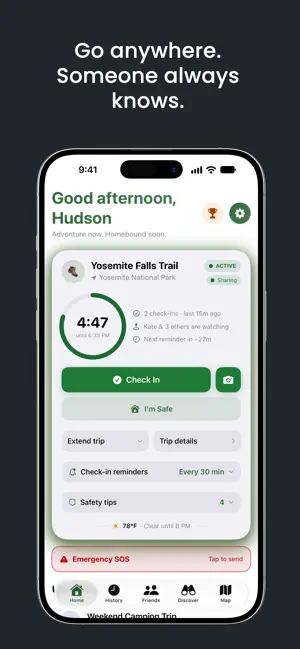
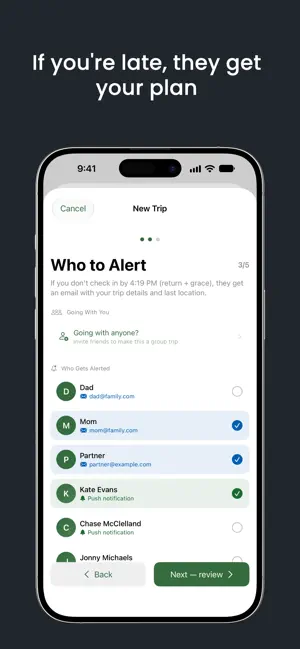
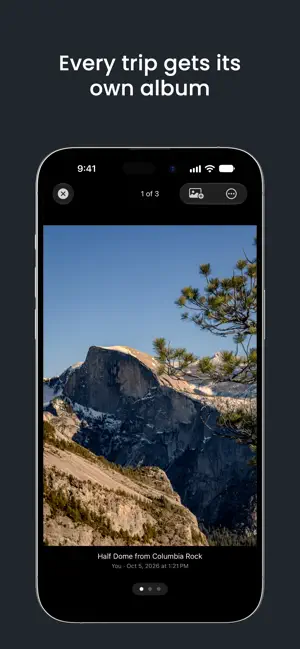
Homebound is a personal safety app for outdoor adventurers. Hiking, climbing, diving, or exploring the backcountry, Homebound makes sure someone always knows where you are and when to expect you back. Share your live location, find your group nearby, and run a trip from your wrist with Homebound for Apple Watch. It fits any time you want someone to know your plan: a night walk back to the dorm, kids on a field trip, or a night out with friends. Share your plan with someone you trust. How It Works 1. Create a Trip – Your activity, location, and return time. No signal? Plan it anyway; it activates when you reconnect. 2. Add Safety Contacts – Emergency contacts or Homebound friends. 3. Check In – Tap to start when you head out. 4. Check Out – Mark yourself safe when you're back. If you miss your return time plus your grace period, your contacts are alerted with your trip details and last known location. KEY FEATURES Homebound for Apple Watch • On Your Wrist – Check in, check out, extend your return time, send an SOS, or find someone in your group without reaching for your phone. • Glanceable Countdown – See the time you have left on your watch face, and get a tap when a check-in is close, even out of service. Trip Planning • Activity Types – Hiking, climbing, skiing, diving, boating, and more, each with its own safety tips. • Quick Trips – Start the trips you repeat in one tap, from the app, Siri, or a Shortcut. • Grace Periods, Reminders & Quiet Hours – A buffer before overdue alerts, and control over when you're reminded. • Discover – Places and activities nearby with current conditions, from trailheads to concerts. Safety Notifications • SOS – Send your safety contacts an immediate alert during a trip, with your last known location and a note. • Check On Me – Friends watching your trip can check on you or send a short message, and you can answer in one tap. • Alerts That Reach You – Overdue and SOS alerts break through Focus and Do Not Disturb. • Real-Time Updates – Contacts are notified when you start, check in, extend, or finish. Trip Photos • Check-In Photos – Add a photo when you check in. Every trip gets its own album, and you choose which photos friends see. • Share Cards – Share a finished trip with seven designs, from a retro park poster to an embroidered trail patch. Live Location & Circles • Live Location Sharing – Optionally share your real-time location during a trip, with a trail of where you've been. • Circles – Share your live location with exactly the friends you choose, for a day, 3 days, or a week, and stop anytime. Group Adventures • Plan Together – Start a group trip, add people even after it's underway, and see everyone on one live map. • Find – An arrow and a distance lead you to anyone in your group, and a meetup pin shows everyone where to meet. • Finish On Your Own Time – Each person finishes individually, and everyone's notified as each one makes it home. Friends & Social • Follow friends' adventures in a photo-first feed with a map of each route, and add them as safety contacts. • Privacy Controls – Choose exactly what friends can see. Report or block anyone you'd rather not see. • Adventure Log – Past trips, stats, safety score, and achievements as you go. Privacy First • Sharing is always opt-in: share live during a trip, or with a Circle for a set time, and stop anytime. We never track you in the background unless you turn it on. • Delete everything anytime, or download your full history. Homebound is not an emergency service. It alerts the people you choose. It does not contact 911, search and rescue, or any public emergency service, and delivery depends on connectivity. In an emergency, call your local emergency number. Terms of Service: https://www.homeboundapp.com/termsofservice/ Privacy Policy: https://www.homeboundapp.com/privacypolicy/ Terms of Use (EULA): https://www.apple.com/legal/internet-services/itunes/dev/stdeula/
Ratings & reviews
5.0
16 ratings
What’s new
Version 1.5.2 · Updated October 11, 2026
Trips Now Have Photos - Add a photo when you check in by tapping the camera icon on the Check In button. Every trip gets its own album, and you can add more photos after you get home. The friends feed has a refreshed, photo-first look with a map of each trip's route, and you pick which photos your friends see. Friends Can Check On You - The people watching your trip can now check on you or send a short message. Reply in one tap with "I'm okay", a quick message you wrote yourself, or a check-in, and it all shows in your trip timeline. Write your own quick messages in Settings > Friends > Quick messages. Find Friends Nearby - On a group trip, Find points an arrow at anyone in your group and shows how far away they are, on iPhone or Apple Watch. You can also set a meetup spot, and everyone gets an arrow to it. Seven New Share Cards - Share a finished trip with seven new designs, from a retro park poster to an embroidered trail patch. Swipe between them before you share. Steadier Live Location - Live location is steadier, shows how recent each position is, and draws your trail on the map. It also stops by itself when the trip ends. SOS Sends Your Location Right Away - SOS now sends your last known location the moment you tap it, along with how old it is. If that location was missing or you've moved since, your contacts get a fresh one. More Improvements - Trips that start close together no longer hide each other on the map. Nearby pins group into one, and trip maps draw your route through each check-in. - Changes you make offline sync more reliably. Anything that can't sync shows up in a new Sync Issues screen where you can try again. - Tap a friend's photo in the feed or comments to open their profile, then tap their photo to see it larger. - Quick Trips use the same activity and contact pickers as the trip planner, plus a new emoji picker. - Activities Discover hides because of the weather now have a Show anyway button. - Your Apple Watch buzzes when a trip starts, and the trip moves up in the Smart Stack. - Overdue and SOS alerts break through Focus, and so do check-in reminders on driving trips. - Larger text sizes, VoiceOver, and Reduce Motion work across more of the app. Bug And Performance Fixes - Exporting your data works again, and a brief network hiccup no longer signs you out. Plus fixes for live location pins, group check-in alerts, multi-day countdowns, the Apple Watch corner complication, and a range of smaller ones. Please report any bugs you find so they can be fixed quickly. Use Settings > Help Make Homebound Better > Report a Bug. - Fixed offline trip bug, UI bugs, and made color changes on trip status changes more reliable. Follow our socials: - Instagram: @homebound.app - Threads: @homebound.app - TikTok: @homeboundapp Share feedback requests here: https://homebound.canny.io/feature-requests Report bugs here: https://homebound.canny.io/bugs
App privacy
The developer, Hudson Schmidt, reported these privacy practices to Apple.
Data Linked to You
The following data, which may be collected and linked to your identity, may be used for the following purposes:
- Usage Data: Product Interaction
- Diagnostics: Other Diagnostic Data
- Location: Precise Location, Coarse Location
- Contact Info: Email Address, Name
- User Content: Photos or Videos, Emails or Text Messages, Other User Content
- Purchases: Purchase History
- Contacts: Contacts
- Identifiers: User ID, Device ID
- Other Data: Other Data Types
Used for: Analytics, Product Personalization, App Functionality
Data Not Linked to You
The following data, which may be collected but is not linked to your identity, may be used for the following purposes:
- Identifiers: Device ID, User ID
- User Content: Photos or Videos
Used for: Developer’s Advertising or Marketing, Analytics, App Functionality
Alternatives to Homebound Check-In
Looking for apps like Homebound Check-In? Here are 6 similar apps on the App Store. The highest rated is Scoop Rides (5.0/5), and all 6 are free to download.
-
 Scoop Rides
5.0
Scoop Rides
5.0
-
 Route - Get Around
5.0
Route - Get Around
5.0
-
 Poly Canyon
5.0
Poly Canyon
5.0
-
 Utah State Parks
3.3
Utah State Parks
3.3
-
 High Valley Transit
4.7
High Valley Transit
4.7
-
 SLC International
2.6
SLC International
2.6
| App | Rating | Price | Last updated | Compare |
|---|---|---|---|---|
| Homebound Check-In | 5.0 / 5 (16 ratings) | Free | October 11, 2026 | |
| Scoop Rides | 5.0 / 5 (2) | Free | Sep 15, 2026 | Compare |
| Route - Get Around | 5.0 / 5 (4) | Free | Nov 15, 2024 | Compare |
| Poly Canyon | 5.0 / 5 (7) | Free | Sep 16, 2026 | Compare |
| Utah State Parks | 3.3 / 5 (32) | Free | Sep 14, 2026 | Compare |
| High Valley Transit | 4.7 / 5 (1,210) | Free | Oct 7, 2026 | Compare |
| SLC International | 2.6 / 5 (37) | Free | Dec 12, 2025 | Compare |
Compare Homebound Check-In with the top alternatives: ratings, updates, ASO score and keyword gaps →