

BibleDesk
Hardeep Kumar Sah Reference iPhoneiPadiPod touchMac
BibleDesk is a paid Reference app for iPhone and iPad by Hardeep Kumar Sah. Rated 4.0/5 from 1 ratings. Requires iOS 26.0. Updated October 24, 2026.
- Rating
- 4.0
- 1 ratings
- Price
- 10 USD
- on the App Store
- Size
- 116 MB
- Age 4+
- Updated
- Oct 24
- 2026 · v2.0
Screenshots
About BibleDesk
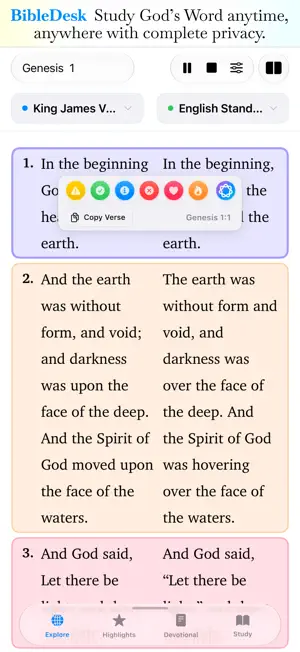
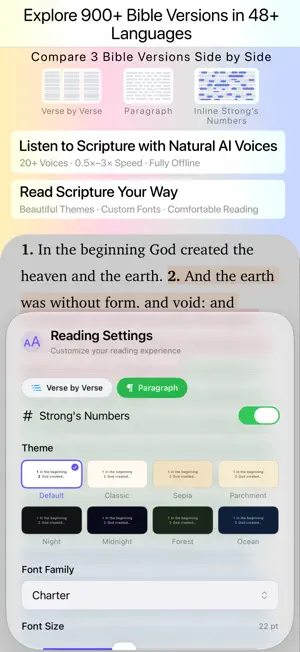
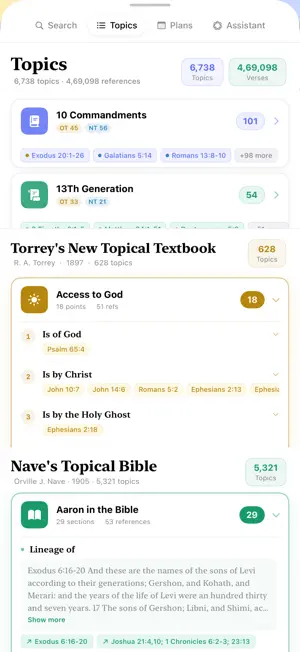
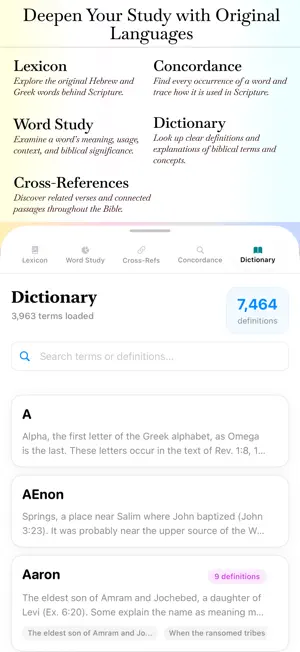
Discover the Word of God with BibleDesk — a complete, beautifully designed Bible study experience for reading, listening, exploring, and going deeper into Scripture. Works fully offline, so you can study God's Word anytime, anywhere, with complete privacy. KEY FEATURES MULTIPLE BIBLE VERSIONS Read from over 10 popular translations, including KJV, NIV, ESV, NLT, and more. Read and compare 3 Bible versions in 48+ languages, and 900+ Translations including : English, Afrikaans, Albanian, Amharic, Arabic, Bengali, Bulgarian, Burmese, Cebuano, Chinese, Czech, Danish, Dutch, Finnish, French, German, Greek, Gujarati, Haitian Creole, Hebrew, Hindi, Hungarian, Indonesian, Italian, Japanese, Korean, Latin, Malayalam, Marathi, Nepali, Norwegian, Polish, Portuguese, Punjabi, Romanian, Russian, Serbian, Spanish, Swahili, Swedish, Tagalog, Tamil, Telugu, Thai, Turkish, Ukrainian, Urdu, and Vietnamese. • Red Letter Edition highlights Jesus' words in red, with supplied words italicized. AUDIO BIBLE Listen with natural, expressive AI voices — completely offline. • 20+ neural voices, including American English male/female • Play, pause, stop, and 0.5×–3.0× speed control in 0.1 increments • Real-time word highlighting with smooth animations ORIGINAL LANGUAGES • Strong's Concordance: Tap KJV words for Greek/Hebrew definitions, pronunciation, and usage statistics • Interlinear: See Hebrew/Greek, Strong's numbers, transliterations, and English together • Lexicon & Word Study: Search Strong's numbers or words and explore their distribution across Scripture • Cross-References: Discover theological and prophetic connections between passages • Dictionary: Look up word meanings while reading STUDY SPACES Build multiple workspaces with Bible readings, tools, and notes side by side. • Use as many panes as you need • Drag and drop to swap panes • Each space remembers its own theme, font, and reading settings • Name and pin your favorite space BIBLE TIMELINE Explore the Bible chronologically from Creation to Revelation. • Browse by era, person, or place — including an interactive map for locations • Open Scripture directly from events • Search hundreds of events and people GOSPEL HARMONY Compare Matthew, Mark, Luke, and John side by side. • Explore 200+ events from the Nativity to the Resurrection • See only the exact verses for each account MATTHEW HENRY'S COMMENTARY The complete concise commentary. • Browse by book and chapter • Quick chapter outlines • Separate chapter overviews and verse-by-verse BIBLE ASSISTANT — APPLE INTELLIGENCE Explore Scripture in six modes: • Scholar — exegesis, original languages, early fathers, cross-references • Reader — examples, Gospel connections, practical application • Devotional — prayers, reflection, and journal prompts • Pastor — illustrations, difficult questions, and group guides • Explore — biblical themes and Christ-centered fulfillment • Chat — natural conversation about Scripture AI INSIGHTS LIBRARY Generate 8 types of Bible insights from any verse and save them for later JOURNAL, PRAYER & SERMON PREP • Journal reflections, prayers, and devotion notes with linked verses • Organize prayers in a dedicated prayer space • Sermon Prep Studio with outlines, Big Ideas, illustrations, small-group questions, and manuscript export READING PLANS, TOPIC STUDY • 10+ reading plans, including Bible in a Year, New Testament in 90 Days, Forgiveness, and Anxiety • Topics from Nave's Topical Bible, Torrey's New Topical Textbook, and community topics SMART SEARCH Find verses, topics, and keywords across translations. Search understands typos, partial references, and everyday phrasing VERSE HIGHLIGHTS Highlight, mark, and revisit meaningful passages THEMES & FONTS Choose from beautiful reading themes designed for comfort and focus during long study Grow closer to God every day — through reading, study, listening, prayer, and reflection. Questions, feedback, or feature requests, please write to [email protected]
What’s new
Version 2.0 · Updated October 24, 2026
New Features: Study Spaces, Bible Timeline, Gospel Harmony, and Matthew Henry's Commentary with Prophecy & Fulfillment. Study Spaces — build your own reading layout Create custom, named workspaces with multiple Bible readings, study tools, and notes side by side — arrange them however you study best. * Split your window into as many panes as you want, each showing a different translation, chapter, or tool * Drag and drop to instantly swap what any two panes are showing * Each Study Space remembers its own theme, font, and reading settings — completely separate from your main reading view * Give each Study Space a name, and pin your favorite one to open automatically every time you launch the app * Everything autosaves — close and reopen anytime, right where you left off Bible Timeline — the whole Bible, in order Browse a complete chronological timeline from Creation to Revelation. * Explore by era, by person, or by place — including an interactive map for locations * Tap any event to read the passage immediately, right in the Timeline window * Search across hundreds of biblical events and people Gospel Harmony — compare all four Gospels at once See how Matthew, Mark, Luke, and John each recorded the same moment in Jesus's life, side by side. * Browse by subject — over 200 events from the Nativity through the Resurrection * Only the exact verses for each account are shown, so you can compare quickly without hunting through full chapters * Full reading experience: highlighting, Strong's numbers, your own theme and font Matthew Henry's Commentary — a classic study companion The complete Matthew Henry concise commentary, built right into the app. * Browse by book and chapter, with a quick outline for every chapter so you can jump straight to the section you need * Chapter overviews set apart from verse-by-verse notes, styled like a real commentary — not just another Bible reading view Prophecy & Fulfillment — see God’s promises kept across ScriptureTrace every major prophecy from the Old Testament to its fulfillment in the New. * Browse by theme (Messiah, Kingdom, Covenant, End Times) or by book — over 300 key prophecies mapped to their fulfillment passages Faster, lighter, and easier to navigate * New keyboard shortcuts to jump straight to Study Spaces, the Bible Timeline, and Gospel Harmony from anywhere. If you have any questions, feedback, or feature requests, please write to [email protected]
App privacy
The developer, Hardeep Kumar Sah, reported these privacy practices to Apple.
Data Not Collected
The developer does not collect any data from this app.
Alternatives to BibleDesk
Looking for apps like BibleDesk? Here are 6 similar apps on the App Store. The highest rated is Lauds: Latin Mass Times (5.0/5), and 2 of the 6 are free to download.
-
 Lauds: Latin Mass Times
5.0
Lauds: Latin Mass Times
5.0
-
 ClassTimer
2.0
ClassTimer
2.0
-
 PrayersPlus
4.6
PrayersPlus
4.6
-
 Mathematical Playground
-
 VerseRoot: Daily Bible Study
4.5
VerseRoot: Daily Bible Study
4.5
-
 CommonLife: AI Bible Companion
4.9
CommonLife: AI Bible Companion
4.9
| App | Rating | Price | Last updated | Compare |
|---|---|---|---|---|
| BibleDesk | 4.0 / 5 (1 rating) | 10 USD | October 24, 2026 | |
| Lauds: Latin Mass Times | 5.0 / 5 (1) | 1.99 USD | Oct 24, 2026 | Compare |
| ClassTimer | 2.0 / 5 (2) | 1.99 USD | Mar 10, 2024 | Compare |
| PrayersPlus | 4.6 / 5 (5) | 2.99 USD | Jan 2, 2026 | Compare |
| Mathematical Playground | – | 1.99 USD | Sep 10, 2025 | Compare |
| VerseRoot: Daily Bible Study | 4.5 / 5 (6) | Free | Oct 8, 2026 | Compare |
| CommonLife: AI Bible Companion | 4.9 / 5 (11) | Free | Apr 18, 2026 | Compare |
Compare BibleDesk with the top alternatives: ratings, updates, ASO score and keyword gaps →