

Resiboo - Receipt Scanner
Ezra Jeremiah Anglo Finance iPhoneiPadiPod touch
Resiboo - Receipt Scanner is a free Finance app for iPhone and iPad by Ezra Jeremiah Anglo. Requires iOS 16.4. Updated September 23, 2026.
- Price
- Free
- on the App Store
- Size
- 80 MB
- Age 4+
- Updated
- Sep 23
- 2026 · v1.2.0
Screenshots


About Resiboo - Receipt Scanner
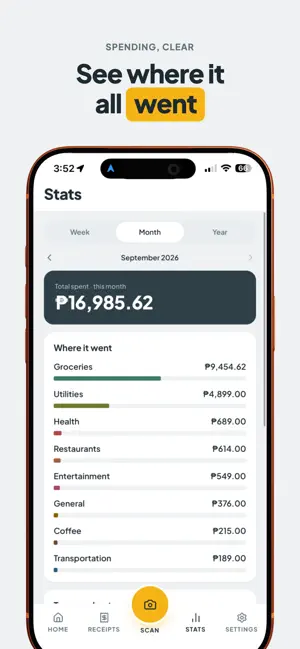
Resiboo turns a photo into an organized expense record instantly, privately, and completely free. Point your camera at any receipt. Resiboo reads the merchant, date, category, and total right on your device, with no account, no API key, and no internet connection required. Ever. Capture, don't type Snap a photo, import one from your library, or grab a screenshot. Resiboo extracts the details and lets you confirm with a single tap. Made a typo or got a bad scan? Fixing it takes one tap too. Ask Resiboo Find what you're looking for by just asking, "how much did I spend at the grocery store last month?", instead of scrolling and filtering. See where it went A clean Stats view breaks spending down by category and merchant, with trends over time. No spreadsheets required. Search everything, including the details Find a receipt by merchant, category, tag, total, or even an item that was printed on it. Back it up your way Save your receipt library to iCloud, Google Drive, or local storage, with optional automatic backups. Restore it all on a new device in a few taps. Export on your terms Build a custom CSV export. Pick your columns, filters, and formatting, and send your data to whatever spreadsheet or tool you already use. Your data is always yours to take with you. Private by design Resiboo has no account, no server, and no cloud of its own. Your receipts and photos stay on your device unless you choose to back them up. There's nothing to sign up for and nothing being collected. Resiboo isn't a budgeting app and it won't lecture you about your spending. It's a fast, quiet way to keep a record of what you bought, so you always have it when you need it. Terms of Use (EULA): https://www.apple.com/legal/internet-services/itunes/dev/stdeula/
What’s new
Version 1.2.0 · Updated September 23, 2026
Introducing Resiboo Cloud, an optional way to sync your vault across your own devices or share one vault with your household. Try it free for 7 days. The free experience stays exactly as it was, with no account required. Review & Confirm now flags uncertain fields. Receipts extracted by OCR highlight fields worth a second look, so nothing gets missed silently. Tags make it faster to organize receipts with default tags and smart suggestions. Insights let you see your top merchants at a glance. Plus general polish, including smoother bottom sheets, improved reminder date and time pickers, and accessibility improvements.
App privacy
The developer, Ezra Jeremiah Anglo, reported these privacy practices to Apple.
Data Linked to You
The following data, which may be collected and linked to your identity, may be used for the following purposes:
- Usage Data: Product Interaction
- Purchases: Purchase History
- Financial Info: Other Financial Info
- Contact Info: Email Address, Name
- User Content: Photos or Videos
- Identifiers: User ID
Used for: Analytics, App Functionality
Alternatives to Resiboo - Receipt Scanner
Looking for apps like Resiboo - Receipt Scanner? Here are 6 similar apps on the App Store.
-
 SnapLedger App
-
 ReceiptVault AI: Scanner
-
 Spendrift: Expense Tracker
-
 BillSnap AI
-
 Receipt Rescue: AI Tracker
-
 Moneta Budget Tracker
| App | Rating | Price | Last updated | Compare |
|---|---|---|---|---|
| Resiboo - Receipt Scanner | – | Free | September 23, 2026 | |
| SnapLedger App | – | Free | Mar 20, 2026 | Compare |
| ReceiptVault AI: Scanner | – | Free | Jun 25, 2026 | Compare |
| Spendrift: Expense Tracker | – | Free | Oct 19, 2026 | Compare |
| BillSnap AI | – | Free | Jul 14, 2026 | Compare |
| Receipt Rescue: AI Tracker | – | Free | Jun 7, 2026 | Compare |
| Moneta Budget Tracker | – | Free | Mar 7, 2026 | Compare |