

Findrer: Find My Lost Devices
OSKAY GUNACAR Utilities iPhoneiPadiPod touch
Findrer: Find My Lost Devices is a free Utilities app for iPhone and iPad by OSKAY GUNACAR. Rated 5.0/5 from 2 ratings. Requires iOS 16.0.
- Rating
- 5.0
- 2 ratings
- Price
- Free
- on the App Store
- Size
- 14 MB
- Age 4+
- Updated
- Jun 25
- 2026 · v1.5
Screenshots


About Findrer: Find My Lost Devices
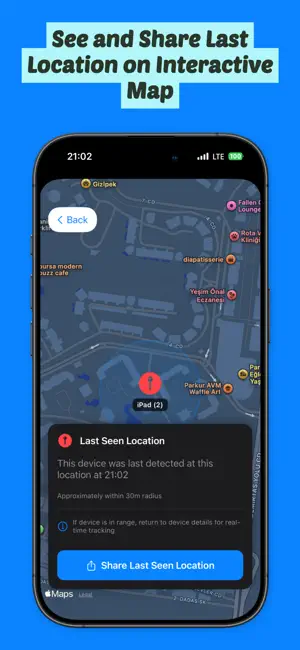
Lost your AirPods again? Can't find your MacBook? Findrer is here to help! Findrer helps you locate any Bluetooth device in seconds using advanced signal strength tracking and intelligent proximity detection. Whether it's your AirPods, MacBook, iPad, wireless headphones, or any other Bluetooth device, Findrer makes finding them quick and effortless. WHY FINDRER? Stop wasting time searching for your devices. Findrer uses real-time Bluetooth signal analysis to guide you directly to your lost items with our intuitive "hot and cold" proximity indicator. The closer you get, the stronger the signal becomes. KEY FEATURES BLUETOOTH DEVICE SCANNER • Instantly scan and detect all nearby Bluetooth devices • Automatic continuous scanning when app is active • View real-time distance estimates for each device • Sort devices by proximity (nearest first) • See connection status and last seen timestamps REAL-TIME PROXIMITY TRACKER • Unique circular proximity indicator (0-100%) • Color-coded feedback system: - Green: Very close (70-100%) - Orange: Medium distance (40-69%) - Red: Far away (0-39%) • Smooth animations guide you to your device • Updates every 500ms for accurate tracking • "Hot and cold" style device hunting LAST SEEN LOCATION MAP • View the last known location of your device on a map • See approximately where your device was last detected • 30-meter search radius visualization • Timestamp showing when device was last seen • Works even when device is out of range SMART NOTIFICATIONS • Get notified when your device goes out of range • Receive alerts when a lost device is found again • Customize notifications for each device • View notification history with timestamps • Never lose track of your important devices DEVICE CUSTOMIZATION • Assign custom names to your devices • Add favorite devices to "My Devices" for quick access • Enable/disable notifications per device • Star important devices for priority tracking LOCATION SHARING • Share device location with friends or family • Generate Apple Maps or Google Maps links • Send location via Messages, Mail, WhatsApp, and more • Help others find your device with precise coordinates PREMIUM FEATURES Upgrade to Findrer Pro to unlock: • Unlimited device tracking (free version limited to 3 devices) • Full map view with last seen locations • Advanced lost/found notifications • Location sharing capabilities • All "My Devices" favorites features • Priority support • All future premium features HOW IT WORKS 1. Open Findrer and grant Bluetooth permissions 2. See all nearby Bluetooth devices listed automatically 3. Select the device you're looking for 4. Follow the real-time proximity indicator 5. Move around as the signal guides you (green = found!) 6. If device is out of range, view its last known location on the map WORKS WITH ALL BLUETOOTH DEVICES • AirPods (all models) • MacBook, iMac, Mac mini • iPad and iPad Pro • Wireless headphones and earbuds • Bluetooth speakers • Fitness trackers and smartwatches • Game controllers • Keyboards and mice • Any Bluetooth 4.0+ (BLE) device USE CASES • Lost your AirPods somewhere in your house? Use proximity tracking to locate them room by room. • Left your MacBook at the office? Check the map to see exactly where it was last detected. • Managing multiple devices? Add them to favorites and get notified if they go missing. • Traveling? Keep track of all your Bluetooth devices in one place. PRIVACY FOCUSED • All data stored locally on your device • No cloud synchronization or external servers • Your location data never leaves your phone • Minimal permissions required • No ads or tracking Terms of Service (EULA): https://www.apple.com/legal/internet-services/itunes/dev/stdeula/
What’s new
Version 1.5 · Updated June 25, 2026
Significant performance boost with major bug fixes and enhanced radar functionality. Best Regards, Oskay
App privacy
The developer, OSKAY GUNACAR, reported these privacy practices to Apple.
Data Not Collected
The developer does not collect any data from this app.
Alternatives to Findrer: Find My Lost Devices
Looking for apps like Findrer: Find My Lost Devices? Here are 6 similar apps on the App Store. The highest rated is Find Bluetooth Devices: Track (5.0/5), and all 6 are free to download.
-
 Device Tracker: Find My Device
4.5
Device Tracker: Find My Device
4.5
-
 Find Air: Find My Lost Device
4.6
Find Air: Find My Lost Device
4.6
-
 Find Bluetooth Devices: Track
5.0
Find Bluetooth Devices: Track
5.0
-
 BLE Radar Ultra
5.0
BLE Radar Ultra
5.0
-
 Find My Bluetooth Device Now
4.2
Find My Bluetooth Device Now
4.2
-
 Camera Detector: Bug Tracker
4.6
Camera Detector: Bug Tracker
4.6
| App | Rating | Price | Last updated | Compare |
|---|---|---|---|---|
| Findrer: Find My Lost Devices | 5.0 / 5 (2 ratings) | Free | June 25, 2026 | |
| Device Tracker: Find My Device | 4.5 / 5 (2) | Free | Oct 15, 2026 | Compare |
| Find Air: Find My Lost Device | 4.6 / 5 (5) | Free | Feb 4, 2026 | Compare |
| Find Bluetooth Devices: Track | 5.0 / 5 (2) | Free | Jul 29, 2026 | Compare |
| BLE Radar Ultra | 5.0 / 5 (3) | Free | Aug 20, 2026 | Compare |
| Find My Bluetooth Device Now | 4.2 / 5 (5) | Free | May 11, 2026 | Compare |
| Camera Detector: Bug Tracker | 4.6 / 5 (358) | Free | Aug 3, 2026 | Compare |